Nothing kills the momentum of an epic boss fight quite like accidentally soft-locking yourself out of the arena. If you’re playing through the His Vile Sanctum main story mission in Borderlands 4 and suddenly find yourself unable to get back into Vile Lictor’s Fortress, you’re not alone. This frustrating glitch has caught plenty of Vault Hunters off guard, especially those who habitually use fast travel or need to take a break mid-mission.
The good news? You haven’t bricked your save file. There’s a straightforward fix that’ll get you back into the Umbral Foundry so you can finish what you started. Let’s break down exactly what causes this issue and how to resolve it without losing your progress.
Understanding the His Vile Sanctum Glitch
This bug occurs during a very specific window in the main story mission. Here’s what typically happens:
You’re progressing through His Vile Sanctum, working alongside Bruce (your trusty companion for this segment). After destroying the limiters together and taking cover, the game teleports you into a cave system that serves as the back entrance to Vile Lictor’s Fortress.
Here’s where things go wrong: If you fast travel away, quit the game, or otherwise leave the area before crossing through the actual loading screen into the Umbral Foundry, the game doesn’t properly save your progress through that cave sequence. When you return, you’ll find yourself locked out with no obvious way back in.
It’s one of those design oversights that feels particularly punishing because the game doesn’t warn you. You might think, “I’ll just fast travel back to town to sell some loot real quick,” only to discover you’ve accidentally blocked your own progression.
Who’s Most At Risk?
- Players who habitually fast travel to sell loot or manage inventory
- Anyone who needs to quit the game mid-mission for real-life reasons
- Completionists who want to explore every corner before committing to a boss fight
- Co-op players whose sessions get interrupted
If any of this sounds familiar, keep reading for the solution.
The Fix: Returning Through Substation Canonary
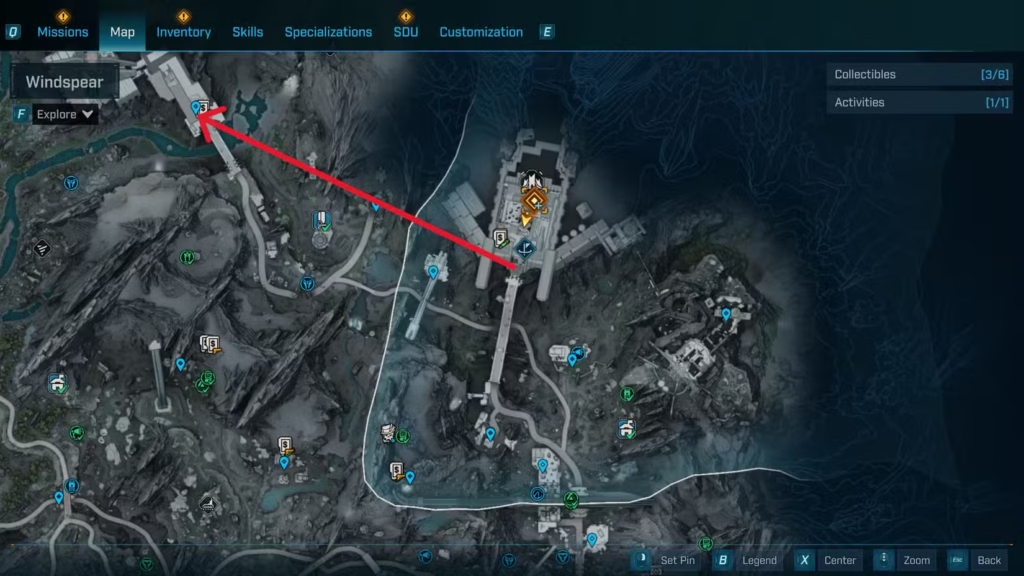
Instead of trying to force your way back through the main entrance (which won’t work), you need to retrace your steps through the cave system. Specifically, you’ll be heading to Substation Canonary, a Point of Interest in the Stoneblood Forest region.
Step-by-Step Instructions
1. Navigate to Substation Canonary
Open your map and look for Substation Canonary in the Stoneblood Forest. It’s positioned to the left of Vile Lictor’s Fortress when viewing the map. Fast travel to the nearest waypoint if you have one unlocked in the area.
2. Enter the Substation
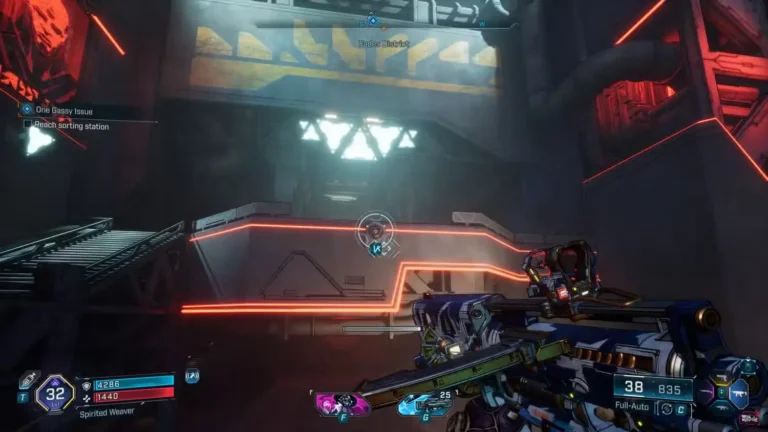
Head inside Substation Canonary and follow the same path you originally took with Bruce during the mission. The route should feel familiar—it’s the tunnel system that eventually leads to the fortress.
3. Look for the Rift
At the end of the cave path, you’ll find a rift that you can interact with using your grapple hook. This is your ticket back inside. Aim at the rift and use your grapple to pull yourself through.
4. Navigate Back to the Fortress
Once you’re through the rift, continue navigating through the caves. You’ll eventually emerge inside the fortress area, back where you need to be to continue the mission.
5. Complete the Bruce Core Sequence
Now that you’re back in, pick up where you left off. You’ll need to:
- Take Bruce’s core to a nearby computer terminal
- Activate the Bruce Bombs (special explosives)
- Throw these bombs at the purple barriers blocking the entrance to Umbral Foundry
- Proceed inside to face Vile Lictor
Once you’ve completed the His Vile Sanctum mission properly, the Umbral Foundry will have a permanent fast travel station inside, meaning you can return anytime without worrying about this glitch again.
Tips to Avoid This Bug in the Future
Don’t fast travel during transitional sequences: If you’re being teleported somewhere or the game is clearly moving you into a new area, let it finish before using fast travel.
Watch for loading screens: As a general rule, once you see a loading screen, you’re safe to fast travel. Before that loading screen appears, you’re in a vulnerable state.
Clear your inventory beforehand: If you’re the type who needs to manage loot frequently, do a full inventory clear before starting major story missions. This reduces the temptation to fast travel mid-mission.
Save manually when possible: While Borderlands 4 primarily uses autosave, being conscious of when the game saves can help you understand safe points to take breaks.
Why This Bug Exists (And Why It’s So Annoying)
From a technical standpoint, this is a classic “trigger sequence” issue. The game expects you to complete the cave navigation in one continuous session, and the triggers that mark progression aren’t set up to accommodate interruptions. It’s similar to issues we’ve seen in other Borderlands 4 story missions, where specific quest sequences can break if you deviate from the expected path.
What makes it particularly frustrating is that fast travel is such a core mechanic in Borderlands. We’re trained to use it constantly for inventory management, quest turn-ins, and co-op coordination. Having an invisible “don’t fast travel here” zone with no warning feels like a trap.
Hopefully, Gearbox will patch this in a future update, but until then, at least the workaround is relatively painless.
Other Common Quest Bugs and Fixes
If you’re encountering issues with other missions in Borderlands 4, you’re not alone. Here are some other problematic quests that have documented fixes:
- One Fell Swoop Mission Bug – Issues with Zadra and mission progression
- TASK Master Quest – Complex power core puzzle that can be confusing
- Recruitment Drive Elevator – Clearance issues preventing progression
For general performance problems or crashes, check out our performance issues and fixes guide.
What to Do If the Fix Doesn’t Work
In rare cases, you might still encounter issues even after following these steps. If that happens:
Try reloading your save: Exit to the main menu and reload your most recent save. Sometimes this resets the quest triggers.
Verify game files: On PC, use Steam’s “Verify Integrity of Game Files” feature to ensure nothing is corrupted.
Check for updates: Make sure you’re running the latest patch for Borderlands 4, as Gearbox may have released a hotfix.
Contact support: If all else fails, reach out to 2K support with your save file details. They may be able to provide additional assistance or manually progress your quest.
Don’t Let One Bug Ruin Your Run
Look, bugs happen in massive open-world games like Borderlands 4. It’s annoying when they block story progression, but at least this one has a reliable workaround. The important thing is not to panic—your save isn’t ruined, and you won’t need to restart your playthrough.
Once you get back inside Vile Lictor’s Fortress and finally take down that boss, you’ll have a permanent fast travel point, which makes the whole area much more accessible for future farming runs. And trust me, you’ll want to come back—Vile Lictor drops some solid legendary loot worth grinding for.
Just remember: the next time you’re in a story mission with Bruce and caves are involved, resist the urge to fast travel until you’re safely through that loading screen. Your future self will thank you.
Now get back in there and show Vile Lictor who’s boss!
Related Guides: