Free cosmetics just for watching streams? Sign me up. Twitch Drops have become one of the easiest ways to snag exclusive in-game rewards without spending a dime, and Call of Duty: Black Ops 7 is no exception to this trend.
Whether you’re grinding camos, leveling up your favorite weapons, or just looking to customize your profile with some exclusive cosmetics, these Twitch Drop rewards are worth claiming. The best part? You can literally have streams running in the background while you do other things—it’s passive rewards at their finest.
Let me walk you through everything you need to know: what rewards are available, how to link your accounts properly, and the exact steps to claim these cosmetics before the promotion ends.
What Are Twitch Drops and Why Should You Care?
Twitch Drops are a partnership between game developers and Twitch that rewards viewers for watching designated streams. Think of it as the streaming equivalent of logging in for daily rewards—except instead of just opening the game, you’re supporting content creators.
Why this matters for Black Ops 7:
- Completely free cosmetic items that others might miss
- Limited-time exclusivity (these won’t be available forever)
- No in-game grinding required—just watch time
- Supports the Call of Duty streaming community
These aren’t game-changing items that’ll make you better at getting Point Blank kills or dominating in multiplayer, but they’re exclusive cosmetics that show you were around for the Black Ops 7 launch period. That’s worth something to collectors and completionists.
Every Black Ops 7 Twitch Drop Reward (Complete List)
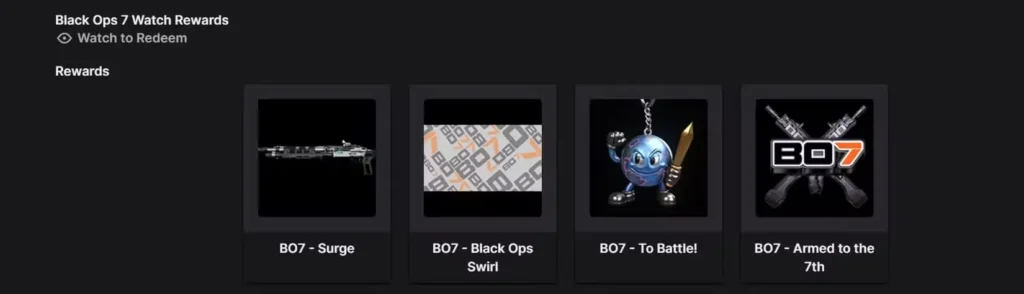
There are four distinct rewards available through the Twitch Drops program, each unlocking as you hit specific viewing milestones:

1. To Battle! Charm (1 Hour Watch Time)
Your first reward comes quickly. This weapon charm can be equipped on your guns to add a personalized touch to your loadouts. It’s a small cosmetic addition, but it’s something not everyone will have—especially players who miss the Twitch Drop window entirely.
2. Black Ops Swirl Calling Card (2 Hours Watch Time)
Calling cards are how you express yourself in the lobby and on leaderboards. The Black Ops Swirl design is exclusive to this promotion, making it a nice piece of flex for anyone browsing all available operators and factions in your profile.
3. Armed to the 7th Emblem (3 Hours Watch Time)
Emblems appear next to your name throughout multiplayer and give you another layer of customization. This particular emblem plays on the “7th” theme that’s central to Black Ops 7’s branding, making it thematically appropriate and distinctive.
4. Surge Blueprint (4 Hours Watch Time)
The crown jewel of the Twitch Drop rewards. Weapon blueprints are pre-configured weapon variants with unique visual designs. The Surge Blueprint provides a custom weapon skin that you can show off during matches—particularly satisfying when you’re working through mastery camo challenges.
Total time investment: Four hours of watching “Drops Enabled” streams gets you everything. That’s less time than a typical gaming session, and you can have it running in the background while working, playing, or doing literally anything else.
Step-by-Step: Linking Your Activision and Twitch Accounts
Before you can claim any rewards, you need to connect your Activision account to your Twitch account. This is a one-time setup that takes about two minutes. Here’s the exact process:
1. Navigate to the Call of Duty website Head to the official Call of Duty site and sign into your Activision account. You can log in using:
- Your console account (PlayStation, Xbox)
- Your Blizzard account (PC)
- Your Steam account (PC)
- Direct Activision credentials
2. Access your account settings Once logged in, click on your username in the top-right corner of the page. This opens a dropdown menu with various account options.
3. Select “Linked Accounts” This section shows all the platforms and services connected to your Activision account. You’ll see options for console accounts, PC platforms, and social networks.
4. Find the Twitch linking option Scroll to the “Social Networks” section. You should see Twitch listed with a “Link Account” button next to it. Click that button.
5. Authorize the connection You’ll be redirected to Twitch’s authorization page. Sign in to your Twitch account (the one you want to receive drops on) and approve the connection between Twitch and Activision.
6. Confirm the link You should receive an on-screen notification confirming that your accounts are now linked. Some users also receive an email confirmation. Either way, you’re now ready to start earning drops.
Troubleshooting tip: If the link button doesn’t appear or the connection fails, try clearing your browser cache or using a different browser. Some users report success using incognito/private browsing mode.
For players who also enjoy Zombies mode, these cosmetics carry over across all game modes, so you’ll see them whether you’re playing multiplayer or fighting the undead.
How to Actually Claim Your Twitch Drop Rewards
Account linking is just the first step. Now you need to accumulate the watch time to unlock each reward. Here’s the complete process:
1. Log into your linked Twitch account Make sure you’re signed into the same Twitch account you connected to your Activision profile. If you’re not logged in, your watch time won’t count.
2. Find “Drops Enabled” streams Navigate to the Call of Duty: Black Ops 7 directory on Twitch. Look for the “Drops Enabled” tag displayed underneath streamers’ names. This tag indicates that watching their stream will count toward your progress.
Not all Black Ops 7 streams qualify—only those with the “Drops Enabled” tag will work.
3. Start watching (actively or passively) Here’s the beauty of Twitch Drops: you don’t need to actively watch. The stream can be running in a background tab, on a second monitor, or even on your phone. As long as:
- You’re logged in
- The stream has “Drops Enabled”
- The video is playing (not paused)
Your watch time will accumulate.
4. Track your progress Click on your Twitch profile icon and select “Drops” from the menu. This shows your current progress toward each reward milestone. You’ll see exactly how much time remains until your next unlock.
5. Claim your rewards When you hit a milestone, you’ll receive a notification on Twitch. Click “Claim” on the drop notification. Some rewards auto-claim after a short period, but manually claiming them is faster and more reliable.
6. Check in-game Launch Black Ops 7 and navigate to your customization menus. Your claimed rewards should appear in:
- Weapon Charms (for the To Battle! Charm)
- Calling Cards (for the Black Ops Swirl design)
- Emblems (for the Armed to the 7th emblem)
- Weapon Blueprints (for the Surge blueprint)
If items don’t appear immediately, restart your game or wait a few minutes for the servers to sync.
Grinding through Prestige levels? These cosmetics persist through Prestige, so you won’t lose them when you reset.
Important Dates: Don’t Miss the Window
Promotion Duration: November 13 – December 1
That’s roughly three weeks to accumulate four hours of watch time. Missing this window means missing these exclusive cosmetics permanently—they won’t be available in the store later, and there’s no indication they’ll return in future promotions.
Pro tip: Don’t wait until the last day. Technical issues happen, streams might be harder to find toward the end of the promotion, and you want buffer time in case something goes wrong with your account linking.
Set a reminder for mid-to-late November to knock this out while there’s still plenty of time.
Known Issues and Current Status
As of this writing, Activision has acknowledged delivery delays with Twitch Drop rewards. Some players who’ve met the watch time requirements are experiencing delays in receiving their cosmetics in-game.
What this means for you:
- The issue is under official investigation
- Your watch time is being tracked correctly
- Rewards will eventually be delivered (don’t panic if they’re delayed)
- You’re not the only one experiencing this
What you should do:
- Continue accumulating watch time as normal
- Claim rewards on Twitch when they unlock
- Be patient with the in-game delivery
- Check periodically rather than constantly restarting your game
Activision typically resolves these issues within a few days of acknowledgment. The important thing is ensuring your watch time counts—the rewards will follow once the backend issues are fixed.
For players optimizing their overall experience, our best settings guide can help ensure smooth gameplay once you’re showing off these cosmetics.
Maximizing Your Twitch Drop Efficiency
Choose the right streams: Bigger streamers often have “Drops Enabled,” but you’re competing with thousands of viewers for chat interaction. Smaller streams with drops can be more engaging if you actually want to watch.
Multi-stream strategy: You can only earn progress on one stream at a time, so don’t bother opening multiple Black Ops 7 streams. However, you can watch on one device while gaming on another.
Mobile watching: Twitch’s mobile app counts toward drop progress. Watch streams on your phone during commutes, lunch breaks, or whenever you’re away from your gaming setup.
Mute and minimize: If you’re genuinely not interested in watching, mute the stream and minimize it to a small window. Your watch time still accumulates as long as the video is playing.
Set it and forget it: Start a stream before bed or when leaving for work. As long as your device doesn’t go to sleep and the stream doesn’t end, you’ll accumulate hours passively.
Check completion before stopping: Don’t assume you’ve hit four hours—verify in your Twitch Drops menu. Some players stop watching at 3 hours and 45 minutes, missing that final reward.
Alternative Black Ops 7 Reward Programs
Twitch Drops aren’t the only way to score free cosmetics and bonuses:
Little Caesars Rewards: There’s a separate promotion through Little Caesars offering in-game bonuses. Details vary by region, but it’s worth checking if you’re a pizza fan who happens to play Call of Duty.
Level Unlock Rewards: As you progress through multiplayer, you’ll naturally unlock weapons, equipment, and perks without spending money. These Twitch Drops are purely cosmetic additions to what you’re already earning.
Prestige Rewards: Reaching Prestige milestones unlocks exclusive calling cards, emblems, and other cosmetics that commemorate your dedication.
Combat Specialty Unlocks: Progressing through Combat Specialties provides gameplay bonuses rather than cosmetics, but they’re another form of free content.
Why These Rewards Matter (Beyond Looking Cool)
Exclusivity: Limited-time cosmetics become increasingly rare over time. A year from now, players will recognize these items as launch-period exclusives.
Conversation starters: Unique cosmetics can spark interactions in lobbies, especially from newer players who missed the promotion.
Collection completion: For completionists working toward 100% mastery camos and unlocks, these Twitch Drops represent another category to check off.
Supporting creators: Even if you’re watching passively, your view counts help streamers. It’s a mutually beneficial system where everyone wins.
Common Questions and Troubleshooting
Q: Can I watch on mobile? Yes! The Twitch mobile app counts toward drop progress as long as you’re logged in.
Q: Do I need to watch one streamer for all four hours? No. You can switch between different “Drops Enabled” streams. Your progress carries over.
Q: What if I pause the stream? Paused time doesn’t count. The video needs to be actively playing (though it can be muted).
Q: Can I watch on multiple devices simultaneously? Your Twitch account can only accumulate progress on one stream at a time, regardless of how many devices you use.
Q: What happens if the streamer raids someone without drops? Your progress stops when the raid transitions to a non-drops stream. Find another drops-enabled stream to continue.
Q: Are these rewards available in Zombies mode too? Yes! Weapon charms and blueprints work across all game modes, including Zombies.
Making the Most of Your Viewing Time
Since you’re investing four hours anyway, why not make it productive?
Learn from skilled players: Watch high-level gameplay to pick up strategies for challenges like getting longshots or mastering specific weapons.
Discover new loadouts: Top streamers often showcase effective weapon builds you might not have considered.
Map knowledge: Observing experienced players reveals flanking routes, power positions, and rotation timings that improve your own gameplay.
Community interaction: Twitch chat can be chaotic, but it’s also where you’ll find fellow Black Ops 7 enthusiasts discussing strategies, sharing experiences, and organizing groups.
Entertainment value: Many Call of Duty streamers are genuinely entertaining. You might discover a new favorite content creator while earning your drops.
The Bigger Picture: Activision’s Streaming Strategy
Twitch Drops represent Activision’s effort to boost Black Ops 7’s presence on streaming platforms. Higher viewer counts on Twitch translate to:
- Increased visibility for the game
- Free marketing through the streaming community
- Stronger launch period momentum
- Community building around content creators
As a player, you benefit through free rewards. Streamers benefit through increased viewership. Activision benefits through marketing exposure. It’s a rare win-win-win scenario in modern gaming.
Set It and Forget It
Four hours of watch time for exclusive cosmetics is an easy win. Even if you have zero interest in actually watching streams, having one running in a background tab while you play the game, work, or go about your day costs you nothing beyond a few browser resources.
The key steps are simple:
- Link your accounts (one-time setup)
- Find drops-enabled streams
- Let them run for four hours total
- Claim your rewards
- Show them off in-game
Don’t overthink it. This is one of the easiest reward systems in modern Call of Duty, requiring no skill, no grind, and no purchase—just passive watching.
With the promotion running until December 1st, you have plenty of time to knock this out. Set a reminder, queue up a stream, and collect your free cosmetics before they’re gone forever.
For more Black Ops 7 content and strategies, check out the official game website or dive deeper into the game’s background on Wikipedia.
Now go claim those drops before you miss out!