Crossplay has become the standard in modern multiplayer gaming, and Call of Duty: Black Ops 7 is no exception. By default, you’re playing against opponents across PlayStation, Xbox, and PC—a unified player base that ensures quick matchmaking and populated lobbies at all hours. But here’s the reality: not everyone wants to play in this mixed environment, and you have every right to customize your multiplayer experience.
Whether you’re a console player frustrated by perceived input advantages of mouse and keyboard users, concerned about cheating on PC, or just prefer platform-specific competition, this guide will show you exactly how to control your crossplay settings on every platform. Let me break down the process, explain the implications, and help you make an informed decision about crossplay in Black Ops 7.
Understanding Crossplay in Black Ops 7
Before we jump into the technical steps, let’s discuss what crossplay actually means and why you might want to disable it.
What Is Crossplay?
Crossplay (also called cross-platform play) allows players on different gaming platforms to compete in the same matches. In Black Ops 7, this means:
- PlayStation 4 and PlayStation 5 players can match with each other
- Xbox One and Xbox Series X|S players can match with each other
- PC players can match with anyone
- All platforms can play together in unified matchmaking pools
When crossplay is enabled (the default setting), the matchmaking system pulls from the entire player base regardless of platform. When disabled, you’re limited to players on your specific platform ecosystem.
Why Consider Disabling Crossplay?
Common Reasons Console Players Disable Crossplay:
Input Method Concerns: Mouse and keyboard players (primarily on PC) have certain advantages in precision aiming, especially at longer ranges. Tracking targets, flick shots, and controlling recoil can be easier with a mouse compared to controller thumbsticks.
Cheating and Hacking Concerns: PC platforms historically have higher instances of cheating due to the open nature of the system. While anti-cheat systems exist, some console players prefer avoiding PC lobbies entirely to minimize exposure to potential cheaters.
Performance Differences: High-end PC players with 144Hz+ monitors and superior frame rates may have advantages over console players locked at 60-120 FPS. These performance differences can impact competitive integrity.
Preference for Controller-Only Lobbies: Some players simply prefer the “level playing field” of controller-only competition where input method isn’t a variable.
Field of View (FOV) Differences: PC players often run higher FOV settings than what’s available or practical on consoles, providing better peripheral vision.
Why Keep Crossplay Enabled?
Benefits of Crossplay:
Faster Matchmaking: Larger player pool means shorter queue times across all game modes, especially in less popular playlists or off-peak hours.
Playing with Friends: If you have friends on different platforms, crossplay allows you to squad up and play together regardless of hardware.
Healthier Game Modes: Niche modes and playlists remain populated longer when drawing from all platforms.
Better Skill-Based Matchmaking: Larger player pool allows the SBMM system to find more appropriate skill matches for your level.
Global Competition: Testing yourself against the entire player base rather than just your platform subset.
How to Disable Crossplay on PlayStation
PlayStation makes the process straightforward with an in-game toggle. Here’s the exact step-by-step process:
Step-by-Step Instructions (PlayStation 4 & PlayStation 5)
Step 1: Launch Black Ops 7 Start the game and wait for it to load to the main menu.
Step 2: Open Settings Menu
- Press the Options button on your controller
- Navigate to Settings in the menu that appears
Step 3: Navigate to Account & Network
- In the Settings menu, scroll down to Account & Network
- Select this option by pressing X
Step 4: Locate Crossplay Setting
- At the very top of the Account & Network menu, you’ll see Crossplay
- This setting shows its current status (On or Off)
Step 5: Toggle Crossplay
- Highlight the Crossplay option
- Press X to toggle between On and Off
- On = Crossplay enabled (default)
- Off = Crossplay disabled (PlayStation only)
Step 6: Confirm and Apply
- The change takes effect immediately
- No restart required
- You can toggle this at any time
Visual Confirmation
When crossplay is disabled on PlayStation, you should see:
- The toggle switch in the Off position
- Potentially a notification about reduced matchmaking pools
- Longer estimated queue times in some modes
Quick Summary (PlayStation)
Settings → Account & Network → Crossplay → Toggle OffSimple, straightforward, and reversible at any time. This is how crossplay settings should work across all platforms.
How to Disable Crossplay on Xbox
Xbox takes a different approach that’s significantly more complicated and honestly frustrating. Instead of an in-game toggle, you must change a system-level privacy setting that affects ALL games, not just Black Ops 7.
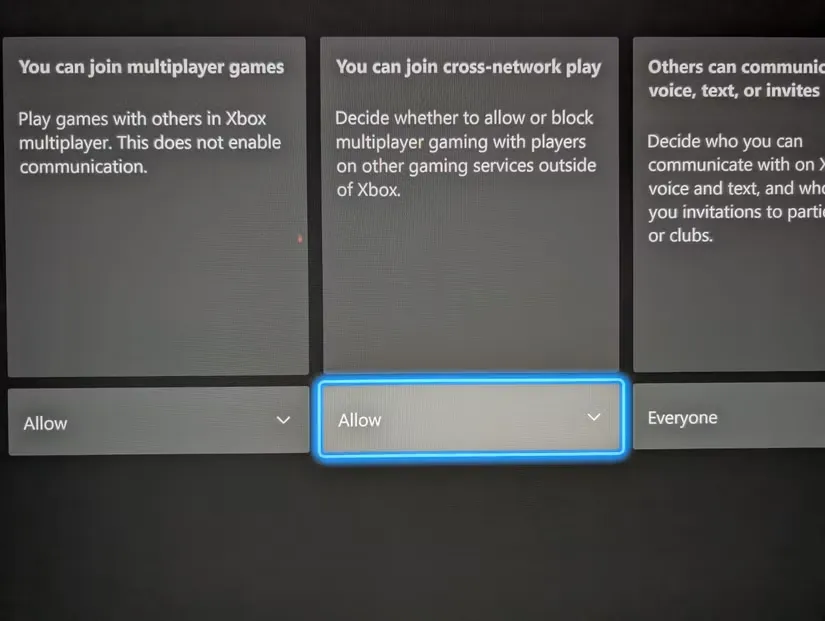
Step-by-Step Instructions (Xbox One, Series S, Series X)
Step 1: Exit Black Ops 7 You’ll need to access Xbox system settings, so back out to the Xbox dashboard.
Step 2: Open Xbox Settings
- Press the Xbox button on your controller to open the guide
- Navigate to Settings (gear icon)
- Select All Settings
Step 3: Navigate to Online Safety and Family
- In the Settings menu, find Account
- Select Privacy & Online Safety
- Then choose Xbox Privacy
Alternative Path: Settings → Account → Privacy & Online Safety → Xbox Privacy
Step 4: Access Privacy Details
- Select View Details & Customize
- This opens your detailed privacy settings
Step 5: Find Communication & Multiplayer
- Scroll down to find Communication & Multiplayer
- Select this option
Step 6: Locate Cross-Network Play Setting
- Look for the setting labeled You can join cross-network play
- This controls crossplay functionality system-wide
Step 7: Change to Block
- The setting will show either Allow or Block
- Highlight the option
- Change from Allow to Block
Step 8: Confirm Changes
- The system may prompt you to confirm
- Accept the changes
- Exit back to the dashboard
Step 9: Relaunch Black Ops 7
- Start Black Ops 7 again
- Crossplay should now be disabled
- You’ll only match with other Xbox players who have crossplay disabled
Re-Enabling Crossplay on Xbox
To turn crossplay back on:
- Return to the same settings path
- Change You can join cross-network play from Block to Allow
- Relaunch Black Ops 7
Important Xbox Considerations
System-Wide Impact: This setting affects ALL games on your Xbox, not just Black Ops 7. If you play other titles with crossplay, they’ll also be restricted to Xbox-only lobbies.
Why Is It This Way? Microsoft has maintained this system-level approach for years, likely due to privacy and parental control frameworks. It’s been a source of frustration for players who want per-game control, but this is unlikely to change soon.
Matchmaking Impact: Xbox-only lobbies (especially with crossplay disabled) can have significantly longer queue times, particularly in less popular modes or regions with smaller Xbox player bases.
Quick Summary (Xbox)
Xbox Settings → Account → Privacy & Online Safety → Xbox Privacy →
View Details & Customize → Communication & Multiplayer →
You can join cross-network play → Block
Far more convoluted than it needs to be, but this is the only way to disable crossplay on Xbox.
Crossplay on PC: The Current Reality
Here’s the disappointing news for PC players: you cannot disable crossplay in Black Ops 7 on PC at the time of writing.
Why PC Can’t Disable Crossplay
Player Population Concerns: PC typically has the smallest player base among the three platforms in Call of Duty games. Allowing PC players to disable crossplay would further fragment an already smaller population, resulting in:
- Extremely long queue times
- Difficulty finding matches in non-peak hours
- Dead lobbies in less popular game modes
- Poor matchmaking quality due to limited skill brackets
Competitive Balance: The common perception (whether accurate or not) is that PC players have input advantages over console players. If PC players could disable crossplay, they’d be creating PC-only lobbies with mouse and keyboard advantages while also having access to superior hardware. This would concentrate the perceived advantages rather than distributing them.
Activision’s Decision: The publisher has clearly decided that maintaining healthy matchmaking populations on PC requires mandatory crossplay. Given PC’s historical player retention issues in Call of Duty titles, this makes business sense even if it frustrates some players.
Workarounds and Alternatives for PC
Option 1: Input-Based Matchmaking Awareness
Black Ops 7 uses input-based matchmaking in some modes, meaning:
- Controller players are generally matched with other controller users
- Mouse and keyboard players match with other M&KB users
- This provides some segregation even within crossplay
Option 2: Private Lobbies
Create or join private PC-only custom lobbies if you want to avoid console players entirely. This requires:
- Finding communities or Discord servers organizing PC-only matches
- Manually inviting players
- No progression or ranked play
Option 3: Accept Crossplay
Honestly, this is the reality for PC players. Crossplay is mandatory, and there’s no indication this will change. The trade-off is faster matchmaking and healthier lobbies.
Will This Change?
Speculation: Future updates could introduce PC crossplay toggles if:
- The PC player base grows substantially
- Community backlash reaches critical mass
- Activision decides the benefits outweigh matchmaking concerns
Likelihood: Low. This has been Activision’s approach for multiple Call of Duty titles, and it appears to be their long-term strategy for maintaining PC health.
Impact of Disabling Crossplay
Understanding what actually changes when you disable crossplay helps you make informed decisions.
Matchmaking Effects
Queue Times:
- Crossplay On: Typically 15-60 seconds for most modes
- Crossplay Off (Console): 1-5+ minutes, sometimes failing to find matches in unpopular modes
Skill-Based Matchmaking Quality:
- Crossplay On: Better skill matching due to larger player pool
- Crossplay Off: Looser SBMM due to limited options, potentially more lopsided matches
Mode Availability:
- Crossplay On: All modes populated at most times
- Crossplay Off: Less popular modes may be unplayable, especially off-peak hours
Regional Considerations:
- High Population Regions (NA, EU): Crossplay-off still viable
- Low Population Regions (OCE, SA, Asia): Crossplay-off can be nearly impossible for matchmaking
Competitive Experience
Perceived Fairness: Console players report feeling the competition is “fairer” in crossplay-disabled lobbies since everyone is using controllers and similar hardware.
Actual Impact: Studies and player data suggest the skill-based matchmaking system compensates for input differences more than players realize. Your win rate likely won’t change dramatically with crossplay off unless you were regularly facing significantly higher-skilled PC players.
Cheating Exposure: Disabling crossplay on console eliminates exposure to PC cheaters entirely. While anti-cheat systems exist, this is the most foolproof prevention method.
Social and Party Considerations
Cross-Platform Parties: If you disable crossplay but have friends on other platforms, you cannot party with them. The game will require all party members to have compatible crossplay settings.
Friend Pool: Your potential friend list and social interactions become limited to your platform ecosystem.
Community Events: Some community events or tournaments may require crossplay enabled for participation.
Best Practices and Recommendations
Who Should Disable Crossplay?
Strong Candidates:
- Competitive players who believe input method parity is crucial
- Console players in high-population regions where matchmaking remains viable
- Players primarily concerned about PC cheating
- Casual players who don’t mind longer queue times
- Those without cross-platform friends
Who Should Keep Crossplay On:
- Players with friends on different platforms (mandatory for parties)
- Anyone in low-population regions or playing off-peak hours
- Players who prioritize fast matchmaking over input parity
- Those playing less popular game modes
- Competitive players who want the largest SBMM pool for best skill matching
Testing Both Options
My Recommendation: Try both settings for a week each and track your experience:
Week 1: Crossplay On
- Note queue times
- Track your performance (KD, win rate)
- Monitor perceived fairness of matches
- Observe any cheating encounters
Week 2: Crossplay Off
- Note queue times (likely longer)
- Track performance (compare to Week 1)
- Monitor match quality
- Assess whether the trade-offs are worth it
Make Decision: Choose the setting that provides the best overall experience for your priorities and playstyle.
Platform-Specific Advice
PlayStation Players: The easy toggle makes experimenting risk-free. Try disabling crossplay for specific gaming sessions (like ranked grinding) and re-enable for casual play or when playing with friends.
Xbox Players: The system-level requirement makes frequent toggling annoying. Decide based on whether you need crossplay for other games. If you play multiple cross-platform titles, keeping it enabled might be more convenient despite Black Ops 7 preferences.
PC Players: Accept mandatory crossplay and focus on mastering your weapon loadouts and combat specialties to compete effectively regardless of opponent platform.
Common Issues and Troubleshooting
“Can’t Find Matches” After Disabling Crossplay
Causes:
- Limited player pool in your region/SBMM bracket
- Playing unpopular game mode
- Off-peak hours
Solutions:
- Try more popular modes (TDM, Domination, Hardpoint)
- Play during peak evening hours in your region
- Re-enable crossplay temporarily if matchmaking fails repeatedly
Party Member Can’t Join
Cause: Party members have incompatible crossplay settings.
Solution: All party members must have the same crossplay configuration (all on or all off). Have everyone check their settings and align them.
Changed Xbox Setting But Still Seeing PC Players
Causes:
- Setting didn’t apply properly
- Game was still running when you changed it
- Looking at usernames that resemble PC but are actually Xbox
Solutions:
- Completely restart the game after changing the setting
- Verify the setting is still on “Block” (it sometimes reverts)
- Check player profiles in-game to confirm platform
Performance Issues After Changing Crossplay
Note: Crossplay settings don’t directly affect performance. If you’re experiencing issues after changing settings, it’s coincidental. Check our optimization guide and lag troubleshooting for performance improvements.
Crossplay in Different Game Modes
Multiplayer
All standard multiplayer modes support crossplay configuration. Your settings apply equally to:
- Team Deathmatch
- Domination
- Hardpoint
- Search and Destroy
- All other standard playlists
Ranked/Competitive: Check if ranked modes require crossplay enabled. Some competitive playlists mandate crossplay to ensure fair skill matching and sufficient population.
Zombies
Crossplay settings affect Zombies matchmaking as well:
- Crossplay On: Find co-op partners faster from any platform
- Crossplay Off: Limited to your platform for zombies strategies
For dedicated zombies players working on Easter eggs or high rounds, having a larger co-op pool via crossplay can be beneficial.
Campaign
Campaign typically isn’t affected by crossplay settings since it’s primarily single-player or private co-op with invited friends.
Future of Crossplay in Call of Duty
Industry Trends
Crossplay is becoming increasingly standard across all multiplayer games. The trend suggests:
- More unified player bases across platforms
- Better cross-progression and account systems
- Improved input-based matchmaking to address fairness concerns
- Enhanced anti-cheat to reduce PC cheating concerns
Potential Changes in Black Ops 7
Possible Updates:
- PC crossplay toggle (unlikely but possible)
- Better input-based matchmaking transparency
- Console FOV sliders to reduce PC advantages
- Enhanced reporting systems for cross-platform issues
Stay updated with official Call of Duty announcements for any policy changes.
Integration with Overall Strategy
Your crossplay decision should integrate with your complete Black Ops 7 approach:
For Aggressive Players: Crossplay exposure to diverse playstyles (including PC movement and aim) can actually improve your skills. Testing yourself against the full spectrum makes you better.
For Tactical Players: Platform-specific lobbies might feel more predictable, allowing for consistent strategy execution without worrying about unexpected PC-specific advantages.
For Weapon Mastery: Regardless of crossplay settings, focus on optimizing your loadouts, understanding BO2 returning weapons, and mastering mechanics.
For Progression: Your prestige journey and unlock progression aren’t affected by crossplay settings—focus on efficient XP farming regardless.
Your Choice, Your Experience
The crossplay debate will likely continue throughout Black Ops 7’s lifecycle. There’s no objectively “correct” answer—it depends entirely on your priorities, platform, region, and tolerance for trade-offs.
The Reality:
✅ PlayStation players have the easiest control with a simple toggle
✅ Xbox players face annoying system-level restrictions but can disable it
❌ PC players are locked into mandatory crossplay
✅ Everyone should experiment before committing to a setting
My Personal Take:
As someone who’s played extensively with both crossplay on and off, I’ve found the skill-based matchmaking system does a reasonable job equalizing competition regardless of platform. Most of what feels like “PC advantage” is actually just facing higher-skilled players that SBMM matched you with.
That said, if disabling crossplay makes the game more enjoyable for you—whether due to perceived fairness, performance concerns, or simply preference—then absolutely do it. The whole point is having fun, and if platform-specific lobbies enhance your experience despite longer queues, that’s a valid choice.
For most players, I’d recommend:
- Start with crossplay on for the full player base experience
- Monitor your enjoyment and performance
- Disable temporarily if you hit frustrating stretches
- Re-evaluate periodically as your skill and the meta evolve
Ultimately, Black Ops 7 gives you the tools (well, PlayStation and Xbox players at least) to customize your experience. Use them to create the multiplayer environment that keeps you coming back.
For more Black Ops 7 guides and optimization tips, check out our coverage of Combat Specialties, armor plate management, and complete settings optimization.