Why Your Stats Matter
Black Ops 7 is here, and players everywhere are diving in with fresh weapons, new maps, and refined mechanics. Whether you’re grinding for hours or just jumping in for a few matches, one thing stays constant: your stats tell the story of your performance.
Your KD ratio has become the unofficial badge of honor in Call of Duty. Want to prove you’re a legitimate player? Show your combat record. Want to figure out why you’re getting stomped in lobbies? Your stats will point you toward the problem areas. It’s one of those features that stuck around from Black Ops 6 for a reason—it works.
The beautiful part is that Treyarch made tracking your progress dead simple. You don’t need third-party websites or complex menus. Everything you need is built right into the game, waiting for you to discover it.
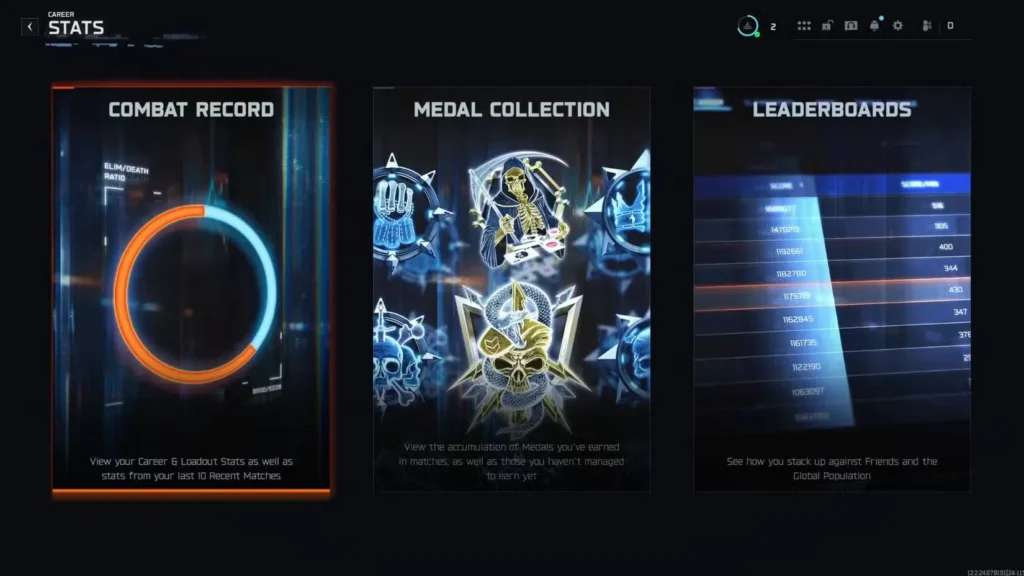
Accessing Your Combat Record in 4 Steps
Finding your KD ratio and full combat stats takes less than a minute once you know where to look. Here’s the straightforward path:
Step 1: Load Into the Game
Start Black Ops 7 and get past the main menu. Make sure you’re signed in and ready to navigate menus.
Step 2: Select Your Mode
Choose which game mode you want to check stats for—Multiplayer, Zombies, Campaign, or any other available mode. You can revisit these stats individually for each mode.
Step 3: Navigate to Career
Look at the top of your screen. You’ll see a menu bar with several options. Click on Career. This is your hub for all personal statistics and progression.
Step 4: Open Combat Record
Once in the Career section, find and select Stats, then choose Combat Record. This is where all your performance data lives.
That’s it. You’re now staring at your complete combat history.
Understanding Your Combat Record
The Combat Record isn’t just a single number. It’s a full dashboard of performance metrics that tell you exactly where you stand.
Elimination/Death Ratio (Elim/D)
This is the headline stat—your KD ratio. Call of Duty’s terminology has shifted slightly; they call it elimination/death ratio instead of traditional KD, but it means the same thing: how many enemies you eliminate before you die. A 1.0 is average, a 1.5+ is solid, and anything above 2.0 puts you in competitive territory.
Win/Loss Ratio
Your W/L tracks how many matches you’ve won versus lost. This is especially important in objective-based modes like Search and Destroy or Domination where team performance matters as much as individual fragging ability.
Total Matches Played
This tracks your cumulative match count across all your sessions. It’s a good indicator of how much time you’ve invested in the game.
Total Playtime
Shows you the raw hours you’ve dedicated to Black Ops 7. Some players find this shocking once they add it up.
Most Used Weapons
See which guns you gravitate toward and rely on most. This is useful for identifying which weapons suit your playstyle naturally.
Highest Killstreak
Your personal best streak in a single match. Whether it’s 10 kills or 30 kills, this shows your peak performance moment.
Best Game (Highest Kills)
Your highest kill count in a single match. This is your personal record for dominance.
Diving Deeper: Per-Weapon Statistics
The Combat Record gets even more detailed when you start clicking individual weapons. This is where you can fine-tune your understanding of what’s working and what isn’t.
Click on any weapon listed in your Combat Record, and a detailed breakdown appears:
- Headshot Percentage – Shows how consistently you’re landing precision shots. A higher percentage means better aim discipline.
- Accuracy Per Weapon – Your accuracy with that specific gun. This reveals which weapons naturally suit your playstyle and where you might need practice.
- Weapon-Specific K/D – Your KD ratio using only that weapon. This helps identify which guns are actually performing well for you versus which ones you’re just using recreationally.
- Total Kills with Gun – Cumulative kills with that weapon across all matches.
This level of detail is incredibly useful for identifying exactly which weapons and playstyles work best for your abilities.
Important Refresh Timing Note
Here’s something that catches people off guard: Your stats don’t always update instantly after a match.
After you complete a match in Black Ops 7, your new eliminations, deaths, and performance metrics are recorded, but they might not appear in your Combat Record immediately. This isn’t a glitch—it’s just how the system works.
If your stats seem outdated:
- Try restarting the game completely. A full reboot usually forces a refresh.
- Play one more match. Sometimes the server syncs your data once you’re back in an active session.
- Give it a few minutes. The system eventually catches up on its own.
Most of the time, stats update within a few seconds to a minute, but during peak hours or after major patches, the delay can stretch longer. Just be aware that what you see in the Combat Record might be from your last match or two, not literally your last game.
Using Your Stats to Improve
Your KD ratio tells you one thing. Your detailed stats tell you everything.
Low Accuracy? Work on Aim
If you’re noticing your weapon accuracy is below 60%, consider checking out our complete settings optimization guide to dial in your sensitivity, aim assist, and visual clarity.
Not Getting Headshots?
Review our headshot guide to learn positioning, pre-aiming, and weapon selection tips that naturally increase headshot frequency.
Your Overall KD Below Expectations?
Compare your W/L ratio to your Elim/D. If your W/L is worse than your KD, you’re likely a strong individual player who needs better team coordination. If your KD is worse than your W/L, you’re playing smart positioning but losing aim duels—focus on mechanical improvement.
Identifying Your Best Weapon
Check which gun has your highest accuracy and K/D. That’s your most comfortable weapon. Master it, learn its ranges and recoil patterns, and use it as your anchor loadout.
Comparing Progress Over Time
While Black Ops 7 doesn’t have a built-in progress tracker showing week-to-week improvements, you can manually track your combat record over time by taking screenshots or noting your stats every week or two. This simple habit helps you see genuine improvement and identifies when you’ve hit plateaus that require strategy changes.
A rising KD trajectory means you’re genuinely improving. A stagnant KD means your current strategy and mechanics have ceiling limitations—time to adjust.
Beyond Your Personal Stats
Your Combat Record is personal, but Call of Duty’s multiplayer is competitive. Want to know how your stats compare to top players?
- Join the BO7 Reddit community where players discuss competitive performance benchmarks
- Check the official Call of Duty Discord for leaderboards and community challenges
- Visit the official Call of Duty website for seasonal challenges and ranked stats
These resources help contextualize whether your KD is competitive for your game mode or if you’ve got room for improvement.
Related Performance Guides
Once you understand where your performance stands, these guides help you level up:
- Best Settings and Optimization Guide
- How to Get Easy Headshots
- Best Ways to Level Up Fast
- How to Get Longshot Kills
- How to Get Point Blank Kills
- Best Meta Loadouts for Multiplayer
- Best Sniper Loadouts Guide
Final Thoughts
Your Combat Record is your personal scoreboard. It’s not just bragging rights—though there’s definitely something satisfying about showing off a solid KD to friends. More importantly, it’s a diagnostic tool that shows you exactly where your strengths lie and where improvement is needed.
The first time you check your stats, you might be surprised at what you find. Maybe your accuracy is better than you thought, or maybe you’ll discover your most-used weapon isn’t actually your most effective weapon. That information is gold when it comes to sharpening your multiplayer game.
So jump into Black Ops 7, navigate to your Combat Record, and take an honest look at your numbers. Then use those insights to grind smarter, not just harder. Your rising KD ratio will thank you.