Stop Settling for Stock Weapons in Zombies
Here’s a game-changer that many Black Ops 7 players don’t know about: you can actually customize what weapons appear when you hit the Mystery Box or buy from Wall-Buys. Instead of getting a bare-bones rifle with no attachments, you can set up custom builds that carry over your attachments, camos, and blueprints into every Zombies match.
This feature is called Zombies Build, and it completely changes how you approach loadout planning. Rather than being stuck with only your starting weapon’s configuration, you can pre-build multiple weapon setups that’ll be waiting for you throughout Ashes of the Damned.
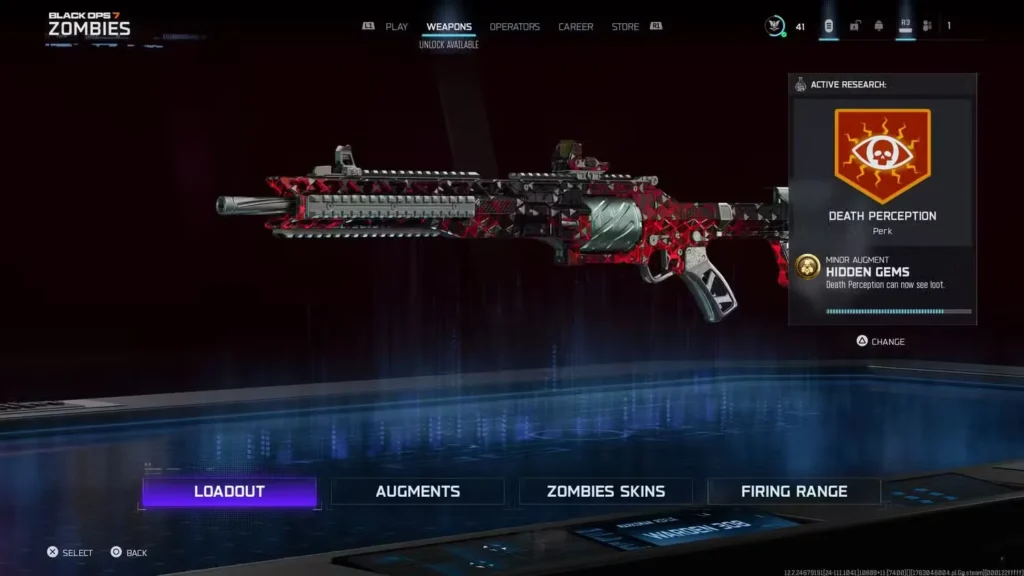
What is the Zombies Build Feature?
Think of Zombies Build as a way to “pre-customize” weapons before they even spawn in your match. When you set a Zombies Build for a specific gun, that customized version replaces the standard variant whenever you acquire it from:
- Mystery Box spins
- Wall-Buy purchases
- Any in-game weapon pickup for that specific gun type
The weapon rarity doesn’t change (Common, Rare, Epic, Legendary stays the same), but all your chosen attachments, optics, camos, and blueprints carry over. It’s essentially bringing your entire arsenal into Zombies without occupying your starting loadout slot.
Why this matters: You’re no longer forced to commit to one primary weapon build for the entire match. Want to use your perfectly tuned sniper rifle setup mid-game? Just buy it from the wall or pull it from the Mystery Box—it’ll have all your preferred attachments already equipped.
Requirements Before You Start
Before you can set up custom Zombies Builds, you need to unlock the Loadout function at Level 4. This is the same system that lets you Create-a-Class for multiplayer, so if you’ve already hit Level 4, you’re good to go.
You’ll also need to have unlocked:
- The weapons you want to customize
- Attachments for those weapons (earned through leveling and progression)
- Any camos or blueprints you want to use (optional but recommended)
If you’re just starting out, check our beginner’s guide to fast-track your progression.
How to Set Up Custom Weapons for Wall-Buys (Step-by-Step)
The process is straightforward once you know where to look. Here’s exactly how to configure your Zombies Build:
Step 1: Access the Zombies Loadout Menu
From the main Black Ops 7 menu:
- Navigate to the Zombies section
- Select the Weapons tab
- Click on Loadouts
This is separate from your multiplayer loadouts—Zombies has its own dedicated weapon configuration area.
Step 2: Choose Your Weapon
Browse through your unlocked weapons and select the one you want to customize. This could be:
- Assault rifles like the M8A1
- SMGs like the Dravec-45
- Pistols for your secondary slot
- Snipers like the Ryden 45K
- Any weapon that appears on walls or in the Mystery Box
Step 3: Customize Your Build
Equip the weapon with whatever attachments, optics, and modifications you want:
- Attachments: Barrels, stocks, grips, magazines—standard gunsmith options
- Camos: Show off your unlocked camos and mastery skins
- Blueprints: If you have weapon blueprints, they’ll carry over too
Build it exactly how you want it to perform in Zombies. Consider attachments that help with:
- Ammo capacity (crucial for extended rounds)
- Recoil control (for headshot farming)
- Damage range (especially important for long-range eliminations)
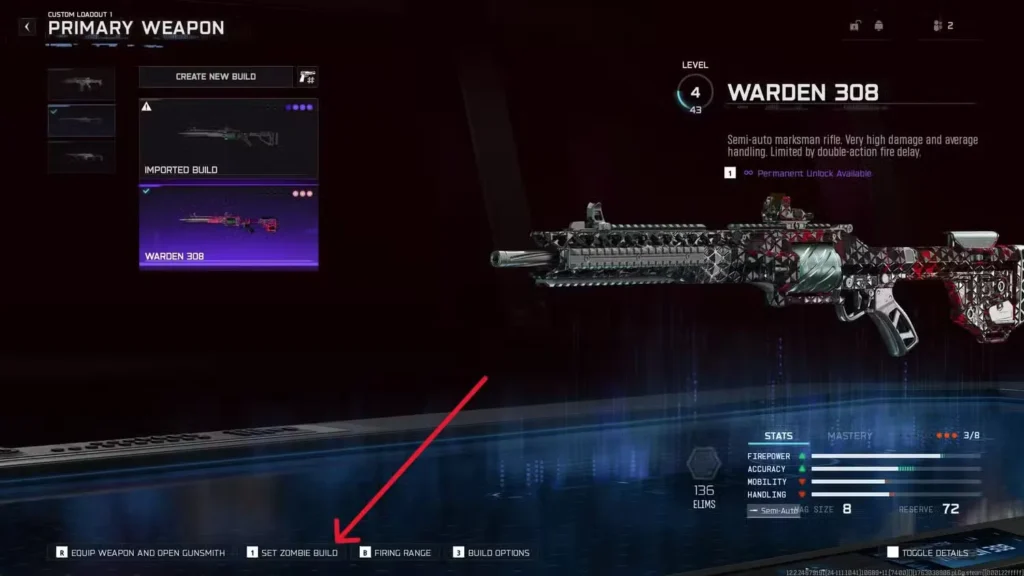
Step 4: Set as Zombies Build
This is the critical step many players miss. While hovering over your customized weapon:
- On PC: Press 1
- On PlayStation: Press L2
- On Xbox: Press LT
You should see a confirmation that the weapon has been set as your Zombies Build. The game will now remember this configuration.
Step 5: Repeat for Other Weapons
You can set Zombies Builds for multiple weapons—not just one. Want your sniper rifle, favorite AR, and a pistol backup all customized? Set builds for each one. This gives you maximum flexibility during matches.
How It Works In-Game
Once you’ve set your Zombies Builds and loaded into Ashes of the Damned:
Mystery Box: Every spin that lands on a weapon you’ve customized will give you your Zombies Build version instead of the default variant.
Wall-Buys: When you purchase a weapon from any wall location, if you’ve set a build for it, you’ll get your custom version.
Rarity stays the same: A Common wall-buy will still be Common rarity, but it’ll have all your attachments. When you Pack-a-Punch it or upgrade the rarity, your custom configuration remains intact.
Strategic Advantages of Custom Wall-Buys
Flexibility without loadout commitment: Your starting weapon is important, but having backup options means you’re not locked into one playstyle. If your primary runs dry on ammo and farming Salvage isn’t an option, buying a wall weapon becomes a legitimate strategy.
Optimize for different scenarios: Set up a close-range build for training zombies, a precision build for critical kills, and a high-capacity build for sustained fire. Switch between them as the match evolves.
Economy efficiency: If you’re low on Essence and can’t afford Mystery Box spins, a 1,500 Essence wall-buy with your custom attachments is often better value than a random box weapon.
Team coordination: In co-op play, having everyone set different weapon builds means your squad has access to diverse, optimized loadouts without overlap.
Pro Tips for Zombies Build Setup
Consider ammo availability: Some weapons have abundant wall-buy locations, making them easy to replenish. Customize weapons that you can reliably resupply from walls.
Optimize for Pack-a-Punch: Your attachments matter even after upgrading. Set up builds that’ll remain effective when Pack-a-Punched and pushing into higher rounds.
Don’t forget melee weapons: While melee weapons work differently, having optimized firearm backups is crucial for when knife kills aren’t viable.
Match your perks and augments: If you’re running specific Combat Specialties or field upgrade augments, build weapons that synergize with those choices.
Test in early rounds: Load into a match and grab your custom wall-buy early to verify everything transferred correctly. Better to discover issues in round 3 than round 30.
Common Questions About Zombies Build
Does this work with Black Ops 2 weapons? Yes, once you’ve unlocked legacy weapons, you can set custom builds for them too.
Can I change builds mid-match? No, you need to set them before loading into Zombies. Plan accordingly or back out to adjust if needed.
Do blueprints affect performance? Blueprints are cosmetic, but they come with preset attachment configurations. You can modify these after applying the blueprint.
Does this work in all Zombies modes? Yes, any mode where you can access Wall-Buys or Mystery Box will use your Zombies Build configurations.
Weapons Worth Setting Custom Builds For
While you can customize any weapon, prioritize these categories:
High wall-buy presence: Weapons with multiple wall locations across maps give you more opportunities to leverage your custom build.
Mystery Box staples: Weapons you frequently pull from the box are worth the customization effort.
Versatile performers: Guns that work well across various scenarios and round ranges. Check our guides on best loadouts for recommendations.
Your preferred weapon class: If you’re a sniper main, prioritize sniper builds. AR player? Focus on rifle configurations.
Don’t Overlook This Feature
The Zombies Build system is one of those features that seems small but fundamentally changes how you play. Once you’ve set up a few solid custom weapons, you’ll wonder how you ever played without it. The ability to buy a wall weapon and have it perfectly configured for your playstyle is invaluable, especially during T.E.D.D. Tasks or when completing specific challenges.
Combined with smart Essence farming, strategic perk acquisition, and proper equipment choices, custom Wall-Buys give you the flexibility to adapt to any situation Ashes of the Damned throws at you.
Take 10 minutes before your next session to set up Zombies Builds for your most-used weapons. You’ll immediately notice the difference when that Mystery Box lands on your weapon and it’s already kitted out exactly how you want it.
Additional Black Ops 7 Resources
Need more help mastering Zombies? Check out these guides:
- Best tactical equipment for Zombies
- How to exfil successfully
- Complete prestige rewards guide
- Should you prestige?
External Resources:
Now get in there and customize those weapons—your future self in round 40 will thank you!