Let’s be real—inventory management in Hytale can get frustrating fast. You’re out exploring, mining, fighting mobs, and before you know it, your inventory is bursting at the seams. You can actually expand your carry capacity by crafting backpack upgrades.
Here’s the thing that makes Hytale’s system a bit different: backpacks aren’t physical items you equip or wear on your back. Instead, they work more like permanent consumables. Once you craft and use a backpack upgrade, it permanently unlocks additional inventory slots for that character. No need to swap bags around or worry about losing your storage it’s a one-time unlock that sticks with you.
Let’s break down exactly how to get your hands on these game-changing upgrades.
Check out full Hytale Guides Page
Getting Your First Backpack: The Basics in Hytale
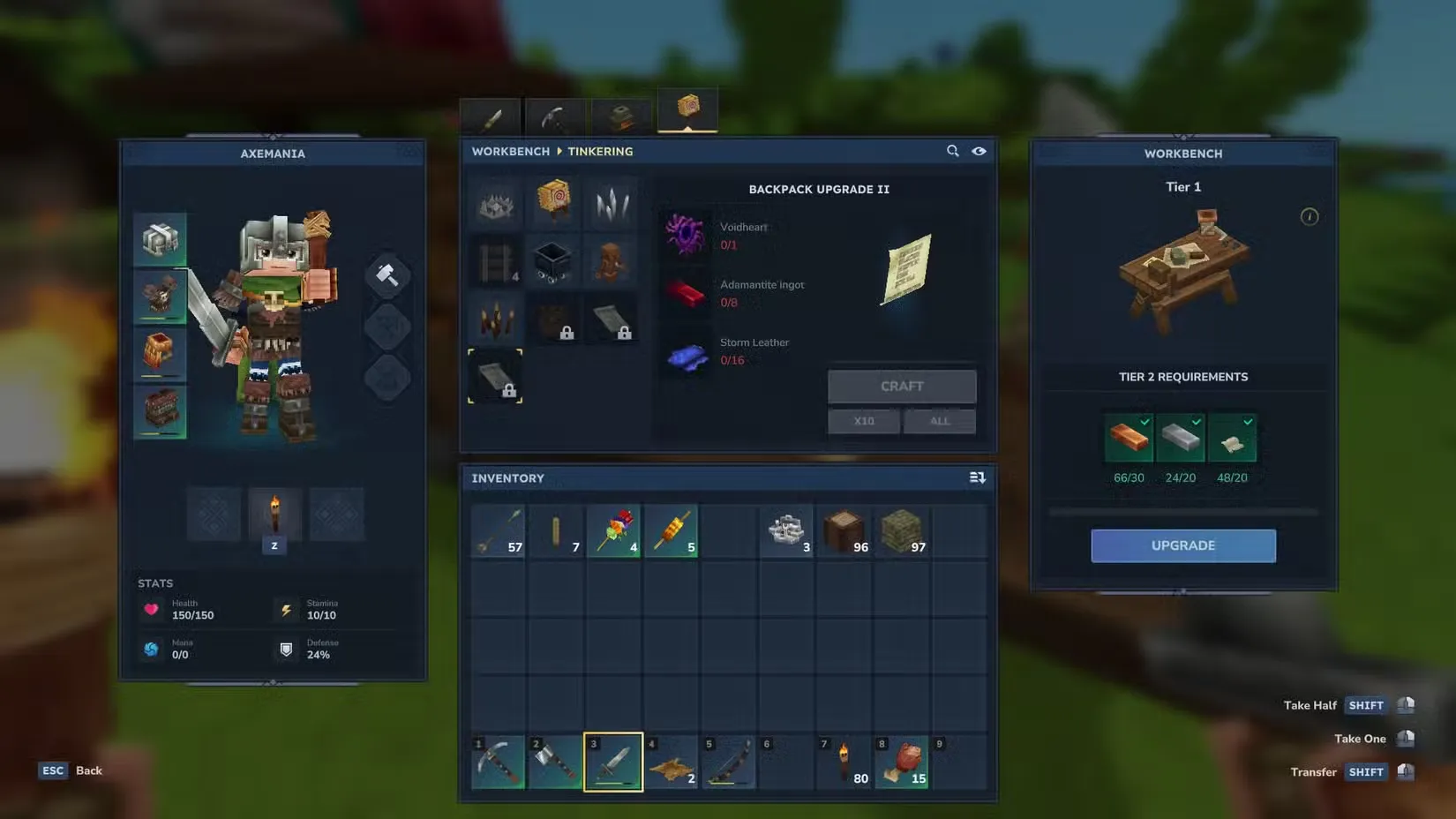
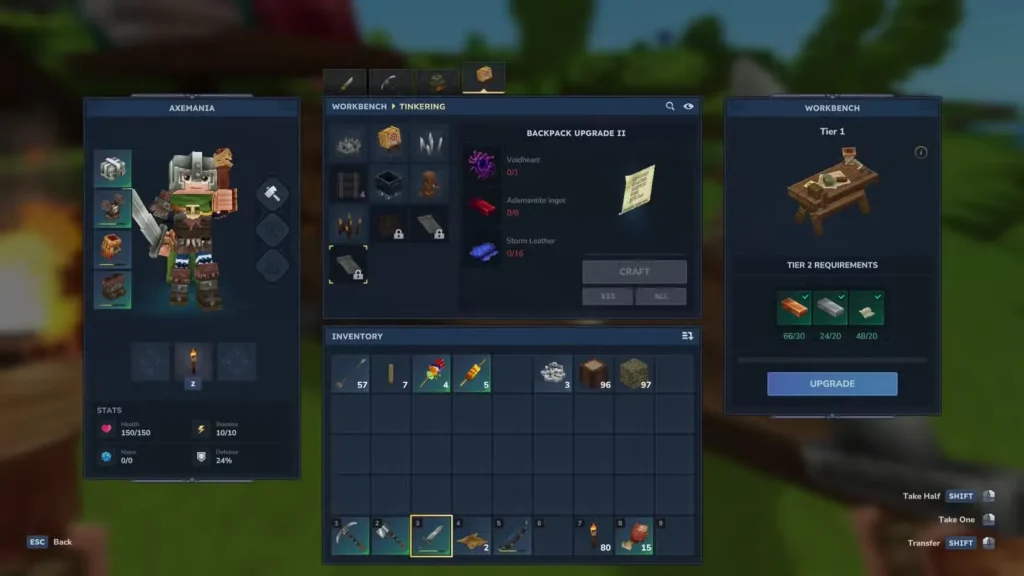
Before you can even think about crafting a backpack, you need to upgrade your Workbench to level 2. This is what unlocks the backpack recipe in the first place.

Upgrading Your Workbench to Level 2
You’ll need these materials:
- 30 Copper Ingots
- 20 Iron Ingots
- 20 Linen Scraps
Quick heads up: Workbench upgrades are per station, not universal. If you have multiple Workbenches scattered around your base, you’ll need to upgrade each one individually if you want the recipes available everywhere.
For the metal ingots, you’ll need to mine Copper and Iron ore, then smelt them in a Furnace. Pretty straightforward. The Linen Scraps are a bit more involved—you get them by defeating humanoid enemies like Skeletons and Trorks. So you’ll need to do some combat farming to gather enough.
Crafting the Initial Backpack Unlock
Once your Workbench hits level 2, interact with it and navigate to the Tinkering Tab. Scroll to the bottom row and you’ll spot the Unlock Backpack recipe. Here’s what it costs:
- 8 Iron Ingots
- 16 Medium Leather
The leather requirement might slow you down a bit depending on how much hunting you’ve done. Medium Leather comes from animals you’ll encounter while exploring, so make sure you’ve been collecting hides along the way.
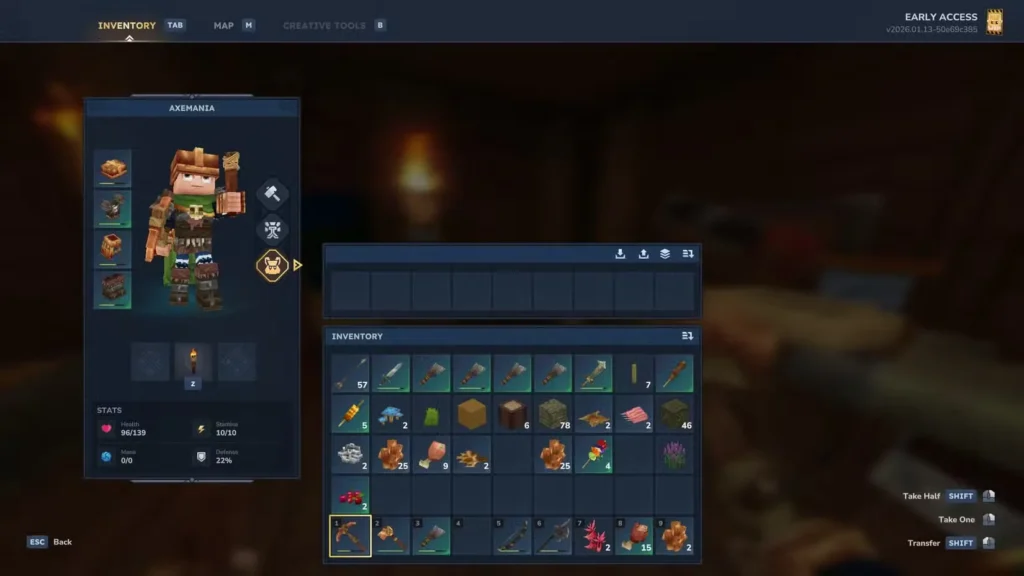
After crafting the upgrade, place it on your hotbar, select it, and right-click to consume it. This permanently unlocks your Backpack slot, which you’ll find to the right of your character model in the inventory screen. Click the third diamond icon below the Crafting tab to access your new storage space.
The base backpack gives you 9 extra slots—enough to stash backup tools, extra building materials, or whatever loot you’re hoarding. It’s not massive, but it makes a noticeable difference when you’re deep in a mining session or dungeon crawl.
Taking It Further: Backpack Upgrades 1 and 2
If nine extra slots aren’t cutting it (and let’s face it, they probably won’t be once you get serious about building or adventuring), you can craft two additional backpack upgrades. These require even higher-tier materials, so you’ll need to progress further into the game.
Backpack Upgrade 1
This requires a higher Workbench level and the following materials:
- 40 Cindercloth Scraps
- 8 Cobalt Ingots
- 24 Heavy Leather
Cindercloth Scraps are the real grind here. These drop from enemies in the Volcanic layer—you know, the dangerous underground zone where lava is everywhere and things are actively trying to burn you alive. Come prepared with fire resistance potions and decent gear before farming down there.
Backpack Upgrade 2
The final upgrade pushes into endgame territory with these requirements:
- 1 Voidheart
- 8 Adamantite Ingots
- 16 Storm Leather
These are all late-game materials, so you’re looking at serious exploration and progression before you can craft this one. The Voidheart especially is a rare drop, and Adamantite requires deep mining in dangerous areas. Storm Leather comes from tougher creatures, so expect some challenging fights.
Each upgrade adds more slots to your backpack, making inventory management progressively less painful as you advance through Hytale’s progression system.
Pro Tips for Managing Your Inventory in Hytale
- Prioritize the first backpack early. That initial 9-slot expansion is achievable fairly early and makes a huge difference in the early-to-mid game.
- Don’t forget about item repair. More inventory space is great, but keeping your tools in good shape means you won’t need to carry as many backups.
- Farm enemies strategically. Since several backpack materials come from mob drops, set up efficient farming routes in areas with high spawn rates.
- Upgrade multiple Workbenches if needed. Having upgraded Workbenches at your main base, mining outpost, and any other frequent locations saves time when you need to craft on the go.
FAQs
Do I need to craft a new backpack for every character?
Yes, backpack upgrades are character-specific. Each character you create will need to craft and consume their own backpack upgrades to unlock additional inventory space.
Can I lose my backpack if I die?
No! Since backpacks function as permanent unlocks rather than equipped items, dying won’t cause you to lose your expanded inventory. Your extra slots stay with you no matter what happens.
How many total inventory slots can I get with all backpack upgrades?
The base backpack gives you 9 extra slots, and each subsequent upgrade adds more. With all upgrades unlocked, you’ll have significantly more carrying capacity than when you started, though the exact total depends on your base inventory size plus all three upgrade tiers combined.
Is there a way to get backpack materials faster?
For mob drops like Linen Scraps and Cindercloth Scraps, finding high-density spawn areas and farming efficiently is your best bet. For ores like Cobalt and Adamantite, using better pickaxes and exploring deeper layers speeds things up. Consider setting up dedicated mining expeditions with storage nearby so you can make multiple trips without losing progress.