To be honest, your first base in StarRupture will be a probably a hot mess. Ore extractors scattered everywhere, rails crossing over each other like spaghetti, and buildings placed in spots that made sense at 2 AM but now just block your expansion plans.
And the good news is You can delete pretty much anything you’ve built, and even better—you get all your materials back. No waste, no penalties, just a clean, complete clean slate to reorganize your base into something that actually makes sense.
Here’s everything you need to know about deconstructing buildings and rails in StarRupture.
How Can I Delete Buildings and Rails (Step-by-Step)
The deconstruction process is actually super simple once you know the keybind.
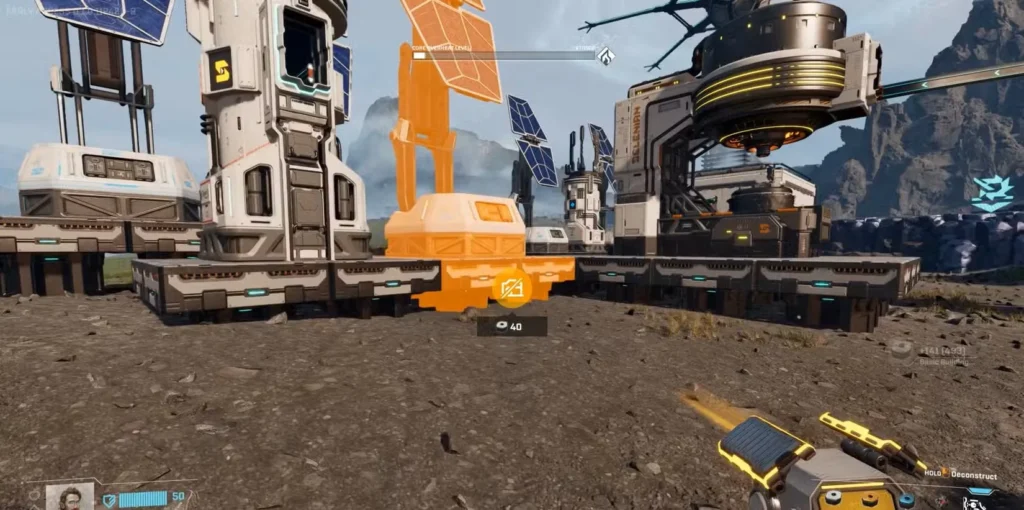
Press F on your keyboard to enter the Deconstruction Mode. You’ll notice your cursor changes to show a building icon with a line through it.
From this point:
- Move your cursor over whatever structure or rail you want to remove
- Press and hold the left mouse button (LMB)
- Watch the circle around your cursor icon gradually fill up
- Once this completes, the structure disappears
- All building materials automatically return to your inventory
That’s it yes that’s it. No complicated menus, no confirmation screens—just point, hold, and delete.
What All Can You Deconstruct?
Hmm, Pretty much everything you build:
- Ore extractors
- Smelters
- Orbital cargo launchers
- Rails (all types)
- Rail supports and connectors
- Processing buildings
- Defense structures
- Platforms and modules
- Storage depots
If you built it, you can tear it down. The game is pretty forgiving in this regard, which is great when you’re still figuring out optimal base layouts.
You Get All Your Materials Back
This is the part that makes reorganizing your base actually viable. When you deconstruct something, you’re not losing resources—you’re just recycling them.
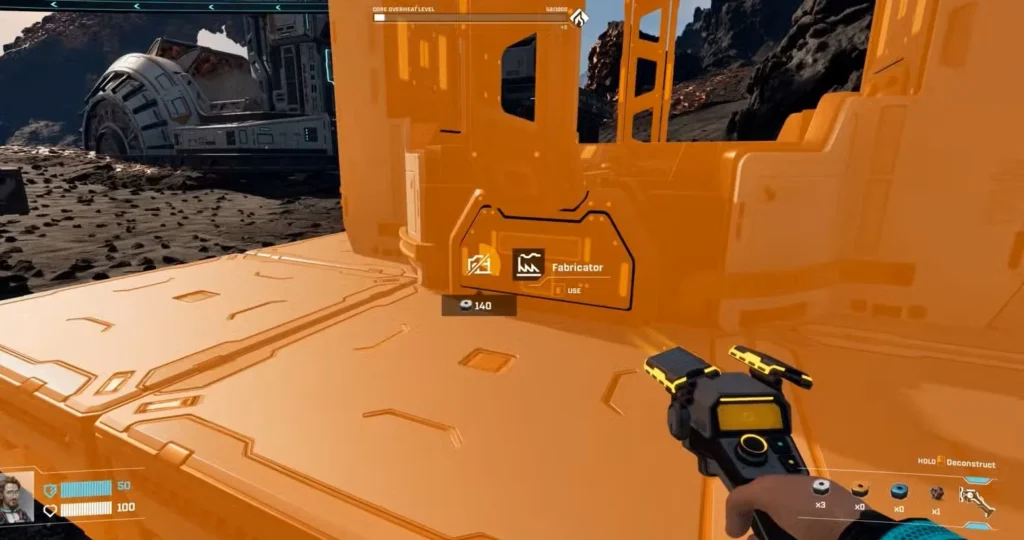
Before you delete anything, you’ll see exactly how many materials you’ll recover displayed underneath the building icon in Deconstruction Mode. No guessing, no surprises.
This means you can experiment freely with different bases layouts without worrying about wasting precious titanium or other resources. Made a mistake? Just tear it down and rebuild it properly. Want to completely redesign your production chain? Go for it—you’re not losing anything except time.
When Should You Deconstruct and Rebuild?
Early on, a messy base is fine. You’re just trying to get basic production running and survive the Ruptures. But as you progress, inefficient layouts becomes real big problem.
Signs it’s time to reorganize:
- Rails crossing over each other unnecessarily
- Buildings too far apart, making rail connections complicated
- Resource extractors in awkward positions after a Rupture shuffles node locations
- Production bottlenecks because buildings aren’t optimally connected
- Running out of space to expand around your original structures
The beauty of StarRupture’s deconstruction system is that you can rework sections of your base gradually. You don’t need to demolish everything at once—just identify problem areas and fix them as needed.
If you’re farming Data Points efficiently, you’ll be unlocking new technologies constantly, which often requires adding new production buildings. That’s usually the perfect time to optimize your layout.

Can You Move or Rotate Buildings?
Here’s where things get a bit annoying. As of right now (during early access), there’s no way to simply move or rotate an existing building.
Yeah, I know—it’s frustrating. Sometimes you just want to rotate a smelter 90 degrees so the rail connection lines up better, but nope. The only option is to:
- Deconstruct the entire building
- Get your materials back
- Rebuild it in the correct orientation
It’s not the end of the world since you get your materials back, but it does add extra steps to what should be a quick adjustment. Hopefully, the developers add a proper move/rotate function in a future update, because it’s one of those quality-of-life features that would make base building way smoother.
For now, just plan ahead when placing buildings. Think about which direction the rail connections need to face before you commit to a spot.
Pro Tips for Smart Deconstruction
Plan your rail network before building it. Rails are easy to delete, but rebuilding an entire network is tedious. Sketch out your connections mentally (or even on paper) before commiting resources.
Deconstruct before Ruptures, not after. If you know a Rupture is coming and you’ve been meaning to reorganize, do it beforehand. After a Rupture, resource nodes move, and you’ll want to rebuild extractors in new locations anyway.
Keep a flat building area. If you followed our beginner’s guide and built on flat terrain north of the small lake, reorganizing is way easier than trying to work around rocky, uneven ground.
Deconstruct outdated tech. Once you unlock Solar Generator V2 or Wind Turbine V2, tear down those old V1 versions and reclaim the space and materials. Newer versions are more efficient anyway.
Don’t be afraid to experiment. Since there’s no penalty for deconstructing, try different layouts. Maybe that ore processing setup you thought would work great actually creates bottlenecks. Tear it down and try something else.
Frequently Asked Questions
Do I lose any materials when deconstructing buildings?
Nope! You get 100% of your building materials back when you deconstruct anything. The exact amount is shown under the building icon in Deconstruction Mode before you delete it. This makes reorganizing your base completely penalty-free.
Can I deconstruct buildings during a Rupture?
You can technically enter Deconstruction Mode during a Rupture, but you should be sheltering in your base anyway. It’s better to wait until after the Rupture ends to do any major reorganization, especially since resource node locations will have changed and you’ll need to reposition extractors.
What happens if I accidentally start deconstructing the wrong building?
Just release the left mouse button before the circle fills completely. The deconstruction will cancel and nothing happens. You need to hold LMB for the full duration for the building to actually be removed, so accidental deletions are pretty rare.
Will deconstructed rails return rail connectors and supports too?
Yes! When you deconstruct rails, you get back all the components—the rail segments, connectors, and supports. Everything you spent building that rail network comes back to your inventory, so you can rebuild it however you want.
Deconstructing buildings and rails in StarRupture is one of those features that seems basic but makes a real huge difference in how you approach base building. The fact that you will get all materials back means there’s zero risk in experimenting with layouts and reorganizing as you unlock all new technologies.
Your base will evolve constantly as you progress through the game. Resource nodes shift after Ruptures, new corporations unlock better buildings, and your production needs change as you tackle higher-level commisions. Don’t be afraid to tear down what’s not working for you and rebuild it better.
Press F, hold left-click, and start building the base you actually want instead of the chaotic mess you cobbled together while learning the game. Your future self will thank you when everything’s running smoothly and efficiently.