One of the coolest features in StarRupture is the ability to build multiple bases across the map and let automation handle resource gathering while you’re off exploring. But here’s the catch: leave your base undefended for too long, and you’ll come back to find the whole thing glowing an eerie blue. That’s right—your Base Core has been infected by aliens, and now nothing works.
I’m talking full lockdown. Can’t use your machines, can’t access your Habitat, can’t do anything until you clear the infection. It’s frustrating, especially when you’ve got a perfectly good production line churning out Ceramics or other advanced materials, only to find it all shut down because some alien decided to throw a party at your Base Core.
The good news? Fixing an infected base is actually pretty straightforward once you know what to look for. And even better, there are ways to prevent it from happening again. Let me walk you through the entire process, from disinfection to setting up proper defenses.
What Causes Base Core Infection?
Before we jump into the fix, let’s talk about how this happens in the first place. When you’re away from one of your bases, aliens can spawn and attack your structures. If your defenses are weak or nonexistent, they’ll eventually reach your Base Core and start whaling on it.
Once the Base Core takes enough damage from infected enemies, it becomes corrupted. The entire perimeter turns blue, all structures within the Base Core’s zone stop functioning, and you’re locked out of your Habitat. It’s basically the game’s way of saying, “Hey, maybe you should’ve built some turrets.”
If you’re juggling multiple bases (which you’ll definitely need to do as you progress through StarRupture), it’s impossible to manually defend all of them at once. That’s why understanding both the cure and the prevention is crucial.
How to Disinfect Your Base Core: Step-by-Step
Alright, your base is infected. Don’t panic—it’s fixable. Here’s exactly what you need to do.

Step 1: Locate the Infection on Your Base Core
Head to your infected base. You’ll notice immediately that something’s wrong—the entire area has a blue tint, and your Base Core is glowing that telltale infected color.
Now, here’s where it gets a bit tricky: the Base Core itself turns blue when infected, and the actual infection blob is also blue. So you’re looking for a lighter blue blob against a darker blue structure. It can be confusing at first, but once you spot it, it’s pretty obvious.
Pro tip: There’s usually only one infection blob on the Base Core, so don’t waste time searching for multiple spots. Focus on finding that single lighter blue mass.
Step 2: Shoot the Infection
Once you’ve spotted the infection, it’s time to blast it. You can use literally any weapon for this—your trusty mining device works just fine. Just aim at the light blue blob and shoot until it’s destroyed.
The moment you kill that infection blob, you’ll see all the other structures in your base start healing. The blue color will gradually fade from your machines, rails, and other buildings. Everything’s on the mend!
But hold up—your Base Core is still infected at this point. Destroying the blob is only half the job.
Step 3: Manually Disinfect the Base Core
After you’ve shot the infection, approach your Base Core. You’ll get a prompt to disinfect it by holding the E button (or whatever your interact key is mapped to).
Hold that button down, and the Base Core will fully cleanse itself. The blue tint disappears completely, the perimeter returns to normal, and all your structures come back online. Your production lines will resume, you can access your Habitat again, and everything’s back to business as usual.
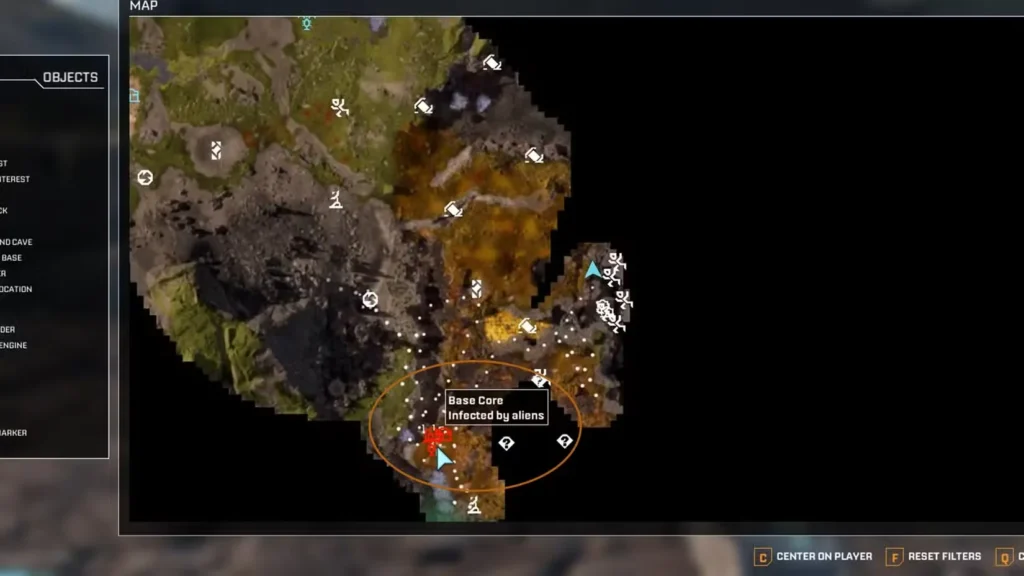
Quick check: If you open your map while your base is infected, you’ll notice the Base Core marker looks different—it’ll have that infected color. Once you’ve disinfected it properly, the map marker returns to normal too. It’s a handy way to check the status of your bases from a distance.
Why Your Base Keeps Getting Infected (And How to Stop It)
So you’ve fixed your infected base. Awesome! But here’s the reality: if you don’t change anything, it’s going to happen again. Aliens respawn, they’ll launch another attack, and you’ll be right back where you started.
Since StarRupture basically requires you to build multiple bases for efficient resource gathering—especially once you start chasing down materials like Sulfur, Helium, and Ignitium—you can’t just babysit one location all day. You need automated defenses.
Setting Up Automated Base Defenses
The solution to constant infections is building a proper defense system. This means turrets, towers, and anything else that’ll shoot aliens before they get close to your Base Core.
Unlocking Defense Structures
To get access to defense structures, you’ll need to level up the Griffits Blue Corporation. As you progress through their reputation ranks, you’ll unlock two key defensive structures:
Defense Turret: This is your basic automated gun. It’ll shoot at any hostile that comes within range, but there’s a catch—it requires manual ammo refills. You’ll need to periodically check on it and restock ammunition, which can be annoying if you’re managing multiple bases.
Defense Tower: This is the upgraded version and honestly the one you should aim for. The Defense Tower automatically refills its own ammunition, meaning you can set it and forget it. It’s way more hands-off and perfect for remote bases you don’t visit often.
Defense Placement Tips
Just slapping down a turret next to your Base Core isn’t going to cut it. You need strategic placement:
- Cover all approach angles: Aliens can come from any direction, so don’t just defend one side of your base
- Create overlapping fields of fire: Multiple turrets covering the same area means aliens get shredded before they get close
- Prioritize Base Core protection: Your most important defenses should form a ring around the Base Core itself
- Elevate when possible: Higher ground gives turrets better sightlines and prevents aliens from sneaking past
If you’re building in an area with lots of enemy spawns (like near underground caves or boss zones like Goliath), consider investing in multiple Defense Towers. The upfront cost in War Bonds and materials is worth it compared to constantly returning to fix infections.
Powering Your Defenses
Don’t forget that turrets and towers need power to function. Make sure your power grid extends to all defensive structures, and that you’ve got enough generation capacity to keep everything running.
Nothing’s worse than building a perfect defensive perimeter only to realize your power setup can’t handle the load. Plan your power infrastructure before you start placing turrets—trust me on this one.

Maintaining Multiple Bases
As you expand across StarRupture’s map and unlock more areas, you’ll inevitably have several bases running simultaneously. Here are some tips for managing them without constantly dealing with infections:
Check Your Map Regularly: Infected bases show up with a different color on the map. Make it a habit to glance at your map every so often to see if any bases need attention.
Prioritize Defense Upgrades Early: Don’t wait until you’ve lost three bases to infection before investing in proper turrets. Build defenses as you build the base itself.
Use Your Building Drone: The Building Drone makes setting up defensive perimeters way faster. You can plan out entire turret placements before committing resources.
Keep Spare Ammo Handy: If you’re using Defense Turrets instead of Towers, stockpile ammunition in nearby Storage Containers. It makes refills quicker when you do your base maintenance runs.
Visit Remote Bases Periodically: Even with automated defenses, it’s worth swinging by your outlying bases every now and then. Clear out any enemies that might be building up, check on your defenses, and make sure everything’s still running smoothly.
What Happens If You Ignore an Infected Base?
Honestly? Not much, in terms of penalties. The base just stays infected until you fix it. Your structures won’t function, but they won’t deteriorate further either. The infection doesn’t spread to other bases, and you won’t lose any stored resources.
That said, an infected base is a useless base. If you’ve got automated production running there—maybe you’re farming Wolfram Powder or Calcium—all that stops the moment the Base Core gets infected. You’re effectively losing whatever that base was producing until you fix it.
Plus, if you’re working on corporation quests or trying to hit the max level cap, having bases offline slows down your progress. It’s always worth taking 5 minutes to disinfect and reinforce rather than ignoring the problem.
FAQs
Can I prevent my Base Core from getting infected in the first place?
Absolutely! The key is building automated defenses before aliens can reach your Base Core. Upgrade the Griffits Blue Corporation to unlock Defense Turrets and Defense Towers, then place them strategically around your base. Defense Towers are especially useful since they refill their own ammunition automatically.
Do I need special weapons or items to remove the infection?
Nope! Any weapon works for shooting the infection blob on the Base Core—even your basic mining device. Once you’ve destroyed the blob, just approach the Base Core and hold the interact button to fully disinfect it. No special tools required.
Will my stored resources disappear if my base gets infected?
No, your resources are safe. An infected base simply locks down all structures and prevents them from functioning. Your Storage Containers won’t be accessible while the base is infected, but once you disinfect the Base Core, everything returns to normal and your stored items are still there.
How do I know if one of my bases is infected when I’m far away?
Check your map! Infected bases show up with a different colored marker. Get in the habit of opening your map regularly to spot any infected bases so you can deal with them quickly. The sooner you catch an infection, the less production time you lose.
And there you have it everything you need to know about fixing and preventing infected Base Cores in StarRupture. The disinfection process itself is quick and easy, but the real game-changer is setting up automated defenses so you’re not constantly running back to fix the same bases over and over.
Once you’ve got a solid defensive setup, you can focus on what really matters: exploring the map, tackling tougher enemies, unlocking all the weapons, and building out those complex production chains. For more tips on managing your bases and resources efficiently, check out our beginner’s guide or dive into specific crafting guides like how to get basic building materials. Happy building!