If there’s one thing you’ll learn fast in StarRupture, it’s that your starting inventory is painfully small, very small. Between gathering basic ores, refined materials, food, water, ammo, and all the random stuff you pick up exploring Arcadia-7, those inventory slots fill up quick.
Running back to base every five minutes because you’re out of space gets old fast. Luckily, there’s a way to expand your inventory multiple ways, actually. You just need to know which corporations to level up and in what order.
Here’s everything you need to know about increasing inventory size and managing storage in the game StarRupture.
How Inventory Upgrades Work
Inventory upgrades in StarRupture are tied directly to corporation progression. As you level up your standing with different corporations by completing commissions and delivering resources, you’ll unlock various rewards including precious inventory slot expansions.
Each and every inventory upgrade gives you 8 additional slots, which might not sound like much, but trust me, it will make a huge difference when you’re hauling refined materials or looting ruins.
The catch? There are only four inventory upgrades available in the game’s current early access state. That’s a total of 32 extra slots if you unlock them all, so you’ll want to prioritize these corporations strategically.
All 4 Inventory Upgrades and How to Get Them
Here’s the complete breakdown of every inventory expansion, which corporation offers it, and what level you need to reach:
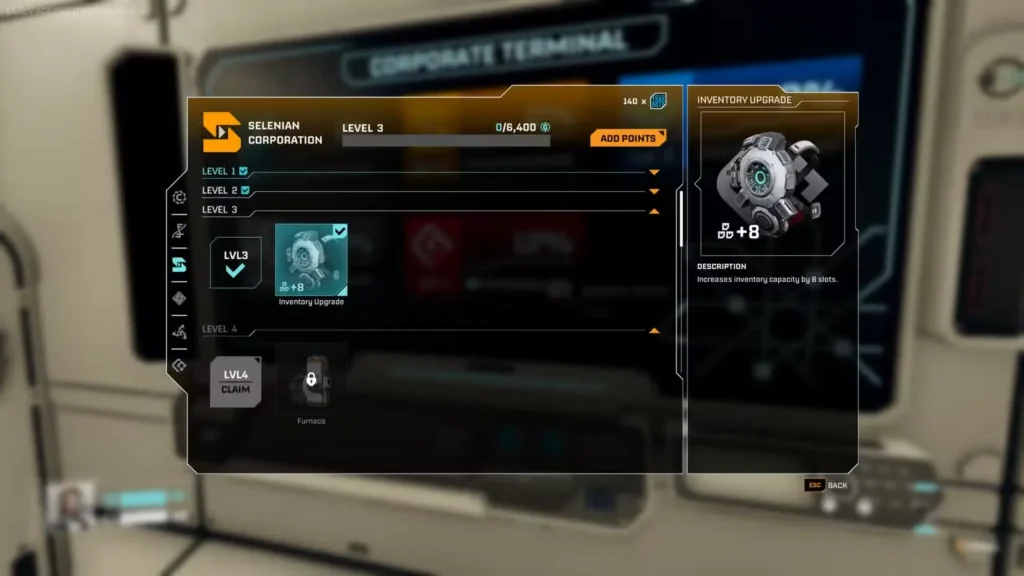
1. Selenian Corporation – Level 3 (+8 Slots)
Requirements: Deliver Titanium Bars, Titanium Rods, or Data Points
This is your first inventory upgrade and one you should prioritize early. Selenian Corp is already important for production buildings, so you’ll naturally be working with them anyway. Getting to Level 3 isn’t too difficult just to set up some basic ore processing and send commissions their way.
If you’re following our beginner’s guide, you should be hitting this milestone pretty naturally as you establish your base infrastructure.
2. Health Solutions – Level 7 (+8 Slots)
Requirements: Glass or Data Points
This one takes a bit longer since Level 7 is deeper into the corporation tree. Health Solutions focuses on medical tech and habitat upgrades, so you’ll need to progress through their lower levels first.
The good news is that by the time you need this upgrade, you should have Data Point farming down to a science. Just dump Data Points into Health Solutions to speed up the process if gathering Glass is inconvenient.
3. GriffithsBlue Corporation – Level 8 (+8 Slots)
Requirements: Applicator or Data Points
GriffithsBlue is the combat-focused corporation, so if you’ve been neglecting them in favor of production techs, this might take some time. Level 8 requires working through their weapon and defense tech tree.
The Applicator is a crafted component, so you’ll need decent production infrastructure by this point. Alternatively, just use Data Points to bypass the material grind entirely.
4. Moon Energy Corporation – Level 11 (+8 Slots)
Requirements: Laser Emitter or Data Points
This is the final inventory upgrade and it’s locked behind Level 11 of Moon Energy—the corporation you probably leveled early to unlock the map. Level 11 is near the top of their tech tree, so this is definitely a late-game upgrade.
By this point, you should have advanced production capabilities and plenty of Data Points from exploring and analyzing resources. The Laser Emitter is a high-tier component, but Data Points remain your best bet for quick leveling.
Claiming Your Inventory Upgrades
Once you have hit the required level with a corporation, don’t forget to actually claim your reward. This is easy to miss if you’re rushing through menus.
Head to the Corporate Terminal inside your habitat, navigate to the corporation you just leveled up, and accept the rewards. The inventory upgrade is applied automatically—no crafting, no equipping, just instant extra slots.
You’ll immediately notice the difference when you open your inventory. Those 8 new slots appear right away and are ready to use.
Storage Solutions: When Inventory Isn’t Enough
Even with all four inventory upgrades unlocked, you’ll still run out of space. Some materials you just don’t need to carry around constantly—basic building supplies, excess ores, components you’re stockpiling for future projects.
That’s where storage containers come in.
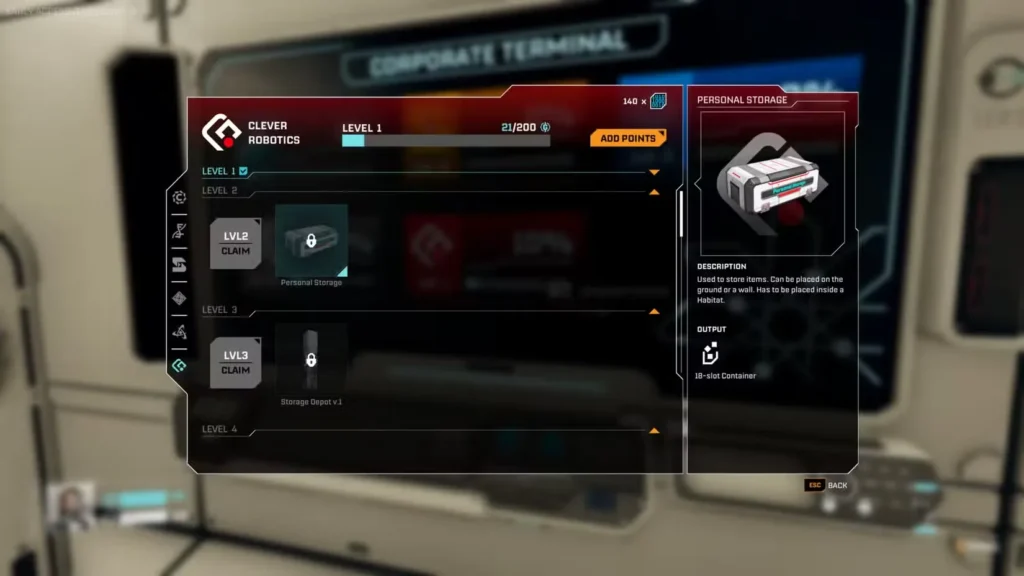
Personal Storage (Clever Robotics Level 2)
The Personal Storage container is your first real storage solution. It offers 18 slots and can be placed repeatedly in your habitat for extensive storage capacity.
Getting it only requires reaching Level 2 with Clever Robotics Corporation, which should be one of your early priorities anyway since they specialize in automation and logistics.
Pro tip: You can place multiple Personal Storage containers in your base. Set up a dedicated storage room and organize your materials by type—one container for basic ores, another for refined components, another for food and supplies, etc.
Advanced Storage Options
Clever Robotics doesn’t stop at Level 2. As you progress through their corporation tree, they unlock even better storage solutions:
- Storage Depot V1 (Level 3) – Larger capacity for bulk materials
- Storage Depot V2 (Level 8) – Even more space
- Large Personal Storage (Level 9) – Upgraded personal container
- Multistorage (Level 12) – Advanced multi-compartment storage
- Expandable Storage (Level 13) – The ultimate storage solution
If you’re serious about base building and automation, Clever Robotics should be one of your top corporation priorities alongside Selenian and Moon Energy.
Strategic Inventory Management Tips
Don’t carry everything. Just because you have inventory space doesn’t mean you need to fill it. Keep essentials like food, water, ammo, and basic repair materials on you. Everything else can stay in storage.
Organize your storage early. Set up a logical system before your base becomes chaotic. Future you will appreciate not having to search through ten random containers for that one component.
Prioritize Selenian Level 3 first. This is the easiest inventory upgrade to get and makes early-game resource gathering way less tedious. Focus on this before worrying about the others.
Use Data Points for faster progression. Rather than farming specific materials each corporation wants, collect Data Points and deliver those instead. It’s usually faster and more flexible.
Balance inventory upgrades with other tech. Don’t tunnel vision on inventory expansions at the expense of critical technologies like the map, better production buildings, or defense structures. Find a balance based on your current needs.
Deconstruct unnecessary structures for materials. If you’re reorganizing your base, deconstruct old buildings to reclaim materials instead of letting them sit in storage taking up space.
FAQ
Can I get more than 4 inventory upgrades?
Not in the current early access version of StarRupture. There are exactly four inventory upgrades available, totaling 32 additional slots beyond your starting capacity. The developers might add more in future updates, but for now, that’s the maximum.
Do inventory upgrades stack with each other?
Yes! Each upgrade you unlock permanently adds 8 more slots to your total inventory capacity. If you unlock all four upgrades, you’ll have 32 extra slots on top of your base inventory. They’re cumulative, not replacements.
What happens to items in my inventory if I die?
You’ll drop your inventory when you die, but you can retrieve it by returning to your death location. However, if you die during a Rupture or in a particularly dangerous area, recovery might be difficult or impossible. This is why proper storage management is important—don’t carry irreplaceable items unnecessarily.
Is there a way to transfer items between storage containers quickly?
Currently, you need to manually move items between your inventory and storage containers. There’s no bulk transfer or auto-sort function in the early access version. This is another reason to organize your storage system logically from the start—it saves time in the long run.
Increasing your inventory size in StarRupture is all about strategic corporation progression. The four upgrades are scattered across different factions, so you can’t just focus on one corporation and call it a day.
Start with Selenian Corp Level 3 for that first crucial expansion, then work toward Health Solutions Level 7 and GriffithsBlue Level 8 as you develop your base. The final upgrade at Moon Energy Level 11 is a long-term goal that’ll come naturally as you progress.
Combine inventory upgrades with smart storage solutions from Clever Robotics, and you’ll never have to worry about running out of space again. Well, at least not as often.
Now stop dropping resources because you’re out of inventory space and go unlock those extra slots. Arcadia-7 has plenty of materials waiting to be collected, and you’re gonna need somewhere to put them all.