Chapter 3 of Inazuma Eleven: Victory Road’s Story Mode throws you into a showdown with the Baseball Club, and winning requires more than just strong players—you’ll need tactical mastery. Specifically, the game wants you to use Keyman Lockdown, a defensive tactic that can shut down opponent key players.
The problem? The game doesn’t exactly hold your hand through the setup process, and if you’re playing with keyboard and mouse, you might run into some frustrating technical issues. Let’s break down everything you need to know about acquiring, setting, and actually using Keyman Lockdown effectively.
What Is Keyman Lockdown?
Before we dive into the how-to, let’s quickly cover what this tactic actually does. Keyman Lockdown is a defensive strategy that lets you assign a player to tightly mark a specific opponent—essentially taking their star player out of the game through focused pressure. Think of it as man-marking on steroids.
This becomes crucial during the Baseball Club match when you need to neutralize Thierry, their key offensive threat. Master this tactic early, and you’ll have a powerful tool for the rest of your Victory Road campaign.
Step 1: Purchasing the Keyman Lockdown Tactic
Unlike some tactics that unlock through story progression, Keyman Lockdown must be purchased. Here’s exactly where to find it:
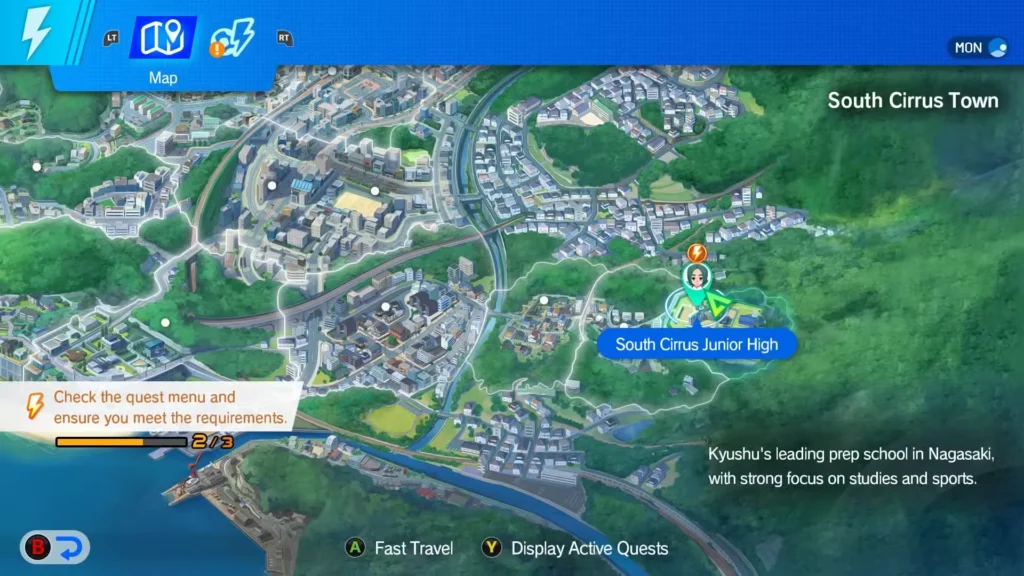
Location: South Cirrus Junior High – West Side
Look for the “Friendly Match – By the Football Club Room” marker on the western side of campus. If you’re having trouble spotting it, check your map—it should be clearly labeled once you’re in the right general area.

Purchase Process:
- Interact with the marker when you reach it
- Select “Special Training Booth” from the options
- Navigate to the Tactics tab in the menu
- Purchase Keyman Lockdown for 3 Zeal tokens
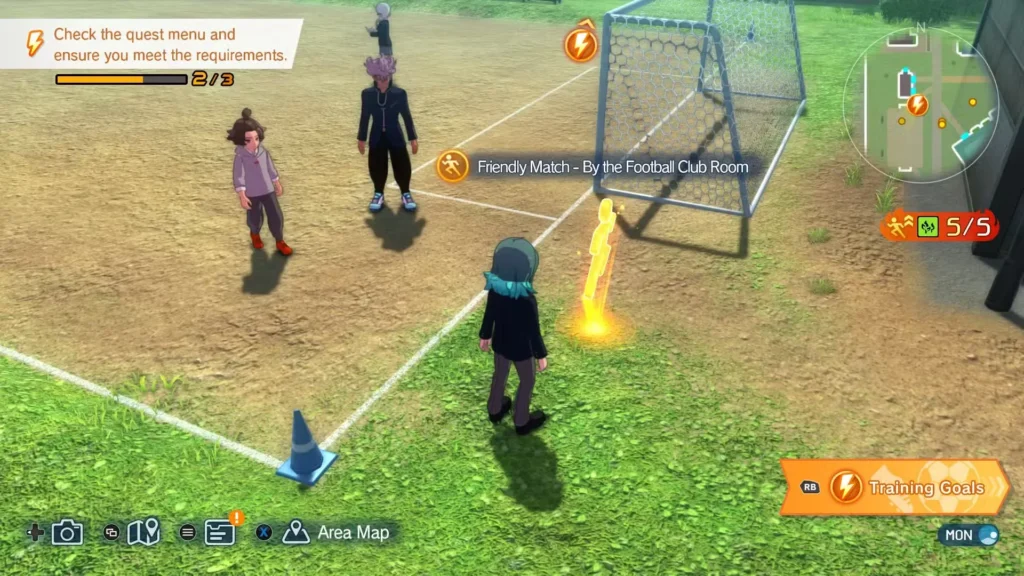
Cost breakdown: Three Zeal tokens is pretty reasonable for such a useful tactic. If you’re short on tokens, complete some side objectives or Story Mode matches—they’re the primary source of Zeal in the early game.
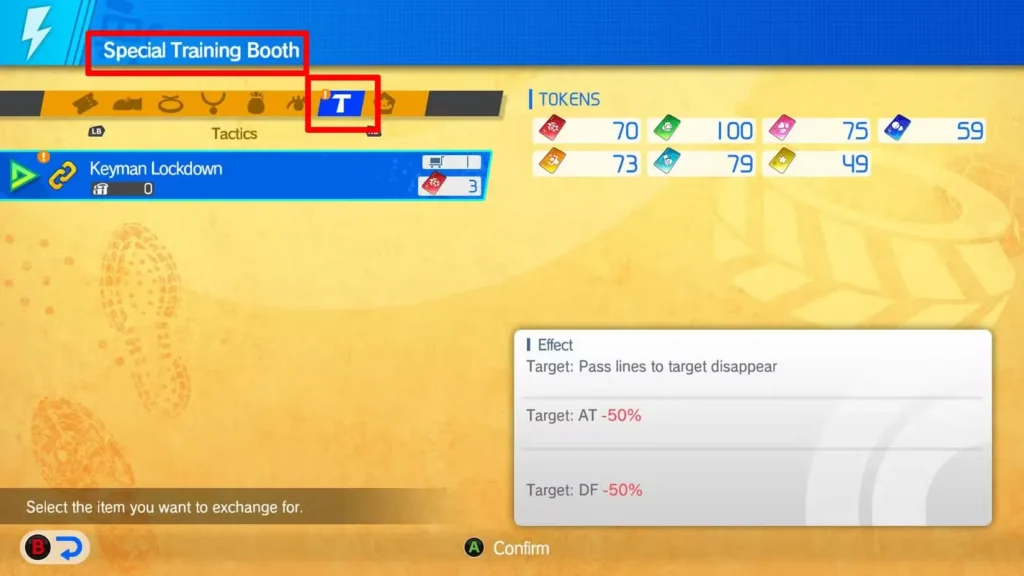
Step 2: Setting Keyman Lockdown in Your Team Dock
Buying the tactic is only half the battle. Now you need to actually equip it so you can use it during matches. The menu navigation here is a bit nested, so follow along carefully:
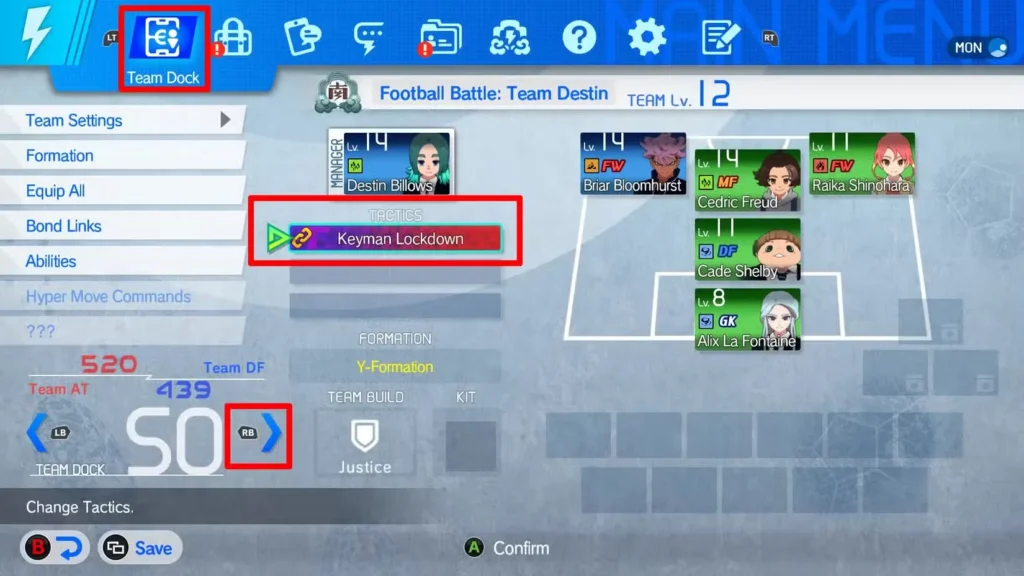
Accessing Team Dock SO Menu:
- Open your main menu
- Navigate to the Team Dock tab at the top of the screen
- Look at the bottom-left corner for “Team Dock RPG”
- Press the input button shown to the right of that text
- This opens the Team Dock SO menu (SO stands for Special Operations)
Equipping the Tactic:
Once you’re in the Team Dock SO menu, you’ll see your manager’s portrait with empty tactic slots beneath it:
- Select an empty tactics box (you can equip multiple tactics)
- Choose Keyman Lockdown from the list that appears
- Confirm your selection
Pro tip: Take a moment to review your other available tactics while you’re here. As you progress through the game, you’ll unlock more options, and having a diverse tactical toolkit makes you far more adaptable during tough matches.
Using Keyman Lockdown During Matches
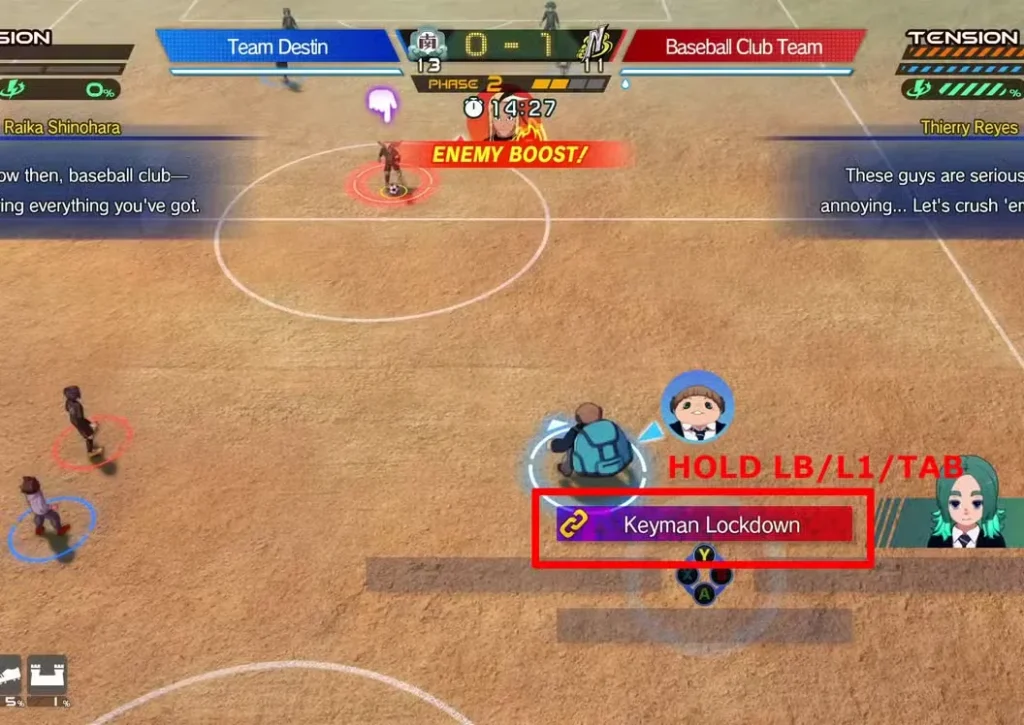
The game will prompt you to use this tactic after your first shot against the Baseball Club, but the tutorial is brief. Here’s the detailed breakdown for both control schemes.
For Controller Users (Recommended Method)
If you’re using a controller—whether PlayStation, Xbox, or other—the process is smooth and intuitive:
Step-by-step execution:
- Hold L1 (PlayStation) or LB (Xbox) during the match
- This brings up your set tactics in the bottom-right corner
- Press Triangle (PlayStation) or Y (Xbox) to activate Keyman Lockdown
- The specific button depends on which slot you placed the tactic in
- Move your joystick toward the target player (Thierry in Chapter 3)
- You’ll see an orange targeting ring move across the field
- Press the Confirm button when the target is inside the ring
- This executes the lockdown on that player

Timing matters: Try to activate Keyman Lockdown when the target player is receiving the ball or about to make a play. This maximizes the disruption and can lead to turnovers.
For Keyboard & Mouse Users (Current Limitations)
Here’s where things get problematic. The keyboard and mouse implementation of this tactic has a significant bug that makes it nearly unusable in its intended form.
What should work:
- Hold Tab to display tactics
- Press the assigned key for Keyman Lockdown
- Use mouse or keyboard to move the targeting ring
- Confirm when positioned correctly
What actually happens: The targeting ring doesn’t respond to mouse movement or keyboard inputs. You literally cannot move it to select your target, which makes the tactic impossible to execute normally.
Workarounds for Keyboard & Mouse Players
Until the developers patch this issue (and hopefully they will soon), you have two options:
Option 1: Proximity Activation (Quick Fix)
- Position your player directly on top of your intended target
- Activate Keyman Lockdown when they’re right next to each other
- The ring should already be positioned correctly
- Confirm immediately
This works in a pinch but requires good positioning and doesn’t let you strategically mark players across the field.
Option 2: Virtual Controller Emulation (Better Solution) Set up software that emulates controller inputs using your keyboard and mouse. Popular options include:
- reWASD
- JoyToKey
- Xpadder
- DS4Windows (if you have a PlayStation controller)
This essentially tricks the game into thinking you’re using a controller, which enables the full functionality of Keyman Lockdown. It’s extra setup work, but it solves the problem completely.
Real talk: If you’re planning to seriously play through Inazuma Eleven: Victory Road, consider using a controller anyway. The game was clearly designed with controller input in mind, and many mechanics feel more natural with analog sticks and trigger buttons.

Strategic Tips for Using Keyman Lockdown
Now that you know how to activate it, let’s talk about when and why to use this tactic effectively:
Best situations for Keyman Lockdown:
- When facing teams with a single star player carrying the offense
- To neutralize playmakers who set up scoring opportunities
- During critical defensive moments when you need to prevent a specific player from receiving the ball
- In story matches where the objective explicitly requires shutting down a key opponent
Things to remember:
- Keyman Lockdown pulls one of your defenders into dedicated marking duty
- This can leave gaps elsewhere if you’re not careful with positioning
- The tactic is most effective when combined with good overall team defense
- Don’t overuse it—save it for genuinely dangerous opponents
Against the Baseball Club specifically: Thierry is their primary offensive threat, so locking him down significantly reduces their scoring chances. Activate it early in the match to establish dominance and force them to rely on less skilled players.
Troubleshooting Common Issues
“I bought the tactic but can’t find it in Team Dock”
- Make sure you’re in Team Dock SO menu, not regular Team Dock
- Check that you have empty tactic slots available
- Verify the purchase went through (check your Zeal token count)
“The tactic won’t activate during matches”
- Confirm you actually equipped it in Team Dock SO, not just purchased it
- Make sure you’re holding the tactics button (L1/LB/Tab) first
- Check that you have enough energy/stamina to execute it
“I’m on keyboard and the targeting doesn’t work”
- This is a known issue, not user error
- Use the proximity workaround or set up controller emulation
- Check for game updates that might patch this bug
Looking Beyond Chapter 3
While Keyman Lockdown is mandatory for progressing past the Baseball Club match, don’t shelve it afterward. This tactic remains useful throughout the entire game, especially in:
- Competitive online matches where opponent star players can dominate
- Difficult story battles against teams with overpowered ace players
- Tournament finals where stopping one key player swings the entire match
As you unlock more tactics, experiment with combining Keyman Lockdown with other defensive strategies. Building a comprehensive tactical playbook is what separates good players from great ones.
Notes
The Keyman Lockdown mechanic adds genuine tactical depth to Victory Road’s matches, forcing you to think strategically about defensive assignments rather than just button-mashing through games. Once you get past the initial setup confusion—and work around the keyboard issues if applicable—it becomes a natural part of your defensive toolkit.
The three Zeal tokens you spend on this tactic are absolutely worth it. Not only is it required for story progression, but it’s genuinely useful in competitive play. Just remember to practice the activation sequence a few times in friendly matches before relying on it in high-stakes situations.
And seriously, if you’re on keyboard and mouse, consider either switching to controller or setting up emulation. The game experience improves dramatically with proper input methods, and you won’t constantly fight against control issues during crucial moments.
Now go shut down that Baseball Club!
Related: Need more resources for team building? Check out our guide on earning and spending Bond Stars to recruit powerful players for your roster.