One of the things I genuinely appreciate about Where Winds Meet is how generous it is with player housing. Coming from other MMOs where owning a place feels like a luxury only for hardcore endgamers with deep pockets, this game takes a refreshingly different approach. Base building here isn’t gatekeeping—it’s genuinely accessible, and honestly, it’s one of the more relaxing activities you can sink time into when you need a break from combat and quests.
The building system borrows heavily from survival games, giving you the freedom to create something truly yours. You’re not limited to picking from a rigid list of predetermined houses (though preset options exist if you want instant gratification). Instead, you get prefab walls, floors, windows, and decorative pieces to mix and match. The best part? The game unlocks this feature surprisingly early in your journey, so you don’t have to grind endlessly before you can start planning your dream home.
Getting Started: How to Unlock Base Building
The Quest You Need to Complete
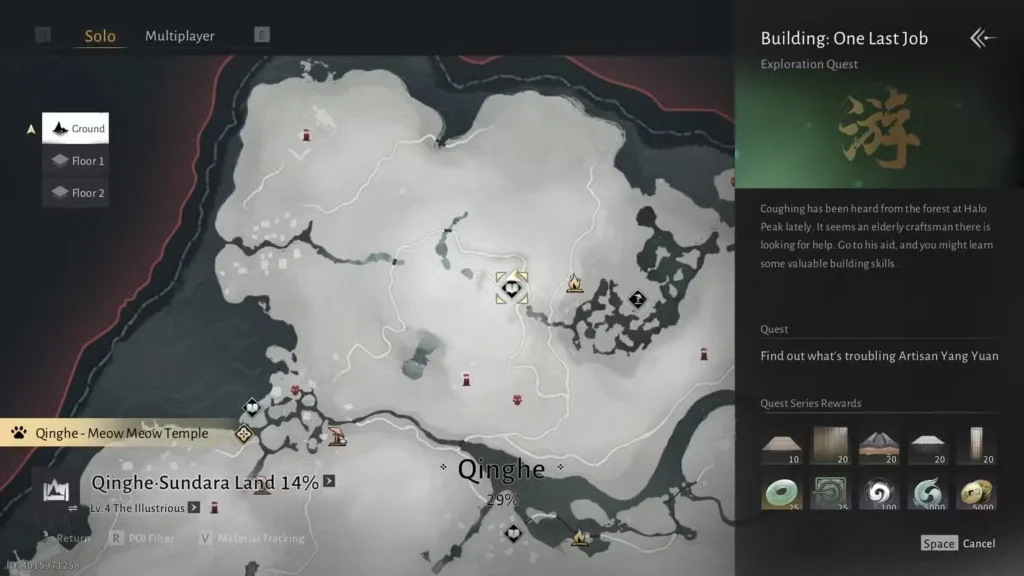
The path to becoming a builder starts with a quest called “Building: One Last Job,” and you’ll find it at Halo Peak. Here’s what you need to know: while there’s no officially confirmed level requirement, the quest seems to unlock somewhere between level 25 and level 40. In my experience, having Chapter One’s story boss already defeated makes a difference, but it’s not entirely clear if that’s a hard requirement or just coincidence.
The first thing to do is check your Journal—specifically the Exploration tab. If “One Last Job” is available there, you’re good to go. Can’t find it? Don’t stress. Push your character a bit closer to level 25 or higher and it should show up.
The Tutorial Quest That Doubles as Real Building Practice
What makes “One Last Job” special is that it’s not just a gateway—it’s an actual tutorial. When you reach the quest marker on Halo Peak, you’ll meet Yang Yuan, an NPC who needs help reconstructing a pagoda. In exchange, he’ll teach you the ropes of construction mode. The game guides you through every step without being condescending about it. You’re learning by doing, and before you know it, you’ll have unlocked Construction Mode permanently.
Entering Construction Mode: Controls and Basics
Getting Into Build Mode
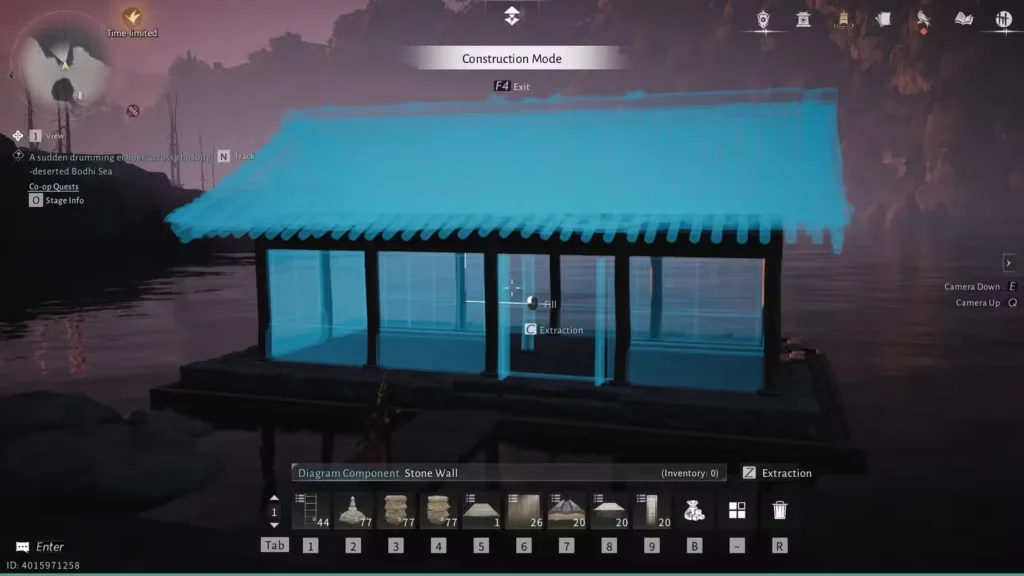
Once Construction Mode is unlocked, accessing it is straightforward:
- Keyboard/Touchpad: Press F4
- Controller: Press Touchpad + R2
The moment you’re in Construction Mode, you’ll notice an on-screen guide showing all the controls you need. It’s helpful to reference if you forget anything, but you’ll pick it up quickly.
What You Can and Can’t Do
Here’s an important detail: you can only build in Solo Mode. This means you’re creating your bases in your private space—no worrying about other players interfering or claiming land. You can place building pieces pretty much anywhere in the world that isn’t restricted (the game makes it obvious if an area is off-limits). This gives you tons of freedom for creative placement, whether you want a cozy cottage by a river or a fortress overlooking a valley.
Building Your Base: Tips for Success
Start small when you’re getting comfortable with the system. Get a feel for how pieces snap together, how terrain affects placement, and what the basic building palette offers. Once you’re confident, go bigger. The preset house option is worth checking out if you ever want a fully built structure instantly—it’s perfect for when you want shelter without the construction headache.
Gathering Resources
You’ll need materials to actually construct anything. Fortunately, the game makes resource gathering painless:
- Raw Ore and Timber are your main building materials
- Pick up pebbles from the ground for ore
- Chop down trees for timber
- General goods merchants stock bulk materials if you need to speed things up
These same merchants also sell crafting materials for healing potions, so it’s worth checking what they have whenever you’re nearby.
Saving Your Work: Base Blueprints Explained
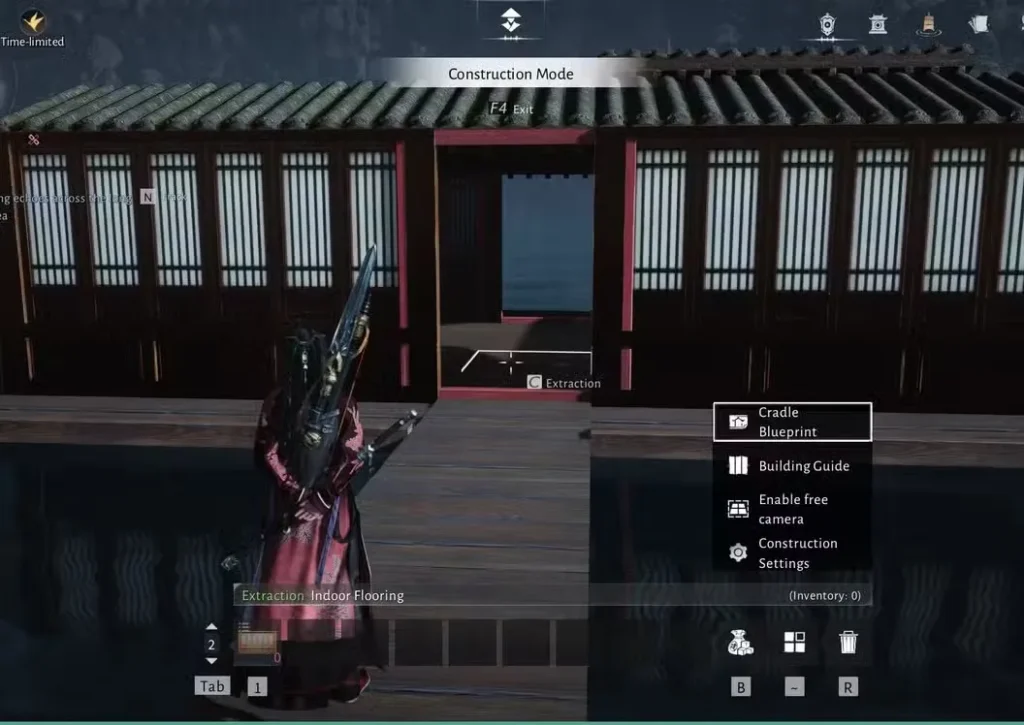
Once you’ve built something you’re proud of, you can save it as a blueprint. This is genuinely useful if you plan to build multiple bases or want to experiment with variations.
How to Save a Base Blueprint
- Enter Construction Mode (F4 or Touchpad + R2)
- Press ~ (tilde) on keyboard or L3 on controller
- Select Cradle Blueprint
- Choose an empty blueprint slot from your available options
- Move the blue highlighted area to cover the building or plot you want to save
- Make any final tweaks or additions you want included
- Hit the Leave button in the upper-right corner
- Confirm to save your blueprint
Your blueprint is now stored and ready to be deployed whenever you want to recreate that build elsewhere. It’s a time-saver and a way to preserve your architectural experiments.
Next Steps: Expand Your Building Knowledge
Once you’ve got the basics down, you might want to explore what else the game has to offer. Base building pairs nicely with other activities—consider checking out our guides on how to get more healing charges (perfect for stocking your base with supplies) and exploration point farming (which can help you discover great building locations).
If you’re still working through the main story or want to optimize your character, our difficulty settings guide and tips for beginners are solid starting points.
Ending Note
Base building in Where Winds Meet struck me as one of those features that sounds like a side distraction but ends up being genuinely engaging. It’s relaxing, creative, and rewarding without feeling like a second job. The fact that it’s accessible early in your playthrough means you can dip your toes in whenever you want, experiment a bit, and build something that feels like home—literally.
Whether you’re crafting a minimalist retreat or an elaborate compound, the building system gives you the freedom to make it yours. Start with “One Last Job,” learn the ropes from Yang Yuan, and before long you’ll have blueprints saved and ideas flowing for your next project.
Useful Resources
For more information about Where Winds Meet, check out these official links:
- Official Website: Where Winds Meet
- Steam Store Page: Where Winds Meet on Steam
- PlayStation Store: Where Winds Meet on PlayStation
- Wikipedia Entry: Where Winds Meet
Happy building, wanderer.