TL;DR
- Pokémon Pokopia runs on real-time gameplay — there is no in-game time travel option.
- You can time travel by adjusting the Nintendo Switch 2’s internal clock in System Settings.
- Close the game fully before changing the date and time, then reopen Pokopia to time travel.
- Time travelling completes crops, finishes building projects, and can unlock limited-time events early.
- Unlike Animal Crossing: New Horizons, there are no weeds or Pokémon leaving as a penalty.
- The only real downside is that shop items and Daily Challenges won’t reset if you time travel back to the present.
Pokémon Pokopia is built around real-time gameplay — if it’s Tuesday night where you are, it’s Tuesday night in Pokopia too. This means certain tasks like growing crops and completing Pokémon Center build projects require you to genuinely wait before they resolve. For patient players that’s no problem, but for those who would rather not stare at a progress bar, time travel is a very real option.
In this guide we explain whether you can time travel in Pokémon Pokopia, exactly how to do it, and every consequence — positive and negative — that comes with it.
You can pick up Pokémon Pokopia on Nintendo Switch 2 if you haven’t already.
Can You Time Travel in Pokémon Pokopia?
There is no time travel option built into Pokémon Pokopia itself. The game is locked to whatever day and time your real-world region is currently in, with no in-game mechanic to fast-forward or skip ahead. However, you can override this entirely by adjusting your Nintendo Switch 2’s internal clock in the system settings.
By changing the Switch 2’s date and time, you can jump to any point in time you choose — whether that’s skipping ahead a few hours for a crop to finish growing, jumping to a specific date to access a limited-time event early, or simply playing during daytime hours when your real-world clock says otherwise.
How to Time Travel in Pokémon Pokopia
Before changing any settings, make sure Pokémon Pokopia is fully closed — not just suspended. Time travel won’t apply properly if the game is still running in the background.
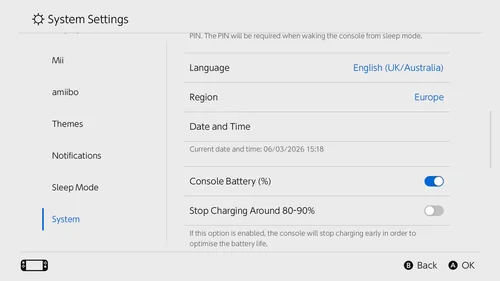
Once the game is closed, follow these steps:
- Open Settings on your Nintendo Switch 2.
- Scroll down and select ‘System’.
- Scroll down and select ‘Date and Time’.
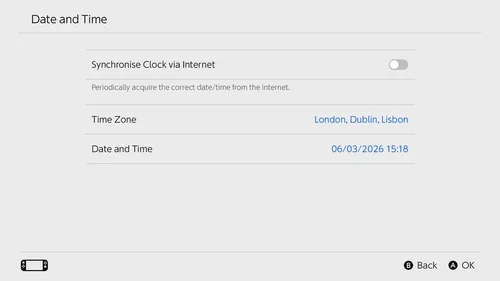
- Toggle ‘Synchronise Clock via Internet’ off. This is essential — leaving it on will override any manual date changes automatically.
- Select ‘Date and Time’ and input the date and/or time you want to travel to.
- Open Pokémon Pokopia and you will have successfully time travelled.
That’s all there is to it. The process is quick and reversible — you can return to the current date and time at any point by toggling ‘Synchronise Clock via Internet’ back on, which will restore your Switch 2 to the real-world time automatically.
Consequences of Time Travelling in Pokémon Pokopia
Time travelling in life-sim adjacent games like Pokopia is a topic some players feel strongly about, but the game itself places no hard penalties on doing it. Unlike Animal Crossing: New Horizons — where time travelling forward could cause weeds to overrun your island or villagers to pack their bags — Pokopia is far more forgiving. There are no negative environmental consequences and no Pokémon will leave your town as a result.
Here is exactly what time travelling does and doesn’t affect:
Crops will mature. Any crops you have planted will complete their growth cycle after time travelling. If you’re waiting on ingredients for a recipe — like Wheat or Beans for the curry in the Time to Party! request — time travelling is the fastest way to skip the wait.
Building and demolition projects will complete. Any active construction projects, including Pokémon Center builds and demolitions, will be finished after time travelling. This is arguably the most useful application of time travel in Pokopia, especially in the mid-game when build queues start stacking up alongside Important Requests.
Limited-time events can be accessed early. Time travelling forward to a specific date lets you access seasonal or limited-time events before they officially begin in real-time. This includes events, and checking for active Mystery Gift Codes tied to event periods. Keep in mind that accessing events this way may affect your ability to experience them alongside the wider community.
Shop items and Daily Challenges may not reset. This is the one genuine downside to time travel in Pokopia. If you time travel to a future date and then return to the present, the shop inventory and Daily Challenges from the day you last time travelled to will remain in place and will not reset to the current day’s offerings. This can leave you stuck with stale shop stock until the next natural daily reset occurs. It’s a minor inconvenience rather than a serious penalty, but worth keeping in mind before you start jumping around the calendar.
Should You Time Travel in Pokémon Pokopia?
Whether to time travel in Pokopia comes down entirely to how you prefer to play. If you enjoy the rhythm of a real-time life sim and like having a reason to check in on the game each day, playing without time travel preserves that loop naturally. If you’re more interested in progressing builds, completing Important Requests like the Time to Party! walkthrough, or simply playing on your own schedule without being held up by timers, time travel is a perfectly functional tool with very few downsides.
Either way, Pokopia doesn’t punish you for it — so the choice is genuinely yours.
Frequently Asked Questions – Time Travel in Pokémon Pokopia
Can you time travel in Pokémon Pokopia?
Not within the game itself — Pokopia has no in-game time travel mechanic. However, you can time travel by adjusting the Nintendo Switch 2’s internal clock in System Settings. Close the game fully, turn off ‘Synchronise Clock via Internet’, change the date and time to your desired point, and then reopen the game.
Does time travelling in Pokémon Pokopia have consequences?
The consequences are mostly positive. Crops mature, building projects complete, and limited-time events can be accessed early. The only downside is that shop items and Daily Challenges won’t reset if you travel back to the present after time travelling forward — they’ll remain set to the last date you visited until the next natural daily reset.
Do Pokémon leave if you time travel in Pokémon Pokopia?
No. Unlike games such as Animal Crossing: New Horizons, there are no negative environmental or social consequences for time travelling in Pokopia. No Pokémon will leave your town and no weeds will appear as a result.
Can you use time travel to skip build timers in Pokémon Pokopia?
Yes. Any active construction or demolition projects — including Pokémon Center builds — will be completed after time travelling. This is one of the most practical reasons to use time travel, especially when multiple build projects are queued at once.
Can time travel unlock events early in Pokémon Pokopia?
Yes. Advancing the Switch 2 clock to a future date allows you to access limited-time events before their real-world start dates. Check for any active Mystery Gift Codes during event periods to make the most of any bonuses available.
More Pokémon Pokopia Guides
- Pokémon Pokopia Time to Party! Walkthrough
- How to Build Pokémon Centers in Pokémon Pokopia
- How to Increase Environment Level in Pokémon Pokopia
- How to Increase Comfort Levels in Pokémon Pokopia
- How to Get Wheat in Pokémon Pokopia
- How to Get Leaves in Pokémon Pokopia
- How to Get Lumber in Pokémon Pokopia
- How to Open Area Gates and Raise Trainer Rank in Pokémon Pokopia
- Pokémon Pokopia Dream Islands – How to Visit and Materials List
- Pokémon Pokopia Mystery Gift Codes
- Character Customisation in Pokémon Pokopia Explained
- How to GameShare Pokémon Pokopia on Switch
- Pokémon Pokopia File Size