Free loot just for hanging out on Twitch? It’s a real thing. To celebrate the global launch of Arknights: Endfield, Gryphline is running a Twitch Drops campaign that lets you stockpile in-game resources without opening your wallet. If you’re going to be watching your favorite streamers explore Talos-II anyway, you might as well get paid for it—at least in Oroberyl and T-Creds.
This guide breaks down every reward currently available, the step-by-step process for linking your accounts (which can be a little finicky), and the “must-know” rules to ensure your watch time actually counts.
Check Complete Arknights Endfield Guides
What Are Arknights Endfield Twitch Drops?
Simple concept: watch participating streams on Twitch, earn in-game rewards. The longer you watch, the more stuff you unlock. It’s a win-win—streamers get viewers, you get free materials, and Gryphline gets more eyes on their game.
The best part? You can literally just leave a stream running in the background while you do literally anything else. As long as the tab is open and you’re logged in, progress counts.
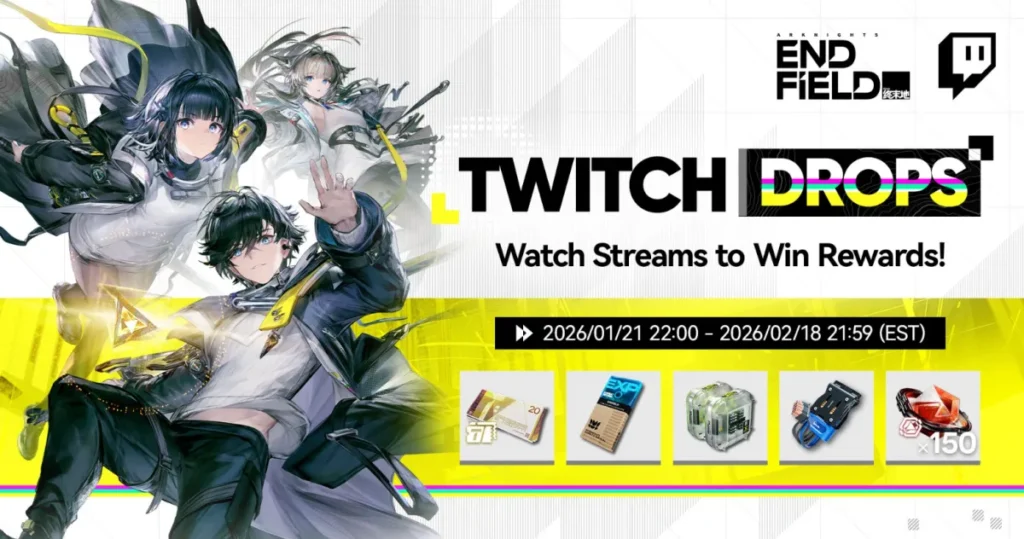
All Arknights Endfield Twitch Drop Rewards
Let’s talk about what you’re actually earning here. These aren’t throwaway rewards—they’re legitimately useful resources that save you grind time.
T-Creds (Currency)
Rarity: 4-Star
Type: Currency
Max Stack: Unlimited
This is one of the main currencies in Endfield, and you can never have enough of it. T-Creds are accepted pretty much everywhere for purchases and trades.
Where else you get it:
- Protocol Space: T-Creds
- Daily Missions
- AIC Trading at the Acquisition Center
- Exploring and gathering out in the world
What it actually is: High-tech currency with serious anti-counterfeiting tech. Basically, it’s the good money that everyone accepts. You’ll burn through this faster than you think, so stock up.
Arms INSP Set (Weapon Material)
Rarity: 4-Star
Type: Weapon Material
Max Stack: Unlimited
This is pure weapon EXP in material form. Use it to level up your weapons quickly without grinding combat.
Where else you get it:
- Protocol Space: Weapon EXP
- MFG Cabin in Dijiang Production
- AIC Trading
- Exploring and gathering
What it actually is: A one-shot toolset that deep-scans your weapon, fixes internal damage, and boosts performance. Fancy tech that translates to “makes number go up.”
Elementary Cognitive Carrier (Operator Material)
Rarity: 4-Star
Type: Operator Material
Max Stack: 50 (Backpack)
Discardable: Yes
This material gives EXP specifically for Operators leveled 61-99. Early game you won’t need it, but mid-to-late game? You’ll wish you had more.
Where else you get it:
- Protocol Space: Operator EXP
- MFG Cabin in Dijiang Production
- AIC Trading
- Exploring and gathering
What it actually is: Data storage units developed by Endfield Industries. New Operators download combat knowledge from them like installing software. The future is weird.
Oroberyl (Premium Currency)
Rarity: 6-Star
Type: Currency
Max Stack: Unlimited
This is the good stuff. Oroberyl is primarily used for recruiting Operators, which makes it one of the most valuable currencies in the game.
Where else you get it:
- Exchange with Origeometry (premium currency)
- Protocol Pass rewards
- Operation Manual rewards
- Credit Store at Acquisition Center
- Daily Missions
- Various mission rewards
- Exploring and gathering
What it actually is: Cut pieces of Origeometry that look beautiful and have tons of practical uses. Think of it as the game’s gacha currency without having to spend real money.
Getting free Oroberyl through Twitch Drops is legitimately valuable. Don’t skip this.
How to Claim Arknights Endfield Twitch Drops
Alright, here’s the step-by-step because the process has a few moving parts and you don’t want to mess this up.
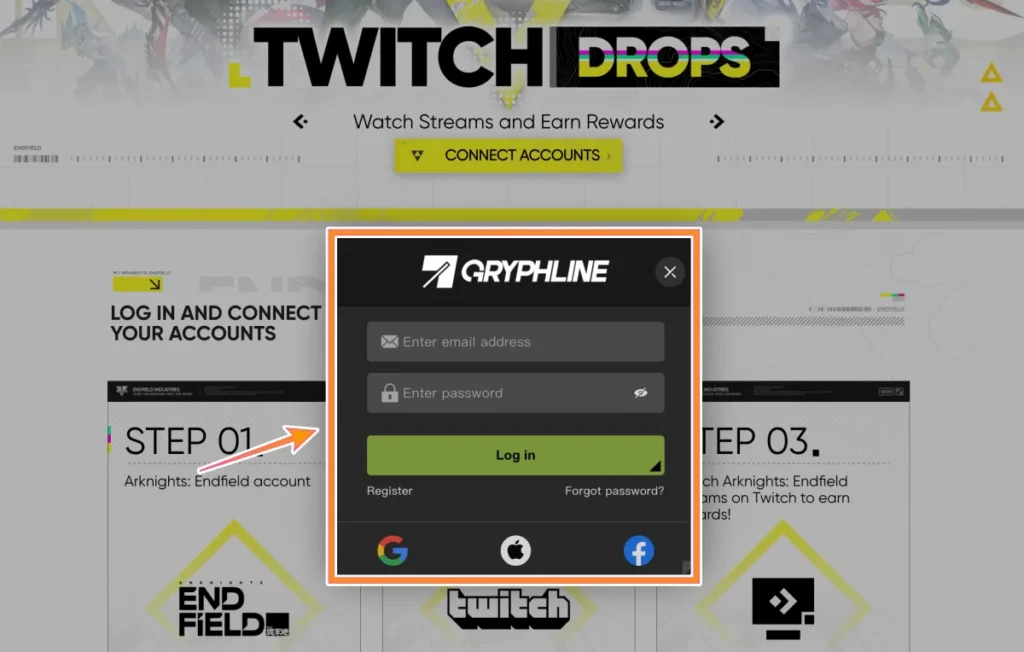
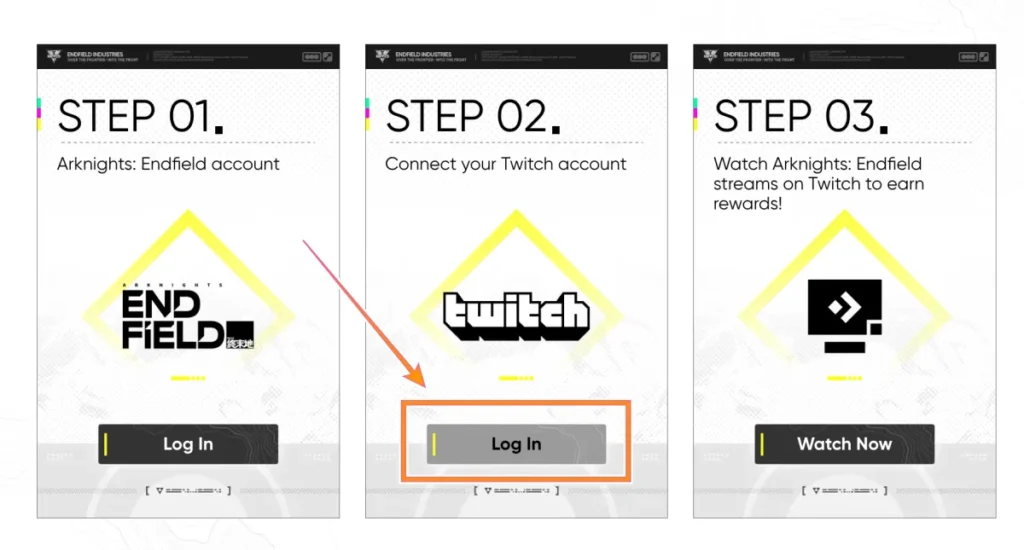
Step 1: Link Your Accounts
First, you need to connect your Twitch account to your Arknights Endfield account. Here’s how:
Log into your Arknights Endfield account – Either through the official website or launch the game
Navigate to account settings – Look for account linking or connections
Find the Twitch connection option and authorize the link
Confirm the connection – Make sure you see verification that accounts are linked
Critical detail: You can only link ONE Endfield character per Twitch account. Choose wisely, because you can’t claim rewards on multiple accounts with the same Twitch profile.
Step 2: Find Eligible Streams
Not every Arknights Endfield stream works. You need to find channels with “Drops Enabled” in their title or description.
Open Twitch and search for Arknights Endfield
Look for the “Drops Enabled” tag on stream thumbnails
Click into a stream and verify drops are active (usually shows below the video player)
Step 3: Watch and Earn
Just… watch. Seriously, that’s it.
Keep the stream tab open – Minimizing is fine, muting is fine, but the tab needs to be active
Stay logged into Twitch – If you’re not logged in, watch time doesn’t count
Monitor your progress – Click your profile icon → Drops → see what you’ve earned
Each reward tier requires a specific amount of watch time. The more you watch, the more you unlock. You’ll see progress bars showing how close you are to each reward.
Step 4: Claim Your Drops
Once you’ve watched long enough to earn a reward:
Go to your Twitch Drops Inventory page (Profile → Drops)
Click “Claim” on each available reward
Rewards will transfer to your linked Endfield account
Important: Claiming on Twitch is required. Rewards don’t automatically transfer—you have to manually claim them in your Twitch Drops inventory first.
Step 5: Collect In-Game
Final step: actually grab your stuff in Arknights Endfield.
Launch the game
Check your in-game inbox/mailbox – Rewards typically arrive within 24 hours
Collect items before they expire – Some rewards have claim windows
And you’re done. Free resources secured.
For tips on how to optimize your game performance while watching streams in the background, check out our best settings guide.
Event Schedule: When Can You Earn Drops?
Mark your calendars. The Twitch Drops campaign runs for nearly a full month, giving you plenty of time to claim everything.
| Event Milestone | EST | PST | UTC |
|---|---|---|---|
| Campaign Start | January 21, 2026 at 10:00 PM | January 21, 2026 at 7:00 PM | January 22, 2026 at 3:00 AM |
| Campaign End | February 18, 2026 at 9:59 PM | February 18, 2026 at 6:59 PM | February 19, 2026 at 2:59 AM |
That’s almost four full weeks to collect all available rewards. You’re not in a rush—spread out your watch time, support different streamers, and collect everything at a comfortable pace.
Just don’t wait until the last day. Server issues, unexpected events, and general life chaos happen. Give yourself buffer time.
Important Rules (Read This Before You Start)
There are a few limitations that could screw you over if you’re not aware of them.
One Account Per Twitch Profile
Each Twitch account can only connect to one Arknights Endfield character. You can’t link multiple game accounts to farm rewards multiple times. The system tracks based on your Twitch account, not your game account.
If you try to disconnect and reconnect different Endfield accounts, you won’t magically get extra drops. One Twitch account = one set of rewards.
Each Drop Claimed Only Once
Every individual reward can only be claimed once per Twitch account, regardless of how many times you watch streams or link/unlink accounts.
So no, you can’t claim the Oroberyl drop, make a new Endfield account, link it, and claim the same reward again. The system remembers what you’ve already collected.
Keep Streams Running (But You Can Multitask)
Good news: You can absolutely leave streams running in the background while you do other stuff. Just keep these in mind:
- The tab must stay open – Closing the tab stops progress
- You must be logged in – Incognito mode or logged-out viewing doesn’t count
- Muting is fine – You don’t actually have to listen
- Minimizing works – Browser window can be minimized, just don’t close the tab
- Multiple tabs don’t stack – Watching three streams simultaneously doesn’t triple your progress
Basically, throw a stream on while you work, game on another screen, or just go about your day. Free resources for minimal effort.
Rewards Have Expiration Windows
Once rewards hit your in-game inbox, claim them before they expire. Most in-game mail has a 30-day window, but don’t risk it. Log in, check your mail, collect your stuff.
Nothing worse than earning rewards through watch time, then losing them because you forgot to claim from your inbox.
Pro Tips for Maximizing Twitch Drops
Set up notifications: Enable Twitch notifications for when drops are claimed so you know when to check your inventory.
Support smaller streamers: Big channels are fine, but smaller streamers with Drops Enabled often have better chat communities and need the support more.
Use multiple devices if needed: Watching on your phone while gaming on PC? Totally works. Just make sure you’re logged into the same Twitch account.
Check stream schedules: Some streamers have set schedules. Find reliable broadcasters so you always have a drop-enabled stream available.
Don’t forget to claim: Seriously, claiming in your Twitch Drops inventory is a separate step. Set a daily reminder if you have to.
Want more ways to enhance your Endfield experience? Browse our complete Arknights Endfield guides collection for character builds, team comps, and progression tips.
Is It Actually Worth It?
Short answer: Yes, absolutely.
You’re getting premium currency (Oroberyl), weapon upgrade materials, operator EXP, and general currency just for having a stream open in the background. Even if you’re not actively watching, that’s free progress toward building your roster and powering up your team.
The time investment is minimal—literally just keeping a tab open—and the rewards are legitimately useful, especially the Oroberyl for pulling characters. There’s zero reason not to participate if you have Twitch and play Endfield.
Plus, you might discover some cool streamers you actually enjoy watching. That’s a bonus.
Frequently Asked Questions
Do I have to actively watch the streams or can they run in the background?
Background watching totally works. Just keep the tab open and stay logged into Twitch. You can mute the stream, minimize the browser, and do other stuff. Progress still counts as long as the tab isn’t closed.
Can I earn drops from multiple streams at the same time?
No. Twitch only tracks progress for one stream at a time. Watching three drop-enabled streams simultaneously doesn’t triple your rewards—only the active tab you’re focused on counts. Pick one stream and stick with it until you unlock the next reward tier.
What happens if I link the wrong Endfield account to my Twitch?
You’re stuck with it for this campaign. Each Twitch account can only link to one Endfield character, and each drop can only be claimed once. Double-check before you link accounts to avoid claiming rewards on an account you don’t actively play.
How long does it take for rewards to appear in-game after claiming on Twitch?
Usually within 24 hours, though most players report seeing rewards within a few hours. Check your in-game inbox/mailbox periodically. If rewards don’t show up after 24 hours, verify your accounts are still linked and contact support.