
Drowning in loot on Kairos? Borderlands 4’s generous enemy drops can quickly overwhelm your limited inventory space, forcing tough decisions about what to keep and what to discard. While the game doesn’t make it obvious how to drop items, mastering this essential skill – along with smart inventory management – will keep you looting efficiently without missing out on valuable gear.
Here’s your complete guide to dropping items, managing inventory space, and maximizing your loot potential in Borderlands 4.
How to Drop Items: Platform-Specific Controls
The game doesn’t clearly explain how to drop items, but once you know the controls, it’s straightforward. Here’s how to drop items from your inventory on every platform:
PC (Keyboard & Mouse)
- Open your inventory
- Highlight the item you want to drop
- Press and hold the “R” key until the item drops
Xbox (Controller)
- Open your inventory
- Select the item you want to drop
- Press and hold the “Y” button until the item drops
PlayStation (Controller)
- Open your inventory
- Select the item you want to drop
- Press and hold the “Triangle” button until the item drops
Pro tip: The hold duration prevents accidental drops, so make sure you hold the button long enough for the action to complete.
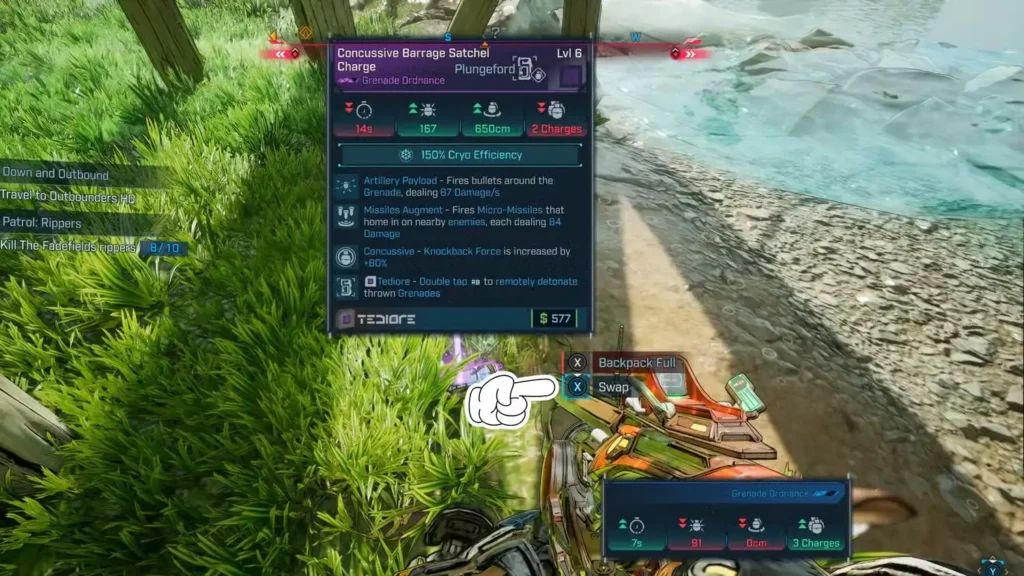
Alternative: Using the Swap Function
Before dropping items outright, consider using the swap function for equipped weapons:
How Swapping Works:
- Pick up a new weapon while your inventory is full
- The game prompts you to swap with your currently equipped weapon
- Your old weapon drops to the ground automatically
- Your new weapon becomes equipped immediately
When Swapping is Useful:
- Quick weapon upgrades during intense combat
- Field testing new weapons without inventory juggling
- Emergency situations where you need better gear immediately
This method is faster than opening your inventory during combat, making it perfect for those heated firefights where every second counts.
Smart Inventory Management: Better Than Dropping
While knowing how to drop items is essential, dropping should be your last resort. Borderlands 4 offers much better alternatives that can actually benefit your progression:
Selling Items for Profit (Recommended Method)
The Junk System:
Borderlands 4 includes a brilliant “Junk” marking system that streamlines selling unwanted loot:
Step-by-Step Process:
- Open your inventory regularly (after each major fight)
- Mark unwanted items as “Junk” using the designated button
- Head to any vending machine in safe areas
- Press the “Sell All Junk” option for instant cash
Why Selling is Superior to Dropping:
- Immediate cash flow for purchasing better gear
- No wasted loot value – everything has monetary worth
- Supports upgrade purchases from vending machines
- Funds ammo and health restocking
What to Mark as Junk:
- Lower-level weapons that you’ve outgrown
- Duplicate gear with worse stats
- Weapons that don’t match your build or playstyle
- Common/uncommon items when you have rare alternatives
For more guidance on optimizing your cash flow, check out our Cash Farming Unlimited Money Guide.
Using Banks for Long-Term Storage
Bank Storage Benefits:
- Preserve valuable gear for future characters
- Store situational weapons for specific encounters
- Keep legendary items even when inventory is full
- Share items between different Vault Hunters
Strategic Banking:
Items Worth Banking:
- Legendary weapons with unique effects
- High-level gear for future use
- Situational equipment (specific elemental weapons)
- Collectible items with sentimental value
Items to Avoid Banking:
- Common weapons easily replaced
- Severely underleveled gear that won’t remain useful
- Broken or damaged equipment
- Items you’ll never realistically use
For comprehensive information about bank locations and storage optimization, reference our Bank Locations Storage Guide.

Advanced Inventory Management Strategies
The 80/20 Rule:
Keep your inventory roughly 80% full during normal gameplay. This provides:
- Room for unexpected legendary drops
- Flexibility during extended missions
- Space for mission-specific items
- Buffer for rapid looting sessions
Elemental Weapon Management:
Maintain at least one weapon of each damage type:
- Incendiary for flesh enemies
- Shock for shields and robots
- Corrosive for armor
- Cryo for crowd control
- Kinetic for general use
Build-Specific Organization:
Organize inventory around your chosen specialization build:
- Weapon types that complement your skills
- Class mods that enhance your playstyle
- Grenades/ordnance that synergize with abilities
- Shields appropriate for your combat role
Emergency Inventory Management During Combat
Quick Decision Making:
When inventory fills during intense combat:
Priority Drop Order:
- Lowest value common weapons first
- Duplicate weapon types with worse stats
- Ammo-consuming weapons when ammo is scarce
- Situational gear not needed for current fight
Combat Inventory Tips:
- Mark junk proactively before entering major battles
- Use weapon swap for immediate upgrades
- Drop ammo-hungry weapons when ammunition is limited
- Prioritize mission-critical items over personal preferences
Optimizing for Different Game Modes
Solo Play Inventory Strategy:
- Diverse weapon selection for various enemy types
- Self-sufficient gear with healing/sustain properties
- Backup weapons for different combat ranges
- Resource management items (health, ammo)
Co-op Play Considerations:
- Specialized weapon focus to complement team roles
- Share rare finds with teammates before dropping
- Coordinate bank usage to avoid duplicate storage
- Communication about wanted vs. unwanted loot
Endgame Farming Focus:
- Legendary-only inventory for serious farming
- Multiple copies of favorite weapons with different parts
- Perfect-roll hunting gear
- Trade-ready items for community exchange
For more endgame strategies, explore our Endgame Guide Post Campaign Activities.
Common Inventory Management Mistakes
Avoid These Pitfalls:
- Hoarding everything “just in case”
- Dropping legendaries without consideration
- Ignoring the junk system and dropping valuable items
- Poor bank organization leading to lost items
- Not upgrading gear frequently enough
Signs You Need Better Inventory Management:
- Constantly full inventory preventing new pickups
- Dropping items during every major fight
- Missing legendary drops due to space issues
- Confusion about which weapons to keep
- Running out of money for essential purchases

Integration with Other Game Systems
SDU Upgrades:
Invest in Storage Deck Upgrades (SDUs) to expand inventory capacity:
- Weapon storage increases
- Grenade carrying capacity
- Class mod storage expansion
- General inventory space upgrades
For detailed SDU information, check our SDU Tokens Complete Collection Guide.
Golden Keys and Premium Loot:
When using Golden Keys for premium loot:
- Clear inventory space before opening golden chests
- Prepare bank storage for multiple legendaries
- Mark current gear as junk before key usage
- Plan for immediate gear upgrades
Platform-Specific Considerations
PC Players:
- Faster inventory navigation with mouse controls
- Keyboard shortcuts for marking junk
- Multiple inventory management mods available
- Easier organization with precise cursor control
Console Players:
- Slower navigation requires more strategic planning
- Controller shortcuts for common actions
- Limited mod support emphasizes vanilla strategies
- Couch co-op sharing considerations
Quality of Life Tips
Regular Maintenance Habits:
- Clean inventory after each major location
- Visit vendors regularly instead of accumulating junk
- Bank valuable items before risky encounters
- Update gear based on level progression
Visual Organization:
- Arrange weapons by type or element
- Group similar items together
- Use favorites system for essential gear
- Color-code mentally by rarity levels
Conclusion: Master Your Loot Game
Effective inventory management in Borderlands 4 transforms from a chore into a strategic advantage. By understanding when to drop, sell, or bank items, you’ll maintain optimal loadouts while maximizing your progression potential.
Key Takeaways:
- Dropping is last resort – selling and banking are better
- Use the junk system religiously for easy vendor sales
- Strategic banking preserves valuable long-term gear
- Platform controls are simple once memorized
- Regular maintenance prevents inventory emergencies
What’s Next: Master these inventory fundamentals, then explore advanced optimization through our specialized guides:
Official Resources:
Related Optimization Guides:
- Bank Locations Storage Guide
- Cash Farming Unlimited Money Guide
- SDU Tokens Complete Collection Guide
- Golden Keys Complete Guide
With these inventory management skills mastered, you’ll spend less time sorting through loot and more time enjoying the chaotic, explosive action that makes Borderlands 4 so addictive!


