
TL;DR
- Subnautica 2 supports up to 4 players in online co-op — no mods needed.
- Crossplay works between PC (Steam) and Xbox Series X|S from day one.
- All storage lockers are shared — every player can access base items.
- Data entries and scanned blueprints are shared automatically across the team.
- You can convert a solo save to multiplayer at any time and back again.
- The save belongs to the host — guests need the host online to continue that world.
- No PvP. No class locks. Just cooperative survival.
Subnautica 2 Multiplayer & Co-Op – Everything You Need to Know
Subnautica 2 is the first game in the entire series to feature native multiplayer. The original game was built around isolation — just you, the ocean, and the silence. The sequel changes that completely. You can now dive in with up to three friends, build a base together, share resources, and face leviathans as a squad. Or you can still play completely solo. The choice is yours.
This guide covers everything about how multiplayer works in Subnautica 2 Early Access — from setting up a session to managing shared progression and getting the most out of co-op play. If you are new to the game, check out our Subnautica 2 beginner tips and tricks guide first.
You can get the game on Steam or through Xbox Game Pass. Both platforms support full crossplay.
Subnautica 2 Multiplayer – Player Limit and Basic Setup
Subnautica 2 supports a maximum of four players per session. That means you and up to three friends in the same world at the same time. This cap was set by Unknown Worlds to keep the game’s survival tension balanced while still making co-op feel meaningful.
A few key facts about the setup:
- Co-op is entirely optional. The full game is playable solo from start to finish.
- There is no splitscreen or LAN. Multiplayer is online only.
- Each player needs their own copy of the game.
- The session is player-hosted. There are no dedicated servers at Early Access launch.
- Drop-in and drop-out is supported. Friends can join or leave without restarting the session.
- No puzzles require multiple players. No mechanics are locked behind co-op.
How to Start a Co-Op Session in Subnautica 2
Getting into a multiplayer session is straightforward. From the main menu, you have two options:
- Host Multiplayer — Creates a world that you control. You invite friends via their in-game Friend Code or from your platform friends list.
- Join Friends — Opens your in-game friends list. Click Join under the relevant player’s name to enter their world.
To add someone who is not already on your friends list, use the in-game Friend Code system. Share your code with them and they can paste it into the Join Game menu to connect instantly.
If you want everyone to experience the story together from the beginning, start a fresh multiplayer save. If you have already started solo and want to bring friends in, you can convert that save at any time.

How to Convert a Solo Save to Multiplayer
Subnautica 2 lets you switch between solo and multiplayer on the same save. Nothing is lost in the conversion. Here is how it works:
- From the main menu, select Play Single Player.
- Choose your save file.
- Click Convert to Multiplayer.
- Your entire world, base, and progression carry over.
- You can convert it back to solo the same way.
If you are not able to host a stable session yourself, you can also share your save file with a friend so they can host it instead. Cross-platform progression is fully supported, so the save works regardless of whether the host is on Steam or Xbox.
Subnautica 2 Crossplay – PC and Xbox Together
Crossplay between PC and Xbox Series X|S is available from day one in Early Access. A Steam player can play with an Xbox Game Pass player without any issues. Crossplay is enabled by default, so you do not need to toggle anything.
To invite a cross-platform friend, use the in-game Friend Code system rather than your platform friends list. Generate a code from within the game and share it with your friend. They enter it in the Join Game menu and connect directly.
Cross-platform progression is also supported if you own the game on multiple platforms and purchase separate copies.
Subnautica 2 Shared Progression – How It Actually Works
This is one of the most important things to understand before jumping into co-op. Subnautica 2 has a fully shared world system. Here is what that means in practice:
- Base storage is fully communal. Every storage locker built in the world is accessible to all players. If someone puts Titanium in a locker, anyone else can take it. Unknown Worlds has said they plan to add non-shared inventory options later in development, but at Early Access launch, all base storage is open to everyone. Play with people you trust.
- Data entries and blueprints are shared automatically. If one player scans a creature or resource and unlocks a blueprint, every player in the session gets it. You do not all have to scan the same things individually. This is a huge time saver in co-op.
- Personal inventory stays private. The items you are currently carrying on your character are yours alone. Only base storage is communal.
- The world save belongs to the host. If the host is offline, guests cannot play in that world. The session requires the host to be connected.
Each player maintains their own individual save file reflecting the state of the world when they last played. This means guests track their own progress within the host’s world.
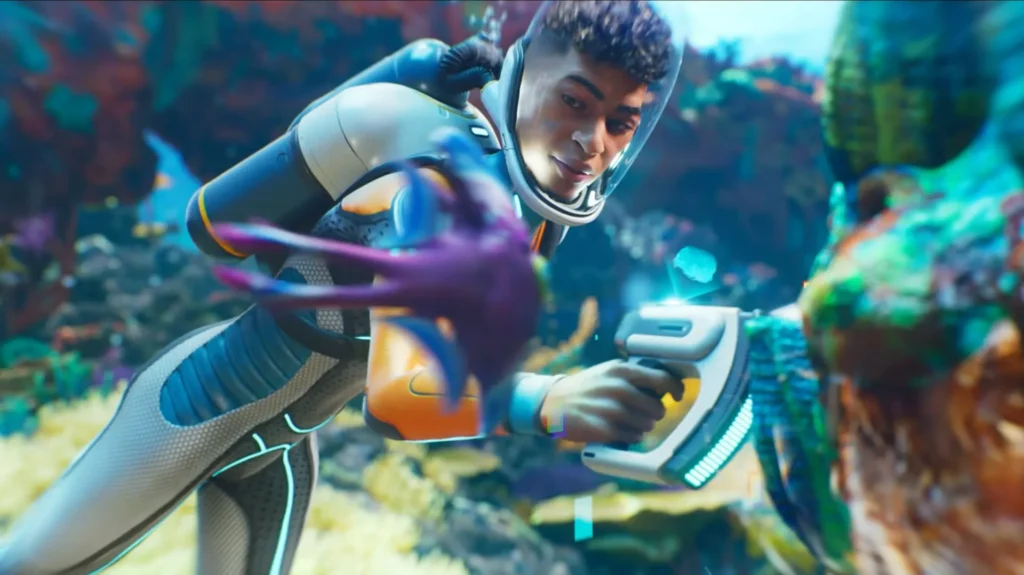
Subnautica 2 Co-Op Roles – How to Divide Your Squad
Subnautica 2 does not lock you into any class or role. There is no tank, no healer, no forced specialization. But players who assign informal roles get significantly further in the early game than squads where everyone does the same thing.
Here are the four natural roles that work best in a full group of four:
The Builder
This player stays close to the base. They manage base expansion, maintain the fabrication queue, monitor hull integrity, and keep the power systems running. It is not the most exciting role, but it is the one that saves the most time for the rest of the squad. Without a dedicated builder, everyone else has to stop exploring to craft, which kills momentum fast.
The Explorer / Scout
This player pushes into new biomes, scans creatures and fragments, marks beacons for the group, and maps out the terrain. They carry high-capacity tanks and prioritize mobility upgrades. The Scanner Station at base lets the Scout set material waypoints that all players can see — use this constantly.
The Resource Runner
This player ferries materials between exploration sites and the base. They operate the Tadpole submersible on longer hauls and make sure the builder always has what they need. The Runner turns the Scout’s finds into actual base progress without either player having to wait on the other.
The Defender
In a four-player group, the fourth slot works best as a second Scout or as a dedicated Defender — someone who provides cover against creature threats when the squad is building exposed structures or gathering in open water. The Distraction Flare and Sonic Resonator are key tools for this role.
For a full breakdown of what to build and unlock first, check our Subnautica 2 best early upgrades and progression path guide.
The Tadpole in Multiplayer – The Most Important Co-Op Vehicle
The Tadpole is Subnautica 2’s early-game submersible. It was designed from the ground up for co-op. One player pilots from the inside while a second can ride on the exterior using built-in oxygen ports — meaning your passenger does not drown while hitching a ride.
In a co-op session, the Tadpole is your lifeline. It dramatically expands exploration range, carries resources, and provides a moving oxygen source for the whole team.
- Build a Tadpole for each player as soon as possible.
- Craft a Repair Tool early — predator encounters will damage the vehicle.
- Install the Cavitation Muffler upgrade to make it quieter and reduce creature aggro.
- Build a Docking Station at your base so vehicles are not left drifting when you log off.
Co-Op Base Building Tips
Base building in co-op is fully open. Any player can place modules, contribute materials, or use the Fabrication Station. There is no permission lock on who can build what — which is both a strength and a risk.
Follow these rules and your base will grow smoothly:
- Pick your base location together before anyone swims off. Moving a half-built base costs a full session. The Sparse Plains biome at 0–500m depth is the right choice for your first base. It has the lowest creature threat and reliable early resources.
- The host should lead base construction. This prevents accidental module deletions. Guests contribute materials and suggest expansion, but let the host place the structural pieces.
- Build the Fabrication module first. Nothing functions without it.
- Communicate before spending large material reserves. Base storage is communal, so one player spending everything on a new module can stall the whole group.
- Add a Scanner Station early. It lets any player set resource waypoints visible to the whole squad.
- Set up a power backup. Solar panels produce zero power at night. Pair them with a Bioreactor fed by organic material so you always have power when it matters.
Death in Co-Op – What Happens and How to Handle It
Death in Subnautica 2 multiplayer works the same as in solo. When you die, your character respawns at the nearest base or vehicle. The items you were carrying drop at the location where you died. They stay there until you swim back to collect them.
Death locations are not automatically marked on screen. This makes item recovery genuinely tricky, especially far from home. A few things to keep in mind in co-op:
- Do not carry all of your rare materials on a deep dive. Leave them in base storage.
- If a teammate dies far out, the Tadpole makes recovery runs much faster.
- Communicate your location before entering dangerous territory so teammates know where to look if something goes wrong.
What Is Shared and What Is Not – Quick Reference
- Shared: Base storage lockers, Data entries and blueprints, Scanner Station waypoints, World state and biome progress
- Not shared: Personal character inventory (carried items), Individual survival stats (oxygen, food, water), Personal crafted gear like Air Tanks
Personal gear — things like your Air Tank or Fins — must be crafted individually by each player. One person unlocking the blueprint is enough, but each player still needs to build their own copy.
Co-Op Tips You Will Wish You Knew Earlier
- Use Discord or voice chat. Subnautica 2’s built-in text chat is basic. A working mic makes co-op coordination dramatically easier.
- Build outposts near deep biomes. A small secondary base with a container and a Fabricator near a resource-rich area saves constant travel back to main base.
- Only invite players you trust. There is no anti-grief protection at Early Access launch. A disruptive player can empty your storage or dismantle your base.
- Accept the chaos in the first two hours. The early game in co-op is messy. Everyone wants to explore everything at once. After two or three hours, the group naturally finds its rhythm.
- Do not all go deep at the same time. Keep at least one player in a safer zone. Being caught in a dangerous area alone without backup is what gets people killed.
- Resource consumption scales with player count. Four players drink and eat more than one. Build multiple Water Fabrication units early and keep food supplies stocked.
Solo vs. Co-Op – Which Should You Choose?
Both modes are fully supported and contain all the same content. No area or story beat is locked behind co-op. No puzzle requires multiple players. The choice comes down to what kind of experience you want.
Solo gives you the classic Subnautica feeling — isolation, tension, and quiet wonder. The fear is personal. Co-op changes the dynamic completely. The exploration feels faster, the base grows faster, and the fear is different. You worry about your teammates. When a leviathan appears while your friend is mining peacefully 800 meters down, that is a different kind of stress than facing it alone.
You can always switch. Convert your solo save to multiplayer when friends are online. Switch it back to solo when you want to explore at your own pace. Progression carries over either way.
For details on when Early Access went live and how to get your group into the game, see our Subnautica 2 Early Access launch times guide. And if you are still deciding whether to pick up the game, our full Subnautica 2 release date, platforms, price, and where to play guide has everything you need.
Where to Get Subnautica 2
Subnautica 2 is available now in Early Access. Pick it up on Steam or play through Xbox Game Pass. Both platforms include full crossplay support from launch day. The game has no season passes, no battle passes, and no microtransactions. You pay once and all future Early Access updates are free. For more about the Subnautica universe, visit the official website.
Thoughts
Subnautica 2 multiplayer is one of the most thoughtfully designed co-op systems in any survival game right now. The shared blueprint system removes tedium. The flexible save conversion means you are never locked out of playing with friends. And the Tadpole’s design — built for two from the ground up — shows that co-op was not bolted on as an afterthought. It was part of the plan from day one.
Get your squad together, divide your roles, build in the Sparse Plains, and do not carry your best gear into the deep without a plan. The alien ocean is beautiful. It is also very willing to kill all four of you at once.


I used to be able to find good advice from
your blog posts.