Key Takeaways
- GTA 6 features seven Heat icons: Appearance, Vehicle, Outfit, Visible Weapon, Partner, CCTV, and Cloud CCTV.
- The red icons underneath your wanted stars indicate what information the police can use to recognize you.
- Losing your wanted level does not automatically remove Heat from the surrounding area.
- Changing clothes, accessories, vehicles, and concealing weapons can remove individual recognition icons.
- Cloud CCTV footage cannot be destroyed, making it one of the most troublesome recognition indicators.
Escaping the police in Grand Theft Auto 6 is no longer as simple as hiding until your wanted stars disappear. Police officers can remember your appearance, clothing, vehicle, and other details connected to a crime.
There are seven Heat icons in GTA 6, displayed beneath the wanted stars in the upper-right corner of your screen. Each icon represents a different recognition factor that can help the police identify Jason or Lucia.
Understanding these symbols can save you from repeatedly triggering police pursuits, losing robbery money, and getting your personal vehicle impounded.
All GTA 6 Heat Icons and Their Meanings
The following seven recognition icons are listed in GTA 6’s in-game Help menu under Wanted & Heat.
| Icon Symbol | Heat Icon | Meaning | How to Clear |
|---|---|---|---|
| Human Head | Appearance Recognized | Police know your facial appearance | Change accessories or hairstyle |
| Car | Vehicle Recognized | Police recognize your vehicle | Switch vehicles or respray |
| Clothes Hanger | Outfit Recognized | Police recognize your clothing | Change your outfit |
| Pistol | Visible Weapon | Your openly carried weapon attracts attention | Holster or store your weapon |
| Two Human Heads | Partner Recognized | Your partner can be identified | Split up |
| Security Camera | Recorded by CCTV | Local security footage can identify you | Destroy the local recording |
| Camera with Cloud | Recorded by Cloud CCTV | Security footage is stored remotely | Leave the Heat zone and wait |
Multiple Heat icons can appear simultaneously. Removing one does not necessarily remove the others or clear your wanted level.
What Is Heat in GTA 6?
Heat is a regional police awareness system that remains active after you escape a pursuit. It represents the continued police presence around your last known location.
For example, if you commit a robbery in Port Gellhorn and successfully escape the responding officers, the surrounding neighborhood may remain marked as a Heat zone.
Returning to that neighborhood while matching the police’s description can cause your wanted level to return.
This means there are three separate things to consider when escaping:
- Wanted level: The current severity of the police response.
- Recognition icons: Details that can help officers identify your character.
- Heat zone: The geographical area where police continue looking for suspects.
Removing recognition icons makes you less identifiable, but it does not immediately eliminate the regional Heat zone.

Appearance Recognized Heat Icon
The human head icon indicates that the police can recognize your character’s facial appearance.
This can happen when Jason or Lucia is seen committing a crime without a face covering or when officers obtain a clear description of the suspect.
How to Remove the Appearance Heat Icon
- Put on or remove a hat.
- Change your eyewear.
- Equip or remove a face covering.
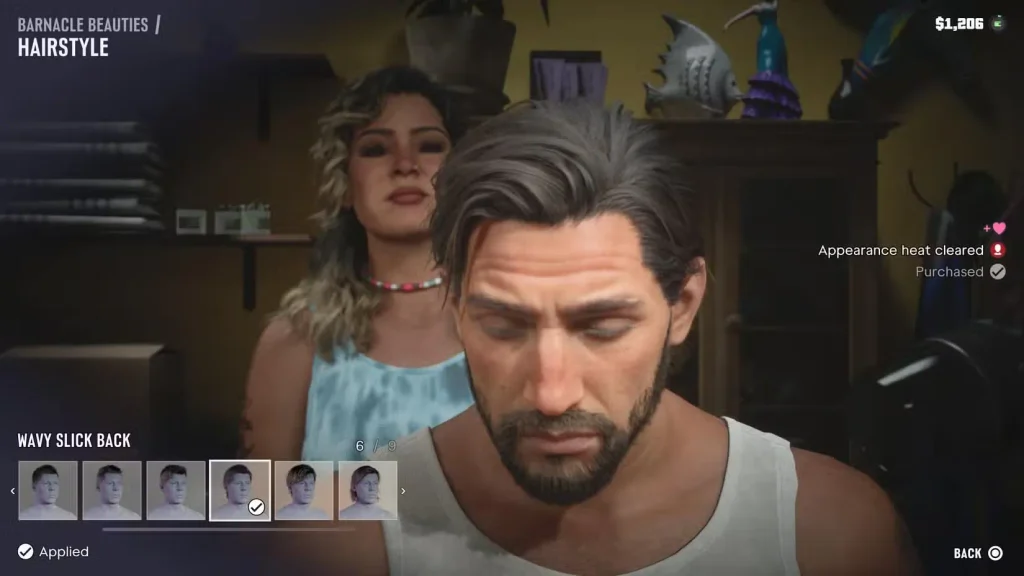
- Change your hairstyle at a barber shop or salon.
Hold L1 on PS5 or LB on Xbox Series X|S to access your loadout and available accessories.
You do not necessarily need to purchase an entirely new hairstyle every time the appearance icon appears. Changing your available accessories can be enough.
If you want a more substantial change, our guide on how to change hairstyle in GTA 6 covers salon locations, customization options, and haircut prices.
Vehicle Recognized Heat Icon
The red car icon means that the police recognize the vehicle you are currently using.
Escaping the police in a recognized vehicle does not make that vehicle unrecognizable. Driving it back into the same Heat zone can attract police attention again.
How to Remove the Vehicle Heat Icon
You have two main options:
- Leave the recognized vehicle and use a different one.
- Change its appearance at an available Pay ‘n’ Spray.
The vehicle recognition icon can disappear immediately after you exit a recognized car. However, returning to the same car may expose you to recognition again.
Pay ‘n’ Spray locations may also refuse service depending on the vehicle’s installed tracker. A recognized vehicle and a vehicle with an active tracker are not necessarily the same problem.
Changing the vehicle’s paint does not guarantee that every other Heat icon will disappear.
Outfit Recognized Heat Icon
The clothes hanger icon indicates that the police have a description of your character’s clothing.
Even if you successfully change your facial appearance, your existing outfit can still make you recognizable.
How to Remove the Clothes Hanger Heat Icon
Change into another outfit using one of the available clothing customization options:
- Your safehouse wardrobe.
- A clothing store changing room.
- A spare outfit stored in your personal vehicle’s trunk.
Keeping a spare outfit in your vehicle is particularly useful because you will not always have access to a nearby safehouse or clothing store.
Does Changing Your Mask Remove Outfit Heat?
Not necessarily. Appearance recognition and outfit recognition are separate indicators.
Changing your mask may remove the appearance icon while leaving the clothes hanger icon active. Check both symbols after making changes to your character’s appearance.
Visible Weapon Heat Icon
The pistol icon indicates that your character is openly carrying a weapon that attracts attention from police officers and civilians.
Unlike some other recognition factors, this icon is not necessarily evidence that the police know your weapon’s exact model. The immediate problem is that your weapon is visible.
How to Remove the Weapon Heat Icon
| Action | PS5 | Xbox Series X|S |
|---|---|---|
| Holster Weapon | Tap L1 | Tap LB |
| Open Loadout Wheel | Hold L1 | Hold LB |
Holstering a handgun conceals it. However, rifles and shotguns may remain visible on your character’s back even after being holstered.
Store longarms inside an available vehicle trunk to remove them from view.
This distinction is important if the pistol icon remains active after you put away your equipped firearm. Check our detailed guide on how to holster weapons manually in GTA 6 for more information.
Partner Recognized Heat Icon
The icon showing two human heads represents partner recognition. It appears when the police can identify your partner, making Jason and Lucia more recognizable while traveling together.
How to Remove the Partner Heat Icon
Use the partner interaction menu and select Split Up when the option is available.
Separating Jason and Lucia can remove the partner recognition indicator. However, their individual appearance, outfit, and weapon recognition factors may remain active.
Splitting up also comes with a gameplay risk. If either protagonist is caught during the encounter, you may still receive the Busted screen.
The Partner Help section and related interactions become available as you progress through Jason and Lucia’s story. If the option is missing early in the campaign, continue completing story missions.
Recorded by CCTV Heat Icon
The security camera icon means that a business’s surveillance system has recorded evidence that can be used to identify your character.
Security cameras are found at various shops, businesses, and robbery locations across Leonida.
How to Remove the CCTV Heat Icon
Standard CCTV footage is stored locally and can be destroyed through the game’s available recording system interactions.
However, destroying a camera after it has already recorded your character is not necessarily the same as removing its saved footage.
Check the recognition indicator after interacting with the recording system to confirm whether it has cleared.
Recorded by Cloud CCTV Heat Icon
The camera symbol with a cloud is the seventh Heat icon in GTA 6. It represents surveillance footage stored remotely rather than exclusively at the business.
Cloud CCTV footage cannot be destroyed using the normal local recording removal mechanic.
The game’s Help information also warns that an alarm will eventually activate when dealing with cloud-connected surveillance.
If this icon appears, prioritize leaving the affected area in the game and allowing regional Heat to expire. Removing your other recognition indicators can still make you less recognizable.
Regular CCTV vs. Cloud CCTV in GTA 6
| Feature | Regular CCTV | Cloud CCTV |
|---|---|---|
| Icon | Security camera | Camera with cloud |
| Recording Storage | Local | Remote |
| Can Recorded Footage Be Destroyed? | Yes | No |
| Recognition Risk | Can be reduced by removing footage | Remains while the relevant Heat is active |
| Recommended Response | Use the local recording interaction | Leave the affected area |
Some early GTA 6 guides list only six recognition icons because they group both surveillance types together. The in-game Help menu lists regular CCTV and cloud CCTV separately, bringing the total to seven.
All GTA 6 Wanted Level Colors Explained
Wanted stars and Heat icons work together, but they communicate different information. The appearance of your wanted stars changes depending on the current police response.
| Wanted Star Appearance | Police Status | Meaning |
|---|---|---|
| Grey or Dim Stars | Cops Responding | Police are responding to a reported crime |
| Black and White Outlined Stars | Suspect Unknown | Police are investigating without a confirmed suspect identity |
| Solid White Stars | In Pursuit | Police have identified you and are actively pursuing you |
| Flashing or Dimmed Stars | Visual Lost | Police have lost sight of you but continue searching |
| Solid Red Stars | Heat | The pursuit has ended, but the area remains under police attention |
| Outlined Red Stars | Heat & Suspect Unknown | The area has Heat, but police lack a usable visual description |
Pay attention to changes in the stars rather than relying only on their number. Two white stars during an active pursuit represent a different situation from two red Heat stars.
What Do Red and Blue Areas Mean on the GTA 6 Map?
Police activity is also represented geographically on the pause map and minimap.
| Map Indicator | Meaning |
|---|---|
| Blue Investigation Area | Police are investigating a reported incident |
| Red Search Area | Police are searching for or pursuing a suspect |
| Red Tinted Neighborhood | Regional Heat remains active |
Open the pause map after escaping a pursuit to see which neighborhoods remain affected by Heat.
Inspecting an affected location can also reveal the recognition information associated with that area.
Heat is regional, meaning you can leave one affected neighborhood without the entire state of Leonida remaining under the same level of police attention.
How to Check Active Heat Icons in GTA 6
You can view recognition indicators in two main places.
On the Gameplay HUD
Look underneath the six wanted stars in the upper-right corner of your screen. Any active recognition indicators appear as small red symbols.
On the Pause Map
Open the map and inspect an affected Heat zone. The regional Heat information helps you understand what recognition factors are still associated with that location.
You can also access the game’s official explanations through Pause Menu > Help > Wanted & Heat.
This section includes information about Heat, appearance, vehicles, outfits, weapons, and CCTV recognition.
How to Remove Heat in GTA 6
Removing recognition indicators and clearing regional Heat are related but separate gameplay mechanics.
Once an active pursuit ends, check the remaining recognition icons and change the corresponding elements of your character’s appearance, outfit, equipment, or vehicle.
Afterward, leave the affected region or remain somewhere safe until the regional Heat expires.
Returning immediately to an area with active Heat can restart a police encounter, even if the original pursuit has already ended.
How Long Does Heat Last in GTA 6?
Ordinary Heat zones expire after enough time has passed without further incidents. However, there is no reliably established universal countdown that applies to every police encounter.
Story-related Heat zones may also behave differently from those generated during ordinary free roam. Some remain active until you advance the main storyline.
If a red area remains on your map, continue with other available activities and check it again later rather than assuming the game is bugged.
Can Police Recognize You Without Any Heat Icons?
Yes. GTA 6 includes a Heat & Suspect Unknown state in which the police lack a clear visual description but continue investigating the surrounding area.
Having no recognition icons makes identification more difficult, but it does not make your character completely immune to police attention.
Other visible factors can also increase suspicion, including:
- Bloodstains on your character.
- Stains caused by exploded dye packs.
- Further criminal activity inside an active Heat zone.
You can use a shower at an available safehouse to clean bloodstains from your character.
Does Getting Arrested Remove Heat in GTA 6?
Getting arrested ends the immediate free-roam police pursuit. However, you should not treat the Busted screen as a guaranteed method of removing every regional or story-related Heat condition.
Getting busted also comes with several penalties, including the loss of pocket cash, unowned weapons, and potentially carried stash bags.
Personal vehicles may also be impounded.
Read our guide on what happens when you’re arrested in GTA 6 for a complete breakdown of these penalties and equipment recovery options.
GTA 6 Heat Icons Not Disappearing? Common Reasons
| Problem | Possible Explanation |
|---|---|
| Head icon remains after changing clothes | Your facial appearance is still recognized |
| Hanger icon remains after changing your mask | Your outfit has not changed |
| Gun icon remains after holstering | A rifle or shotgun is still visible |
| Car icon returns after entering a vehicle | The vehicle remains recognized |
| Partner icon remains active | Your partner still contributes to recognition |
| Cloud camera icon cannot be removed | The recording is stored remotely |
| Red map area remains after removing all icons | Regional Heat is still active |
| Heat does not expire after waiting | The area may have a story-related restriction |
The most common mistake is assuming that removing one recognition indicator should clear the entire police awareness system.
Always check which specific symbol remains active before attempting another change.
GTA 5 vs. GTA 6 Police Heat System
| Feature | GTA 5 | GTA 6 |
|---|---|---|
| Maximum Wanted Level | 5 Stars | 6 Stars |
| Persistent Regional Heat | No equivalent system | Yes |
| Facial Appearance Recognition Icons | No | Yes |
| Outfit Recognition Icons | No | Yes |
| Vehicle Recognition | Yes | Expanded system |
| Partner Recognition | No equivalent system | Yes |
| Cloud CCTV Recognition | No | Yes |
| Unknown Suspect Status | No equivalent system | Yes |
| Spare Outfit Storage in Vehicles | No | Yes |
The biggest difference is that GTA 6 separates ending a police chase from removing the recognition information associated with it.
This makes clothing customization, weapon storage, and vehicle management more meaningful than they were in previous Grand Theft Auto games.
Why Understanding Heat Matters During GTA 6 Robberies
Heat becomes particularly important when completing several robbery activities in the same neighborhood. Previous police encounters can affect your ability to explore the surrounding area without attracting further attention.
For example, the Port Gellhorn Stash House robbery in GTA 6 offers cash, a unique assault rifle, and additional valuables. Getting arrested before securing those rewards can result in unnecessary losses.
Check your recognition indicators and regional Heat before beginning another nearby activity.
Remember that disappearing wanted stars do not always mean the police have forgotten about you. Understanding all seven Heat icons is the key to managing the new recognition system.
For more police mechanics, robbery walkthroughs, character customization guides, and gameplay tips, explore our complete GTA 6 guides and walkthroughs hub.