TL;DR – GTA 6 Buck Me Walkthrough
- Start the mission: After Coming Home, wait for Lucia’s call and visit the Fleeca Bank in Key Lento. The map objective is called Set Up Bank Account.
- Talk to the manager: Ask the teller about opening an account, then follow the bank manager into his office.
- Best dialogue choice: Choose Saved Cash instead of Say Nothing. This improves Jason and Lucia’s relationship.
- Unlock BuckMe: Return home, open the purple BuckMe app on Jason’s phone, and collect the $100 welcome credit.
- Complete the mission: Select Checking Account, choose Buck Yourself, and transfer the $100 into Family Savings. This transfer cannot be reversed.
- Important banking tip: Checking money can be withdrawn at ATMs, but Family Savings money is permanently locked and cannot be spent.
To complete Buck Me in GTA 6, meet Lucia at Fleeca Bank, talk to the manager, open the BuckMe app, and transfer your $100 welcome credit into Family Savings. The mission then ends and unlocks GTA 6’s banking system.
Buck Me, also called Set Up Bank Account, is a main story mission in Grand Theft Auto VI Chapter 1: Just Like Paradise. It takes place shortly after Lucia Caminos returns from prison and needs somewhere to receive her community service payments.
Jason Duval and Lucia initially try to open a normal bank account. Unfortunately, their credit history is bad enough that the manager refuses their application. Instead, he recommends BuckMe, a mobile banking service with checking and savings accounts.
The mission has no combat or complicated puzzles. However, it introduces one of the most important money mechanics in GTA 6. The difference between Checking Account and Family Savings is easy to miss, and transferring money into the wrong account can leave you unable to spend it.
This GTA 6 Buck Me walkthrough covers the bank location, every mission objective, the Saved Cash or Say Nothing choice, the $100 welcome bonus, Family Savings, ATM deposits, and what to do after completing the mission.

GTA 6 Buck Me Mission Overview
| Mission Details | Information |
|---|---|
| Mission Name | Buck Me |
| Map Objective | Set Up Bank Account |
| Chapter | Chapter 1: Just Like Paradise |
| Playable Character | Jason Duval |
| Mission Giver | Lucia Caminos |
| Starting Location | Fleeca Bank, Key Lento, Mariana County |
| Unlock Requirement | Complete Coming Home |
| Main Reward | BuckMe banking app |
| Welcome Bonus | $100 checking account credit |
| Required Transfer | $100 to Family Savings |
| Estimated Duration | Approximately 5–10 minutes |
| Next Main Mission | Down to Earth, after completing the required story jobs |
Buck Me appears after Lucia’s release from prison. Its position in mission lists varies because some guides count smaller objectives separately and early Chapter 1 missions can be completed in different orders.
It is a mandatory story mission and introduces the banking features you will use throughout GTA 6.
How to Unlock Buck Me in GTA 6
Buck Me becomes available roughly half an in-game day after Coming Home.
Lucia contacts Jason and explains that she needs an account to receive payments from her community service work.
Neither character has a regular bank account, so they decide to meet at Fleeca Bank.
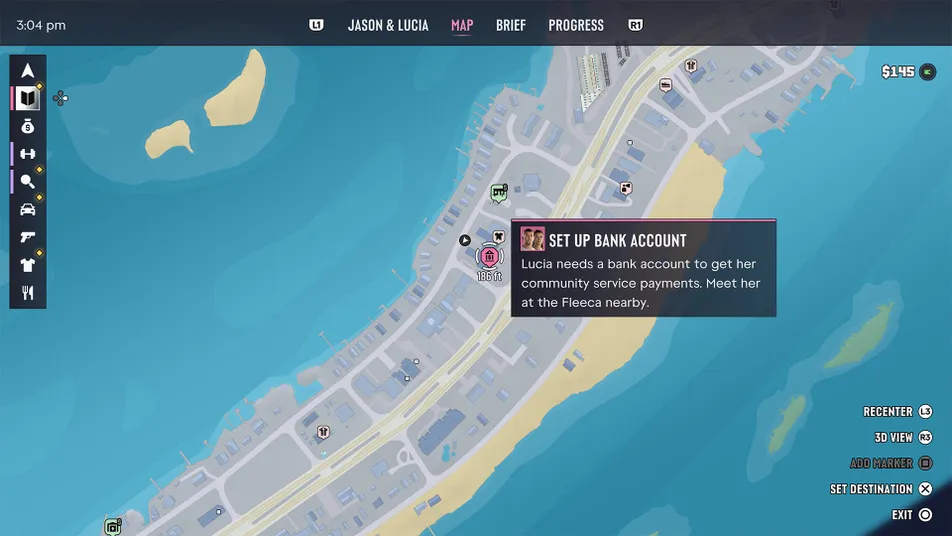
How to Start the Buck Me Mission
- Complete Coming Home and finish its closing cutscene.
- Continue playing until Lucia calls Jason.
- Listen to her explanation about opening a bank account.
- Open the map.
- Find the pink story objective labeled Set Up Bank Account.
- Set a waypoint to Fleeca Bank in Key Lento.
- Travel to the bank while controlling Jason.
You do not need to bring a specific amount of money to the bank.
The mission can begin even if Jason has very little cash left.
Do You Need to Complete Clean Up After Donnie First?
No. Buck Me and Clean Up After Donnie become available around the same period after Coming Home.
You can tackle them in different orders.
However, both are required before the next major story mission, Down to Earth, becomes available.
If you still need to recover Donnie’s missing shipment, our GTA 6 Clean Up After Donnie walkthrough covers the Kingfishers shack, free sniper rifle, cocaine delivery, and $600 payment.
GTA 6 Buck Me Walkthrough: All Objectives
Buck Me has four main objectives:
- Ask about setting up a bank account.
- Speak to the bank manager.
- Open the BuckMe app.
- Move money into Family Savings.
The first two objectives take place inside Fleeca Bank. The remaining steps happen after Jason and Lucia return home.
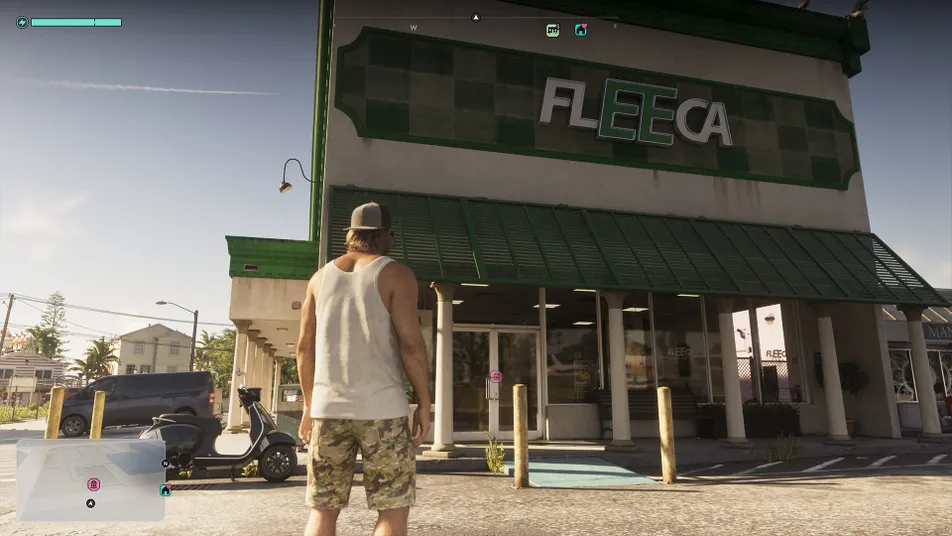
1. Find Fleeca Bank in Key Lento
The mission begins at the local Fleeca Financial Services branch in Key Lento, Mariana County.
The bank is near Sunset Drive and has a green Fleeca sign above the entrance.
It also has an ATM outside, which becomes useful after unlocking BuckMe.
Where Is Fleeca Bank in GTA 6?
- Open the Story section of the map.
- Select Set Up Bank Account.
- Follow the pink GPS route toward Key Lento’s commercial area.
- Look for the Fleeca Financial Services building with green signage.
- Park your vehicle outside.
- Enter the building through the front door.
The location is close to Jason’s starting home.
You can drive Jason’s pickup, use another vehicle, or travel there on a scooter.
Tip: Do not confuse the bank’s exterior ATM with the mission entrance. You must enter the bank and speak with the teller first.
2. Ask the Fleeca Teller About Opening an Account
Inside the bank, approach the teller behind the counter.
She is wearing a yellow outfit in documented launch walkthroughs.
Your objective reads Ask about setting up a bank account.
How to Speak to the Teller
- Walk toward the teller’s counter.
- Hold L2 on PS5 or LT on Xbox to focus on the employee.
- Look for the Bank Account? interaction.
- Press X on PS5 or A on Xbox to select it.
- Listen to the teller explain the process.
The teller tells Jason that he needs to speak with the bank manager.
The objective updates to Speak to the manager.
You do not need to fill out paperwork, answer security questions, or deposit cash at the counter.
Why Won’t the Teller Open an Account?
This is part of the mission’s story.
The teller is not responsible for approving Jason’s application. She directs him to the manager instead.
Do not keep repeating the same conversation. Once the objective updates, find the manager nearby.
3. Find and Follow the Fleeca Bank Manager
The manager is sitting at a desk near the windows on the right side of the bank.
He wears a blue patterned shirt, making him easy to recognize.
How to Find the Bank Manager
- Turn away from the teller’s counter.
- Look toward the desks on the right side of the room.
- Find the man wearing a blue patterned shirt.
- Approach him until the Manager interaction appears.
- Hold L2 or LT to focus on him.
- Select the Bank Account conversation option.
- Follow him toward the private office.
The manager leads Jason into his office, where Lucia joins the meeting.
He begins checking their financial records.
Unfortunately, their credit history prevents them from qualifying for a normal account.
Can You Open a Regular Fleeca Account?
No. The bank manager rejects the standard account application as part of the scripted story.
Neither Jason nor Lucia can change this outcome through a different dialogue option.
The manager suggests using a financial app called BuckMe instead.
This leads to an important conversation choice.

4. GTA 6 Buck Me Choice: Saved Cash or Say Nothing?
During the conversation, the manager asks whether Jason has any money saved.
You can tell him about your savings or keep quiet.
Choose Saved Cash if you want to improve Jason and Lucia’s relationship.
What Happens If You Choose Saved Cash?
Jason tells the manager and Lucia that he has put money aside.
This is the positive response.
According to launch mission guides, the choice improves Jason’s relationship with Lucia.
The option is selected using:
- PS5: X.
- Xbox Series X|S: A.
You do not need to withdraw the cash or physically bring it to the bank for this dialogue choice.
What Happens If You Choose Say Nothing?
Jason decides not to mention his savings.
Lucia reacts less positively to him keeping financial information to himself.
GTA Base reports that this response negatively affects their relationship.
The option is selected using:
- PS5: Square.
- Xbox Series X|S: X.
Both dialogue choices lead to BuckMe being recommended.
Saved Cash vs Say Nothing: Which Is Better?
| Choice | Relationship Effect | Banking Outcome |
|---|---|---|
| Saved Cash | Positive | Unlocks BuckMe |
| Say Nothing | Negative | Unlocks BuckMe |
Best choice: Saved Cash.
There is no confirmed extra cash reward for choosing either response, and both unlock the same banking features.
Since the relationship boost is useful and costs nothing, telling Lucia about Jason’s savings is the better option.
5. Return Home and Unlock the BuckMe App
After the meeting, the game plays a cutscene and takes Jason and Lucia back to his house in Key Lento.
You do not need to drive back manually.
The two characters discuss BuckMe and decide to try the app.
A message arrives confirming that a $100 welcome credit has been added to the new checking account.
Your objective changes to Open BuckMe.
How to Open BuckMe in GTA 6
- Press Up on the D-pad to open Jason’s phone.
- Open the phone’s app menu.
- Look for the purple icon with a white B.
- Select BuckMe.
- Read the introductory banking information.
- Continue until the account screen appears.
The app introduces two different money accounts:
- Checking Account: Used for spending, deposits, withdrawals, and everyday purchases.
- Family Savings: A long-term account with permanent, nonwithdrawable deposits and milestone rewards.
The mission requires transferring the welcome credit into Family Savings.
6. How to Move $100 Into Family Savings in GTA 6
This is the final playable objective of Buck Me.
The app shows a $100 welcome credit in Jason’s checking account.
You must transfer that money to Family Savings using the option called Buck Yourself.
How to Complete the Buck Yourself Transfer
- Open the BuckMe app on Jason’s phone.
- Select Checking Account.
- Find the Buck Yourself option.
- Select the transfer option.
- Read the warning about Family Savings.
- Confirm the $100 transfer.
- Wait for the account balances to update.
After the transfer, Family Savings should show $100.
The next savings milestone is $5,000, leaving another $4,900 to reach the first goal.
Once the transfer is complete, the mission finishes its banking tutorial and moves into a short closing scene with Jason and Lucia at home.
Why Can’t You Withdraw the $100?
Money deposited into Family Savings cannot be withdrawn.
This is an intentional BuckMe feature, not a bug.
Family Savings is designed for long-term progress and unlocking account benefits.
The game makes you transfer the $100 welcome credit there as part of the mission.
Afterward, think carefully before transferring any more of your spending money.
What If You Don’t Have $100 in Cash?
You do not need $100 in your pocket to complete Buck Me.
The app provides a $100 checking account welcome credit during the mission.
Use that credit for the required transfer.
GTA 6 BuckMe Checking Account vs Family Savings
Understanding the difference between the two accounts is essential for managing money in GTA 6.
Both can hold funds, but they serve very different purposes.
| Feature | Checking Account | Family Savings |
|---|---|---|
| Can You Spend the Money? | Yes | No |
| Can You Withdraw Money? | Yes, at ATMs | No |
| Can You Deposit Money? | Yes | Yes, through transfers |
| Can You Lose Money on Death? | A smaller penalty may apply | No |
| Balance Limit | Increases as you unlock tiers | Used for long-term milestones |
| Main Purpose | Everyday purchases and payments | Permanent savings and account perks |
Best beginner advice: Keep money you expect to spend soon in Checking. Only transfer funds into Family Savings when you are comfortable permanently giving up access to them.
How to Deposit Cash Into BuckMe at an ATM
After unlocking the app, you can begin depositing physical cash into your checking account.
This is important because carrying too much money around Leonida is risky.
Jason can lose pocket cash after dying or getting arrested.
BuckMe helps reduce that risk by allowing you to move cash into the banking system.
How to Find an ATM With BuckMe
- Open Jason’s phone using Up on the D-pad.
- Launch the BuckMe app.
- Scroll down to ATM Finder.
- Select Set Destination.
- Follow the marked route to the ATM.
- Approach the machine.
- Select the available Deposit interaction.
- Choose the amount of pocket cash to deposit.
- Confirm the transaction.
There is an ATM near Jason’s house in Key Lento, so you do not need to travel across the state to make your first deposit.
Does Depositing Cash at an ATM Complete Buck Me?
No. Buck Me itself ends when you transfer the $100 welcome credit into Family Savings.
Deposit Cash Into BuckMe is a separate follow-up tutorial that becomes available after unlocking the banking app.
It teaches you how to deposit physical cash at any usable ATM.
You can complete that activity later without preventing the main story from progressing.
Can You Withdraw Cash From BuckMe?
Yes, but only from your checking account.
Visit an ATM and select the available withdrawal option.
The cash is transferred from Checking into your pocket.
You cannot withdraw money from Family Savings.
How BuckMe Payments Work in GTA 6
Once you unlock BuckMe, the game changes how you handle larger purchases.
Stores can accept cash for smaller transactions, while more expensive purchases are processed through the banking system.
Can You Buy Items Without Pocket Cash?
Yes.
If Jason has no pocket cash but has money in Checking, eligible purchases can be charged through BuckMe.
This reduces the need to carry large amounts of physical cash.
However, Family Savings cannot be used to pay for items.
What Happens When a Purchase Costs More Than $1,000?
According to launch banking guides, purchases above $1,000 are paid through BuckMe rather than directly from pocket cash.
That makes your checking account particularly important when buying expensive weapons, vehicles, or upgrades.
Tip: Before making a large purchase, make sure you have enough money in Checking rather than Family Savings.
What Happens If Your Checking Account Is Full?
BuckMe has a balance limit that increases as you reach savings milestones.
When Checking reaches its current limit, additional incoming payments can be held until you make room.
You can free up space by spending money or transferring some to Family Savings.
However, transferring money into Family Savings is permanent, so do not use it casually just to clear space.
GTA 6 Family Savings: First $5,000 Goal and Perks
After Buck Me, a continuing objective called Save for the Future appears in the story list.
It tracks your long-term Family Savings progress.
Your first goal is to save $5,000.
The $100 welcome transfer already counts toward that amount.
What Happens When You Save $5,000?
The first milestone is called Buckin’ Broke.
Reaching it increases your checking account limit to $15,000.
It does not award an additional purchase discount at that tier.
GTA 6 BuckMe Savings Milestones
| Savings Goal | Tier | Benefit |
|---|---|---|
| $5,000 | Buckin’ Broke | $15,000 checking account limit |
| $10,000 | BuckeDry | $100,000 checking limit and 20% off RydeMe rides |
| $100,000 | BuckMe Gold | $500,000 checking limit and 20% off garage purchases |
| $500,000 | BuckMe Premium / Black | $2 million checking limit and 10% off liveries; automatically granted in Chapter 4 |
| $1,000,000 | Rich as Buck | Continues the savings progression |
These are later progression milestones. You do not need to reach any of them during Buck Me.
Higher-tier benefits become available as the story progresses.
Do You Need $5,000 to Unlock the Next Story Mission?
No. The $5,000 Family Savings goal is not required to begin Down to Earth.
Once Buck Me and Clean Up After Donnie are completed, the next major story activity becomes available.
You can work toward the savings goal while completing other missions.
Does Family Savings Earn Interest?
Yes. BuckMe’s Family Savings system includes interest and account perks as part of its long-term progression.
However, this does not change the main restriction: money transferred into Family Savings cannot be withdrawn for normal purchases.
GTA 6 Buck Me Rewards and Unlocks
Buck Me does not pay Jason a traditional mission completion fee.
Instead, it provides access to the banking system and includes a $100 welcome credit.
| Reward or Unlock | Details |
|---|---|
| BuckMe App | Unlocks checking and Family Savings accounts. |
| $100 Welcome Credit | Deposited into Checking and transferred to Family Savings during the mission. |
| ATM Banking | Allows cash deposits and withdrawals. |
| Family Savings | Permanent savings account with milestone benefits. |
| Save for the Future | Long-term savings objective becomes available. |
| Relationship Progress | Choosing Saved Cash improves Jason and Lucia’s relationship. |
| Story Progression | Counts toward unlocking Down to Earth. |
Important: The $100 welcome credit is not an additional $100 in spendable pocket cash at the end of the mission.
The required tutorial transfers it into Family Savings, where it remains permanently locked.
Best GTA 6 BuckMe Money Tips for Beginners
1. Deposit Large Amounts of Pocket Cash
Carrying all your earnings around Leonida is risky.
When you have more cash than you need for small purchases, deposit the extra at an ATM.
2. Keep Spending Money in Checking
Checking money can be used for purchases and withdrawn when needed.
Family Savings cannot.
Do not transfer your entire balance into Family Savings if you still need to buy ammunition, healing items, or vehicle repairs.
3. Save for Milestones Gradually
The first $5,000 Family Savings goal does not need to be completed immediately.
Work toward it while completing story missions and earning money from other activities.
4. Watch the Checking Account Limit
If your account reaches its current maximum, new payments can be held.
Check your balance regularly and decide whether to spend money or move a portion into permanent savings.
5. Choose Saved Cash During the Bank Meeting
It improves Jason and Lucia’s relationship without requiring an additional payment.
Since both choices unlock BuckMe, there is no practical reason to hide the savings unless you prefer that dialogue outcome.
6. Remember That Banked Money Is Not Completely Risk-Free
Family Savings is protected from loss, but Checking may still be affected by smaller penalties when Jason dies.
Banking your cash reduces risk. It does not remove every possible financial penalty.
GTA 6 Buck Me Not Working? Common Problems and Fixes
Why Isn’t Buck Me Appearing on My Map?
Complete Coming Home first and wait for Lucia’s phone call.
The mission is listed as Set Up Bank Account, not necessarily Buck Me.
Check the Story section for the pink bank marker in Key Lento.
Where Is Fleeca Bank in GTA 6?
The relevant branch is in Key Lento, near Sunset Drive.
Look for the green Fleeca Financial Services sign and the ATM outside the building.
Why Won’t the Bank Teller Help Me?
Approach the counter and hold L2 on PS5 or LT on Xbox.
Select the Bank Account interaction.
The teller sends Jason to the manager instead of opening the account herself.
Where Is the Bank Manager?
He is at a desk near the windows on the right side of the bank.
Look for a man wearing a blue patterned shirt.
Speak with him and follow him into his office.
What Happens If You Choose Say Nothing?
The meeting continues, and BuckMe is still unlocked.
However, the response has a negative effect on Jason and Lucia’s relationship compared with choosing Saved Cash.
Why Can’t I Open a Normal Bank Account?
The refusal is scripted.
Jason and Lucia have poor credit, so the manager recommends BuckMe instead.
There is no known way to get the manager to approve a regular Fleeca account during this mission.
Where Is the BuckMe App on Jason’s Phone?
Open the phone with Up on the D-pad.
Look for the purple app icon with a white B.
The app appears after the Fleeca meeting and the following cutscene.
Why Isn’t My $100 Bonus Appearing?
The welcome credit is deposited into your new checking account, not handed to Jason as physical cash.
Open BuckMe and check the Checking Account balance.
Once you transfer it into Family Savings, the checking balance decreases and the savings balance increases.
How Do You Complete the Move Money Into Family Savings Objective?
Open BuckMe, select Checking Account, and choose Buck Yourself.
Confirm the $100 transfer.
That completes the banking objective.
Why Can’t I Take Money Out of Family Savings?
Family Savings deposits are permanent and cannot be withdrawn.
This is a game mechanic, not a glitch.
Keep money in Checking if you want to spend it later.
Where Is the Nearest ATM?
Use BuckMe’s ATM Finder and select Set Destination.
The app marks a nearby ATM on the map.
There is one near Jason’s starting house in Key Lento.
Why Won’t Buck Me Complete After the Bank Meeting?
The bank meeting is not the final objective.
You must return home through the scripted cutscene, open BuckMe, and transfer the $100 welcome credit into Family Savings.
The mission finishes after the banking tutorial and closing scene.
GTA 6 Buck Me FAQs
What Is Buck Me in GTA 6?
Buck Me is a mandatory Chapter 1 mission in which Jason and Lucia attempt to open a bank account. Their normal application is rejected, so they begin using the BuckMe mobile banking app.
How Do You Start Buck Me?
Complete Coming Home, wait approximately half an in-game day for Lucia’s call, and visit Fleeca Bank in Key Lento.
What Is the Best Choice in Buck Me?
Choose Saved Cash during the bank manager conversation. It improves Jason and Lucia’s relationship and does not change the banking unlock.
Can You Open a Fleeca Bank Account Instead of BuckMe?
No. The manager refuses the regular application due to the characters’ poor credit. BuckMe is the intended banking system.
How Much Money Does Buck Me Give You?
You receive a $100 welcome credit in your checking account, which the mission requires you to transfer into Family Savings. There is no separate guaranteed cash payout for completing the mission.
What Does Buck Yourself Mean in GTA 6?
Buck Yourself is the option used to move money from Checking into Family Savings within the BuckMe app.
Can You Withdraw Family Savings Money?
No. Family Savings money is permanently locked. It cannot be withdrawn or used for normal purchases.
What Is the First BuckMe Savings Goal?
The first goal is $5,000, called Buckin’ Broke. Reaching it increases the checking account limit to $15,000.
How Do You Deposit Cash in GTA 6?
Open BuckMe, select ATM Finder, set a destination, visit an ATM, and use the deposit option to move pocket cash into Checking.
Do You Need to Save $5,000 Before Continuing the Story?
No. Save for the Future is a continuing savings objective and does not block the next main mission once its other prerequisites are met.
Does Buck Me Have Gold Medal Objectives?
No separate Gold Medal objectives are documented for Buck Me in the launch walkthroughs.
Are There Any Missable Collectibles in Buck Me?
No mission-specific collectible or unique weapon has been identified during Buck Me.
The important decision is the Saved Cash or Say Nothing dialogue choice, which affects Jason and Lucia’s relationship.
What Mission Comes After Buck Me?
Down to Earth is the next major story mission once both Buck Me and Clean Up After Donnie are complete.
You can also complete the separate Deposit Cash Into BuckMe tutorial and gradually work on Save for the Future.
What to Do After Completing Buck Me in GTA 6
After transferring the $100 welcome credit into Family Savings, Buck Me is complete.
You now have access to checking, savings, ATMs, and the game’s larger payment system. From this point onward, you should think about how much cash you carry and how much you want to keep permanently invested in Family Savings.
Your first priority should be depositing any large amount of pocket cash you do not immediately need. Then continue earning money and building toward the $5,000 savings milestone at your own pace.
If you have not completed Donnie’s missing package job, follow our GTA 6 Clean Up After Donnie walkthrough to recover the cocaine, collect the optional sniper rifle, and unlock Donnie’s fence.
Once both missions are finished, the story continues with Down to Earth, where Brian sends Jason and Lucia on another smuggling job.
For the full mission order, missable activities, and Chapter 1 point-of-no-return checklist, read our GTA 6 Chapter 1 walkthrough.
If you want more help with earning and protecting money, saving, combat, and vehicles, see our GTA 6 beginner’s guide.
Find more mission walkthroughs, guides, and GTA 6 updates in the GamingProMax GTA 6 guides hub.

