TL;DR – GTA 6 Unwanted Attention Walkthrough
- Start the mission: Meet Cal Hampton near the waterfront in northern Key Lento, then drive his truck to the police impound in Hamlet.
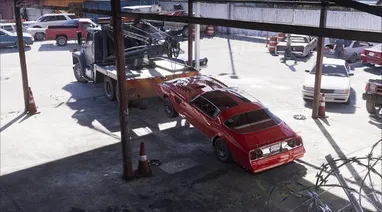
- Find the Phoenix: Climb into the impound, sneak past the guards, and locate the red Imponte ’77 Phoenix attached to a tow truck near the rear of the lot.
- Steal the car: Release the tow hook, hotwire the Phoenix, and escape through the main gate. The police will spot you during the escape.
- Lose the cops: Break police line of sight, leave the flashing search area, and take the Phoenix to Pay ‘n’ Spray for repairs and a different paint color.
- Complete the mission: Deliver the car to Brian’s Garage, collect $150 from the back room, remove your recognizable hat and glasses, and buy a new outfit.
To complete Unwanted Attention in GTA 6, steal the red Imponte Phoenix from the Hamlet police impound, lose the cops, respray the car, and deliver it to Brian’s Garage. After collecting your $150 payment, change Jason’s accessories and buy an outfit to clear the remaining police recognition.
Unwanted Attention is an early Chapter 1 mission in Grand Theft Auto VI. Jason Duval and Cal Hampton must recover a vehicle containing a payment owed to Brian Heder. Unfortunately, the car is sitting inside a guarded police impound.
The mission introduces several important mechanics, including the police scanner, WAiNK vehicle scanning, hotwiring, and the new recognition system. Unlike GTA 5, losing your wanted stars does not always mean the police have forgotten what you look like.
This GTA 6 Unwanted Attention walkthrough covers the safest impound route, how to release and hotwire the Phoenix, ways to escape the police, the Pay ‘n’ Spray repair, and the final clothing objective.
GTA 6 Unwanted Attention Mission Overview
| Mission Details | Information |
|---|---|
| Mission Name | Unwanted Attention |
| Starting Objective | Go See Cal |
| Chapter | Chapter 1: Just Like Paradise |
| Playable Character | Jason Duval |
| Mission Giver | Cal Hampton |
| Starting Location | Northern Key Lento, Mariana County |
| Impound Location | Hamlet, Penny Bun Street |
| Required Vehicle | Red Imponte ’77 Phoenix |
| Unlock Requirement | Complete Gone Fishing |
| Cash Reward | $150 |
| Important Unlock | Police radio scanner |
Unwanted Attention is listed as the sixth main mission in walkthroughs that include the Prologue and follow the in-game story recap order. Some guides number it differently because several early Chapter 1 missions can be completed in different orders.
The mission is mandatory for story progression.

How to Start Unwanted Attention in GTA 6
Unwanted Attention becomes available after completing Gone Fishing, when Jason gains access to his house and the surrounding Key Lento area.
You do not need to complete every other early Chapter 1 mission before meeting Cal.

Where to Find Cal Hampton
- Open the map while playing as Jason.
- Go to the Story menu.
- Find the objective labeled Go See Cal.
- Set a waypoint to northern Key Lento.
- Travel toward the waterfront.
- Find Cal fishing near the water, beside his pickup truck.
- Approach him to begin the mission.
Cal explains that he was supposed to collect a payment for Brian, but the vehicle holding it was impounded by the police.
The car is an Imponte Phoenix, and the money or merchandise Brian wants is stored in its trunk.
Jason agrees to help recover it.
Drive to Hamlet With Cal
After the conversation, get into Cal’s truck and follow the mission route northwest toward Hamlet.
Hamlet is a small town outside the main Key Lento area.
During the drive, Cal installs a police radio scanner on Jason’s phone.

What Does the Police Scanner Do?
The scanner lets you hear police radio communications during wanted-level situations.
It can provide information about police activity and search locations, helping you understand how officers are responding.
Important: Cal installs the scanner automatically. You do not need to buy it, download a separate app, or complete another mission.
After the installation, the scanner works in the background when police activity is relevant.
Follow the route until you reach the police impound on Penny Bun Street.
GTA 6 Unwanted Attention Walkthrough: All Objectives
These are the main objectives you need to complete:
- Meet Cal in northern Key Lento.
- Drive Cal to the police impound in Hamlet.
- Enter the impound lot.
- Search for the red Imponte Phoenix.
- Release the vehicle from the tow truck.
- Hotwire the Phoenix and escape the impound.
- Lose the police.
- Repair and respray the Phoenix at Pay ‘n’ Spray.
- Deliver the vehicle to Brian’s Garage.
- Collect the $150 payment.
- Change Jason’s hat and glasses.
- Buy and wear a new outfit.
The most difficult sections are reaching the Phoenix without attracting attention and escaping the police without destroying the car.

1. How to Enter the Police Impound in Hamlet
When you reach the police impound, Cal stays behind while Jason enters the restricted area.
The impound contains police vehicles, tow trucks, guards, fences, and shipping containers.
There are multiple ways inside, but climbing over the wall is the better option if you want to avoid an early alarm.
Best Stealth Route Into the Police Impound
- Leave Cal’s truck near the impound.
- Walk toward the perimeter wall.
- Move left along the wall until you find a climbable section.
- Climb over the wall using the displayed movement prompt.
- Crouch immediately after entering.
- Move between the parked vehicles and tow trucks.
- Head toward the shipping containers at the rear.
- Climb across the containers to reach the next section.
- Continue toward the covered tow-truck parking area.
Staying low makes it easier to avoid the guards patrolling the yard.
The parked vehicles and containers provide useful cover while you move toward the Phoenix.
Can You Break Open the Main Gate?
Yes. Another entrance is the chain-link gate beside the Police Impound sign.
On the default controls, the Break Open prompt uses:
- PS5: Square.
- Xbox Series X|S: X.
However, forcing the gate can trigger an alarm before you reach the vehicle.
If the police start searching the area, move away from the marked search zone and stay out of sight until the game allows you to return.
Our recommendation: Use the wall and shipping-container route. It gives you more cover and reduces the risk of getting caught before finding the Phoenix.
2. Find the Red Imponte Phoenix in the Impound
The car you need is a red Imponte ’77 Phoenix.
It is near the back of the police impound, attached to a blue-and-white tow truck beneath a covered parking structure.
Do not waste time checking every random vehicle in the yard.

Where Is the Phoenix in Unwanted Attention?
- Continue toward the rear of the impound.
- Look for the large covered parking area.
- Find the blue-and-white tow truck.
- Look behind the tow truck for the red Phoenix.
- Approach the vehicle until the objective changes to Steal the Phoenix.
The Phoenix may appear positioned behind or attached to the tow truck, depending on the angle you approach from.
The important detail is the towing connection, which must be released before you drive away.
Use the WAiNK App to Identify the Phoenix
This mission also introduces the WAiNK vehicle scanner.
It allows you to scan vehicles and learn more about their make, model, security equipment, and other characteristics.
To use WAiNK:
- Hold Up on the D-pad to access the quick scanner.
- Aim the phone camera at a vehicle.
- Hold R1 on PS5 or RB on Xbox to scan.
- Read the vehicle information displayed on the screen.
You can also open WAiNK through the phone’s app menu.
Beginner tip: Make a habit of scanning unfamiliar vehicles. Vehicle scanning contributes toward GTA 6’s broader completion activities, and the information becomes useful when stealing or purchasing cars later.
3. How to Unhook the Phoenix From the Tow Truck
Once you find the Phoenix, you must release it from the tow truck.
This is one of the easiest objectives to misunderstand because simply entering the red car may not free it.

How to Release the Phoenix
- Approach the tow truck connected to the Phoenix.
- Enter the tow truck or approach its release control when prompted.
- Use the displayed Unhook interaction.
- Wait for the towing connection to release.
- Exit the tow truck.
- Approach the red Phoenix.

Several launch walkthroughs show clicking the right analog stick (R3/RS) to release the tow hook. Other documented sequences show a directional release prompt.
Follow the Unhook button displayed in your game if it differs from the guide.
Once the Phoenix is free, you can attempt to start it.
4. How to Hotwire the Phoenix in GTA 6
The Phoenix is not your personal vehicle, so Jason must hotwire it before driving away.
GTA 6 uses an interactive hotwiring system instead of automatically starting every stolen car.
Hotwire the Phoenix Step by Step
- Enter the driver’s seat of the red Phoenix.
- Wait for the hotwiring interface to appear.
- Look at the two semicircular indicators on the screen.
- Move the left analog stick until its marker reaches the correct position.
- Move the right analog stick to align the second marker.
- Keep the sticks in the correct positions until both indicators fill.
- Once the engine starts, prepare to leave the impound.
Important: Do not repeatedly press the accelerator while the hotwiring indicators are still incomplete.
The vehicle will not start until the required stick positions are aligned.
Hotwiring becomes useful outside this mission, although some newer vehicles have more advanced security systems that require additional tools.
Do You Need to Defeat Every Guard?
No. You do not have to clear the impound.
In fact, taking down guards can cause additional police patrols to investigate when officers stop responding.
The simplest approach is to avoid unnecessary combat, free the Phoenix, and leave as soon as possible.
5. How to Open the Impound Gate and Escape
After starting the Phoenix, drive toward the main exit.
The gate can be opened through the guard booth controls, while some walkthrough routes trigger its opening as the vehicle approaches.
If the gate is still closed, look for the nearby red switch or the displayed gate-opening objective.
You cannot avoid police attention entirely during this escape. The mission is designed to trigger a pursuit as Jason leaves the impound.
Fastest Way to Escape the Impound
- Start the Phoenix after hotwiring it.
- Follow the driveway toward the main gate.
- Open the gate using the available switch or follow the gate interaction.
- Wait until there is enough space to drive through.
- Accelerate onto the street.
- Follow the road away from the impound.
- Begin escaping the police search area.
If a guard tries to pull Jason out of the car while you are waiting at the gate, rapidly press the displayed struggle button.
The default escape input is Square on PS5 or X on Xbox.
Important: Avoid crashing into the gate or heavily damaging the Phoenix. The car must remain in drivable condition for the delivery.
6. How to Lose the Cops in GTA 6 Unwanted Attention
Once Jason escapes the impound, the objective changes to Lose the cops.
The police begin searching for the stolen Phoenix.
You need to escape the flashing search area on the minimap and remain out of sight long enough for the immediate pursuit to end.
Best Way to Escape the Police in Hamlet
- Drive away from the impound without stopping.
- Use turns and buildings to break police line of sight.
- Watch for the flashing red-and-blue search area on the minimap.
- Take a side road or off-road route when practical.
- Avoid driving directly toward police vehicles.
- Once out of sight, build distance from the search area.
- Continue driving carefully until the wanted pursuit ends.
A useful approach is to take several turns through Hamlet before reaching a longer open road where you can gain distance.
The roads toward Route 82 can give you room to get away from the patrols.
Should You Fight the Police?
No. Fighting the police is not required.
Using weapons against officers can make the pursuit more dangerous and increase the risk of damaging the Phoenix.
Your objective is escaping with the vehicle, not defeating every patrol car.
Best tip: Keep the Phoenix moving, avoid collisions, and focus on leaving the search area.
What If the Wanted Stars Disappear but the Map Is Still Red?
This is normal in GTA 6.
The game separates the immediate wanted level from longer-lasting police recognition.
Even after officers stop actively chasing you, they may remember your vehicle or clothing in areas where you have recently committed crimes.
The red heat outline can remain on the map after your wanted stars disappear.
This mission teaches you how to reduce that recognition.
7. Take the Phoenix to Pay ‘n’ Spray in Hamlet
After losing the police, Brian contacts Jason and tells him to clean up the vehicle.
The game marks the nearby Pay ‘n’ Spray in Hamlet.
Drive the Phoenix to the garage and enter the service bay.

How to Repair and Respray the Phoenix
- Follow the Pay ‘n’ Spray marker on the map.
- Drive the Phoenix inside the garage.
- Open the repair menu.
- Select Repair.
- Accept the free mission repair when offered.
- Open the Respray category.
- Select a visibly different paint color.
- Confirm the selection.
- Leave the garage when the objective updates.
Important: Repair may need to be completed before Respray becomes available.
Do not assume the paint menu is bugged if it is initially locked. Finish the repair first.
Which Color Should You Choose?
Any noticeably different color should work.
The Phoenix starts red, so choosing gray, black, or another contrasting color is a sensible option.
A red paint selection may display a Too Similar warning, even if it is listed as free.
Choose another color and confirm the purchase.
Does Respraying Remove the Police Heat?
Respraying removes the vehicle’s known appearance from the police recognition system.
However, it does not automatically clear every form of recognition attached to Jason.
Officers may still recognize his clothing, hat, or glasses.
That is why the mission continues with a disguise tutorial after you deliver the Phoenix.
8. Deliver the Phoenix to Brian’s Garage
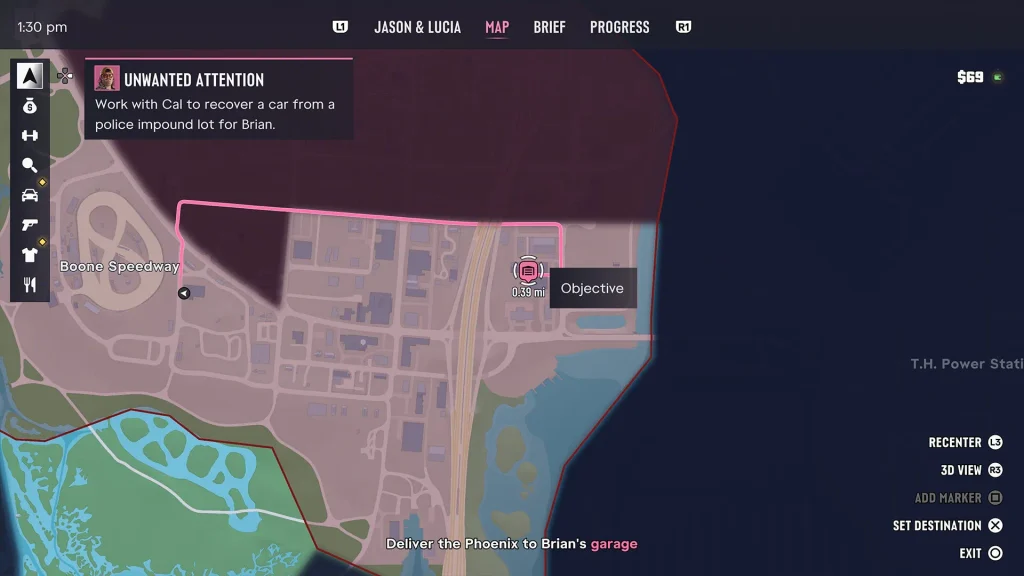
After completing the respray, a new objective marker appears for Brian’s Garage.
The garage is a short drive from Pay ‘n’ Spray in Hamlet.
Where Is Brian’s Garage?
Follow the marked route toward Brian’s storage location.
Look for the garage entrance near the building marked Ventilation Specialists.
The correct entrance is reached through the nearby alley.
How to Deliver the Phoenix
- Drive the repainted Phoenix toward the destination marker.
- Enter the alley beside the garage building.
- Look for the open loading bay.
- Drive the Phoenix completely inside.
- Stop in the marked delivery area.
- Exit the vehicle when prompted.
The delivery triggers a message from Brian.
He tells Jason that some cash has been left inside the garage as payment for the job.
Tip: You do not need to clear all clothing and headwear recognition icons before delivering the vehicle. That part of the tutorial comes afterward.
9. Collect the $150 Reward From Brian’s Garage
The Unwanted Attention mission pays $150.
Unlike some other early Chapter 1 rewards, this money is collected directly during the mission rather than arriving at Jason’s mailbox.
Where Is the Cash in Brian’s Garage?
- Leave the delivered Phoenix.
- Walk toward the rear office inside the garage.
- Enter the back room.
- Look for the cash placed on the desk.
- Approach it until the collection prompt appears.
- Pick up the $150.
The mission then introduces another important gameplay mechanic: changing your appearance to reduce police recognition.
Common mistake: Do not leave Brian’s Garage immediately after parking the Phoenix. You still need to collect the cash and complete the disguise objectives.
10. How to Remove Your Hat and Glasses to Lower Police Recognition
After collecting the money, the mission asks you to adjust Jason’s hat and glasses.
These accessories can help identify your character after a crime.
Changing or removing them can reduce how recognizable Jason is to officers.

How to Change Your Hat and Glasses
- Hold L1 on PS5 or LB on Xbox to open the loadout wheel.
- Press R1 on PS5 or RB on Xbox to move to the Items section.
- Find the headwear slot.
- Select the hat and use the Take Off interaction.
- Find the glasses slot.
- Remove or adjust the glasses using the displayed prompt.
- Check that the recognition indicators update.
On the default controls, the Take Off interaction uses X on PS5 or A on Xbox.
When a red recognition indicator changes to white, that particular appearance is no longer known to the police.
What Do the Red Recognition Icons Mean?
After escaping a pursuit, look at the indicators in the upper-right corner of the screen.
They represent different details the police may recognize.
| Recognition Indicator | What It Means | How to Reduce It |
|---|---|---|
| Vehicle | Police know the car used in the crime. | Respray the vehicle or use another car. |
| Clothing | Police recognize the outfit Jason was wearing. | Change into another outfit. |
| Hat and Glasses | Police recognize Jason’s accessories. | Remove or replace those accessories. |
Changing one item does not necessarily remove all recognition.
For example, repainting the Phoenix clears its known appearance, but Jason may still need a different outfit.
11. Buy a New Outfit to Complete Unwanted Attention
The final objective is to purchase a new outfit.
After leaving Brian’s Garage, visit the nearby Big Shots store, which is part of the local gun shop.
It is close enough that you can reach it on foot.
Where to Buy the Outfit
- Leave Brian’s Garage after adjusting your accessories.
- Follow the new clothing objective marker.
- Enter the nearby Big Shots gun shop.
- Look for the outfit displays near the entrance.
- Interact with a mannequin or clothing display.
- Select an available outfit.
- Purchase and equip it.
Launch walkthroughs show two main outfit choices, including Big Shots Workwear and Tactical Gear.
You do not need the more expensive outfit to complete the mission.
What Is the Cheapest Outfit?
The Big Shots Workwear outfit, Hinterland Tee & Cargos, is shown at $59 in documented launch footage.
Other available sets may cost more, with launch guides showing choices around $59–$96.
Because the mission pays $150, the cheaper outfit is easily affordable using your reward.
Best choice: Buy the cheapest full outfit unless you particularly like the appearance of another option.
After purchasing and wearing a different outfit, Jason’s clothing recognition should clear.
Once the disguise tutorial finishes, Unwanted Attention is complete.
GTA 6 Unwanted Attention Rewards and Unlocks
The mission rewards you with cash and introduces several mechanics that remain useful throughout the game.
| Reward or Unlock | Details |
|---|---|
| $150 Cash | Collected from the back room of Brian’s Garage. |
| Police Scanner | Installed automatically by Cal during the drive to Hamlet. |
| WAiNK Scanning Tutorial | Introduces vehicle identification and scanning. |
| Hotwiring Tutorial | Shows how to start certain stolen vehicles. |
| Vehicle Recognition | Teaches how respraying can reduce police identification. |
| Clothing Recognition | Introduces changing accessories and outfits to clear heat. |
| Story Progression | Completes one of the required Chapter 1 missions. |
No separate Gold Medal objectives are documented for Unwanted Attention in the launch mission guides checked.
The biggest long-term reward is understanding how the police recognition system works.
GTA 6 Police Heat vs Wanted Level: What’s the Difference?
Unwanted Attention is one of the first missions to explain the difference between an active police pursuit and lingering recognition.
In earlier Grand Theft Auto games, losing your wanted stars was usually enough to return to normal activities.
GTA 6 gives you more to think about.
Wanted Level
Your wanted level represents the immediate police response.
While the police are chasing you, you need to break line of sight and escape their search area.
Once the pursuit ends, the wanted stars disappear.
Police Heat and Recognition
Police heat can remain after the active pursuit.
Officers may remember identifying details connected to a crime, including the vehicle you used and what you were wearing.
That means returning to the same area in the same car and outfit can make you easier to recognize.
Best Ways to Reduce Recognition
- Change vehicles: Use another car when police have identified your current one.
- Respray your car: A different paint color can remove the vehicle’s known appearance.
- Remove accessories: Take off a recognizable hat or glasses.
- Change outfits: Buy or equip clothing different from what you wore during the crime.
- Use a spare outfit: Store additional clothes in a vehicle when that feature is available.
- Duck while driving: Holding Circle on PS5 or B on Xbox can make Jason harder to identify through the windows.
These methods reduce recognition, but they do not make you immune to new police attention.
Committing another crime or being identified by witnesses can start a fresh pursuit.
For more tips on escaping police and managing vehicles, check our GTA 6 beginner’s guide.
GTA 6 Unwanted Attention: Common Problems and Fixes
Why Isn’t Unwanted Attention Appearing on My Map?
The starting objective is called Go See Cal.
Complete Gone Fishing, then open the map’s Story section and find Cal near the northern Key Lento waterfront.
The mission becomes Unwanted Attention after Jason meets him.
How Do You Get Into the Police Impound?
Walk along the left side of the perimeter wall and look for a climbable section.
Once inside, crouch and use the containers to reach the rear parking area.
You can also force the chain-link gate open, but that may trigger an early alarm.
Where Is the Phoenix in the Impound?
The red Imponte Phoenix is near the rear of the lot, attached to a tow truck under a covered structure.
Use the WAiNK scanner if you need help identifying it.
Why Can’t I Drive the Phoenix?
Make sure the towing connection has been released.
Then enter the car and complete the hotwiring minigame by aligning both analog sticks with their target positions.
The car will not start until the hotwiring indicators are complete.
Why Won’t the Impound Gate Open?
Look for the gate controls near the guard booth or follow the displayed exit prompt.
Some routes open the gate before entering the Phoenix, while others trigger the exit as the vehicle approaches.
Do not repeatedly ram the gate and destroy the car. You need to deliver the Phoenix in drivable condition.
Can You Escape the Impound Without Getting Wanted?
The police pursuit is part of the mission.
You can avoid some earlier detection by sneaking through the yard, but getting spotted during the exit is expected.
Why Won’t Pay ‘n’ Spray Let Me Respray the Phoenix?
Select Repair first.
The repair is free during the mission and may be required before the Respray option unlocks.
If the selected color is rejected as too similar, choose a noticeably different color from the original red.
Why Do I Still Have Police Heat After Respraying?
The respray clears the vehicle’s recognition, not every part of Jason’s appearance.
Continue the mission and change his hat, glasses, and outfit.
The remaining recognition indicators should update as you complete those steps.
Where Is the $150 Reward?
After delivering the Phoenix, walk into the back room of Brian’s Garage.
The cash is on a desk inside.
You must pick it up before completing the final clothing objective.
Where Do You Buy Clothes for Unwanted Attention?
Visit the nearby Big Shots gun shop.
Look for the outfit displays near the entrance and purchase a complete outfit.
The Workwear set is one of the cheaper choices.
Why Isn’t Changing My Hat and Glasses Completing the Objective?
First, make sure you are using the Items section of the loadout wheel rather than simply opening the weapon wheel.
Remove or change both accessories when prompted, then check whether their recognition indicators turn white.
Some players have reported an early launch issue where the disguise tutorial does not register the change, particularly if accessories were altered before the instruction appeared.
If it happens, try equipping different headwear or glasses and then changing them when prompted. If the objective remains stuck, restarting the checkpoint or mission may be necessary. This is a reported workaround, not a guaranteed fix.
GTA 6 Unwanted Attention FAQs
What Mission Number Is Unwanted Attention in GTA 6?
Unwanted Attention is commonly listed as the sixth main mission when the Prologue is counted. It can be started after Gone Fishing, and its position in your played mission order can vary because several early missions are available at the same time.
Where Is the Police Impound in GTA 6?
The police impound used in Unwanted Attention is in Hamlet, on Penny Bun Street, northwest of Key Lento.
What Car Do You Steal in Unwanted Attention?
You steal a red Imponte ’77 Phoenix. It is connected to a tow truck near the rear of the police impound.
How Do You Unhook the Phoenix?
Use the tow truck’s release interaction to disconnect the Phoenix. Several guides show clicking R3 or RS, although the exact displayed control can vary between walkthrough routes. Follow the in-game Unhook prompt.
How Do You Hotwire the Phoenix?
Enter the Phoenix and use the left and right analog sticks to align the two hotwiring indicators. Hold each stick at the correct position until both semicircles fill and the engine starts.
How Do You Lose the Police in Unwanted Attention?
Drive away from the impound, break line of sight, and leave the flashing search area on the minimap. Avoid damaging the Phoenix because you must deliver it afterward.
Does Respraying the Phoenix Clear Your Wanted Level?
The respray removes the vehicle’s recognized appearance after you have escaped the active pursuit. It does not automatically clear recognition connected to Jason’s clothing or accessories.
How Much Money Do You Get From Unwanted Attention?
The mission reward is $150, collected from Brian’s Garage after delivering the Phoenix.
Is the Police Scanner Permanent?
Yes. Cal installs the scanner during this mission, and it continues to provide police radio information during later criminal activities.
Can You Keep the Phoenix After the Mission?
The mission requires delivering the Phoenix to Brian, so it is not awarded to Jason as a personal vehicle. Permanent ownership and registration of eligible stolen cars are introduced through later story progression.
Does Unwanted Attention Have a Gold Medal Challenge?
No separate Gold Medal objectives are documented for the mission in the launch walkthroughs checked.
What Mission Comes After Unwanted Attention?
You can continue with any remaining early Chapter 1 missions. After completing the required opening jobs, Brian introduces Collect Mandy’s Rent, which leads into Pipework.
What to Do After Completing Unwanted Attention
After buying your new outfit, Unwanted Attention is finished.
You now have a police scanner, experience hotwiring a stolen vehicle, and a better understanding of how police recognition works in GTA 6.
These skills become useful during later robberies, vehicle thefts, and missions where you need to escape without attracting fresh attention.
If you have not repaired Jason’s pickup yet, our GTA 6 Just a Scratch walkthrough covers Joey’s garage, engine restoration, and vehicle repairs.
Once the required early missions are complete, continue with our GTA 6 Pipework walkthrough to find Mandy’s plunger, repair her kitchen sink, and collect the optional Macizo Cigar.
For the full mission order, optional activities, and important point-of-no-return warnings, follow our GTA 6 Chapter 1 guide.
You can find more GTA 6 mission walkthroughs, gameplay tips, and updates in the GamingProMax GTA 6 hub.

