One of the coolest features in Heartopia is having your own residential plot—your little slice of paradise where your home sits. But here’s the thing: you start with a pretty limited amount of space. If you’re dreaming of sprawling gardens, cozy patios, or just want more room to express your creativity, you’ll need to unlock additional home plots.
The good news? You can expand your property significantly in Heartopia, going from a modest starter plot to a massive 18-plot estate. This guide breaks down exactly how to increase your plot limit and purchase new land to build the home of your dreams.
New to the game? Check out our Heartopia beginner’s guide first, and don’t forget to grab some free codes to help fund your expansion!
Understanding the Home Plot System
Before we dive into unlocking plots, let’s clarify what we’re talking about here:
- Your residential plot is the land where your home stands, plus the surrounding terrain
- Each home plot is an 8×5 tile rectangle of buildable land—plan your layout around this module
- You can expand your property by purchasing additional plots adjacent to your existing land
- More plots = more space for gardens, outdoor furniture, decorations, crafting stations, and creative landscaping
- Unlocking a new plot also increases your load limit—the total number of furniture and decorative items you can place on your property
- You can own up to 18 total home plots in Heartopia through continued D.G. Member progression
Think of it like real estate—you’re buying the land around your house to create your perfect outdoor space. But unlike real estate, you can’t just throw money at it immediately; you need to unlock the ability to purchase more plots first. Home Plots don’t unlock automatically—you need to progress through the right systems, meet specific requirements, and manually purchase each new plot.
How to Increase Your Home Plot Limit
Here’s where many players get confused: increasing your plot limit and actually purchasing plots are two separate things. First, you need to unlock the ability to own more plots, then you can buy them. Both steps require different resources—D.G. rank for the limit, and Gold for the actual purchase.
The D.G. Member’s Guild Connection
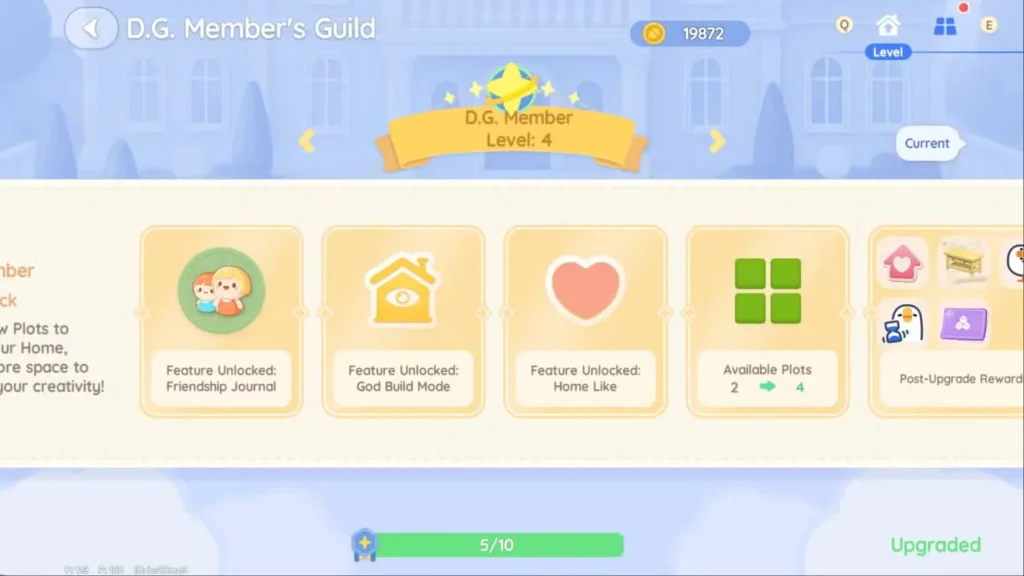
Your home plot limit is directly tied to your D.G. Member’s Guild rank. As you level up in this guild, you unlock perks that allow you to own more plots. Here’s the confirmed progression:
- Starting: 2 plots (granted when you first receive your house)
- D.G. Member Level 4: Plot limit increases from 2 to 4
- D.G. Member Level 6: Plot limit increases from 4 to 5
- Higher levels (up to Level 14+): Continue unlocking additional plot slots, with the maximum being 18 total plots
The pattern continues as you rank up, with each milestone granting you access to purchase more land. It’s a progression system that rewards dedicated players who consistently engage with the game’s community features. For context on the broader hobby and progression systems that feed into this, our Heartopia hobbies unlock and upgrade guide is a great companion read.
Earning Contribution Medals
To rank up in the D.G. Member’s Guild, you need Contribution Medals. Here’s how the system works:
Complete Daily Resident Requests
- NPCs around town will have requests for you to fulfill—tasks like delivering items, catching fish, collecting materials, or taking photos
- Each completed request rewards you with Contribution Medals (roughly 50 medals per request)
- You can accept up to 5 requests per day, for a maximum of around 250 medals daily
- Requests reset daily at 6 AM server time
Important tip: If you want to expand your property quickly, consistency is key. Make sure you’re knocking out all five daily requests every single day. Missing days means missing out on medals, which slows down your progression significantly. At 250 medals per day, reaching D.G. Level 4 takes roughly 3–4 days of consistent play.
While you’re waiting for your medal count to build up, use that time to earn Gold simultaneously. Selling crops like tomatoes (around 40 Gold each) or fishing for high-value catches like trout (around 60 Gold each) are reliable ways to build your plot budget before the plots become available to purchase. Our Heartopia fish selling guide and cooking recipes guide can help you maximize your daily Gold income during this grind.
Ranking Up at the D.G. Member’s Guild
Once you’ve earned enough Contribution Medals, it’s time to rank up:
- Open your Watch (on PC, press Tab; on mobile, tap the phone/watch icon in the top-right corner of the screen)
- Navigate to the D.G. Member’s Guild app
- Check if you have enough medals to rank up
- Confirm the rank upgrade to unlock new perks, including increased plot limits
The guild app tracks your progress, so you can always see how close you are to your next rank. This is also where you’ll manage your plot purchases, which we’ll cover next.
How to Actually Purchase and Unlock Home Plots
Okay, so you’ve increased your plot limit—awesome! But those new plot slots don’t automatically give you land. You still need to purchase each individual plot with Gold. Here’s exactly how:
Step-by-Step Plot Purchase Process
1. Open the D.G. Member’s Guild App
Access it through your Watch interface (Tab on PC, phone icon on mobile).
2. Open Plot Management
In the top-right corner, tap or click the four-square icon to open the Plot Management view. On PC, you can also press E as a shortcut.
3. Identify Purchasable Plots Using the Lock Icon
This is the most useful trick to know: locked plots display a lock icon. A shaking/wiggling lock means the plot is available to purchase right now. A stationary/still lock means you haven’t reached the D.G. level requirement for that plot yet. Only look for the wiggling ones.
4. Select a Plot Adjacent to Your Property
Only plots directly adjacent to your existing property are purchasable. You can’t buy random plots across town—your expansion must connect to land you already own, creating one continuous residential area.
5. Pay the Required Gold
Each plot costs Gold, starting at 8,000 Gold per plot. Note that plot costs increase as you purchase more—later plots cost progressively more Gold, so budget accordingly. Make sure you have enough saved before attempting to purchase.
6. Instant Access
Once you complete the payment, construction starts immediately, and you get instant access to your new plot. No waiting around for timers—it’s yours right away!
Strategic Plot Purchasing Tips
- Plan before you buy: Each plot is 8×5 tiles. Sketch out your ideal layout before purchasing—once you buy, you can’t choose exactly which adjacent plot becomes available, so knowing your expansion direction matters.
- Designate a production plot: Buy one plot specifically for storage, crafting, and cooking stations so your decorative plots stay clean and aesthetic.
- Budget for increasing costs: Don’t assume all plots cost the same. Later plots cost more Gold, so keep earning between purchases. Resources from our materials guide can help you find efficient farming routes.
- Maximize efficiency: Focus on completing daily requests consistently to unlock higher plot limits before spending all your Gold—no point burning resources if you can’t purchase the next plot yet.
- Look for the wiggling lock: When in Plot Management, always scan for the shaking lock first. If all locks are still, you need to keep grinding D.G. levels before any new plots are purchasable.
Need more Gold for your expansion? Grab some freebies with our Heartopia codes list, and check out our wheat farming guide and Black Truffle farming guide for high-value crop income.
Maximizing Your Property Expansion Strategy
Here’s a practical phase-by-phase approach to expanding your home efficiently:
Early Game (Levels 1–4)
Focus on completing all five daily resident requests every day. Simultaneously, farm crops and fish to build your Gold reserve. Don’t worry too much about purchasing plots yet—just grind those Contribution Medals to hit Level 4 and unlock your first plot expansion from 2 to 4 slots. At ~250 medals/day, this takes 3–4 days of consistent play.
Mid Game (Levels 4–6)
Once you hit Level 4, you’ll have 4 plot slots available. Start purchasing plots strategically based on your design plans—remember each starts at 8,000 Gold. Continue the daily request grind to reach Level 6, which bumps you to 5 available plots.
Late Game (Level 6+)
Now you’re in full expansion mode. Keep ranking up through continued daily requests, purchase plots as new ones unlock (with the shaking lock as your signal), and build out your dream property. The plot costs increase as you buy more, so maintaining a healthy Gold income from fishing, gardening, and cooking becomes increasingly important. Remember: 18 plots is the max, so plan your final layout accordingly!
Daily Routine Checklist:
- Log in and check for the 6 AM daily reset
- Accept all 5 available resident requests
- Complete them as efficiently as possible
- Farm crops and fish to build Gold reserves
- Check your Contribution Medal progress in the D.G. Guild app
- Rank up when possible
- Open Plot Management and look for shaking locks — purchase if you have enough Gold and available slots
Want to show off your expanded property to friends? Check out our co-op guide to learn how to invite others to visit your home!
FAQs
How many home plots can I have in Heartopia?
You can own up to 18 home plots total in Heartopia. You start with 2 plots and progressively unlock the ability to purchase more by ranking up your D.G. Member’s Guild level through completing daily resident requests.
Do I need to pay for plots after unlocking the plot limit?
Yes. Increasing your plot limit through D.G. Member ranks only gives you permission to own more plots—you still need to purchase each individual plot with Gold in the Plot Management tab of the D.G. Member’s Guild app. Plots start at 8,000 Gold each, with costs increasing for later plots.
How often do Daily Resident Requests reset in Heartopia?
Daily Resident Requests reset every day at 6 AM server time. You can accept and complete up to 5 requests per day. They are replaced with new requests at each reset—any incomplete requests don’t carry over.
Can I buy any plot I want or only specific ones?
You can only purchase plots that are directly adjacent to your existing property. Your expansion must connect to land you already own, creating one continuous residential area. In the Plot Management screen, look for a shaking or wiggling lock icon—that means the plot is ready to purchase right now. A still, stationary lock means you haven’t met the D.G. level requirement yet.
How much does each home plot cost in Heartopia?
Home plots start at 8,000 Gold each. The cost increases progressively as you purchase more plots—later plots are more expensive than earlier ones. Make sure to keep earning Gold consistently so you’re ready when new plots unlock.
What does unlocking a new plot do besides give me more space?
Each new home plot you unlock also increases your load limit—the total number of furniture and decorative items you can place across your entire property. So expanding your land also lets you decorate more freely.
How do I know if a plot is ready to purchase in Heartopia?
In Plot Management (opened via the four-square icon in the D.G. Member’s Guild app), look for the lock icon on each plot. A shaking or wiggling lock means that plot is available to purchase right now. A stationary lock means you need to level up your D.G. rank first.
Ready to start building your dream property? Download Heartopia now:
Expanding your home in Heartopia is a rewarding long-term goal that gives you tons of creative freedom. Whether you’re planning an elaborate garden, a cozy outdoor lounge, or just want maximum space to experiment with decorations, those 18 plots give you plenty of room to work with. Stay consistent with your daily requests, watch for that wiggling lock, and save up your Gold—before you know it, you’ll have the property you’ve always wanted!
Looking for more customization options? Learn how to change your hairstyle to complete your perfect look, or check out our complete materials and resources guide to make sure you always have what you need to keep building.


