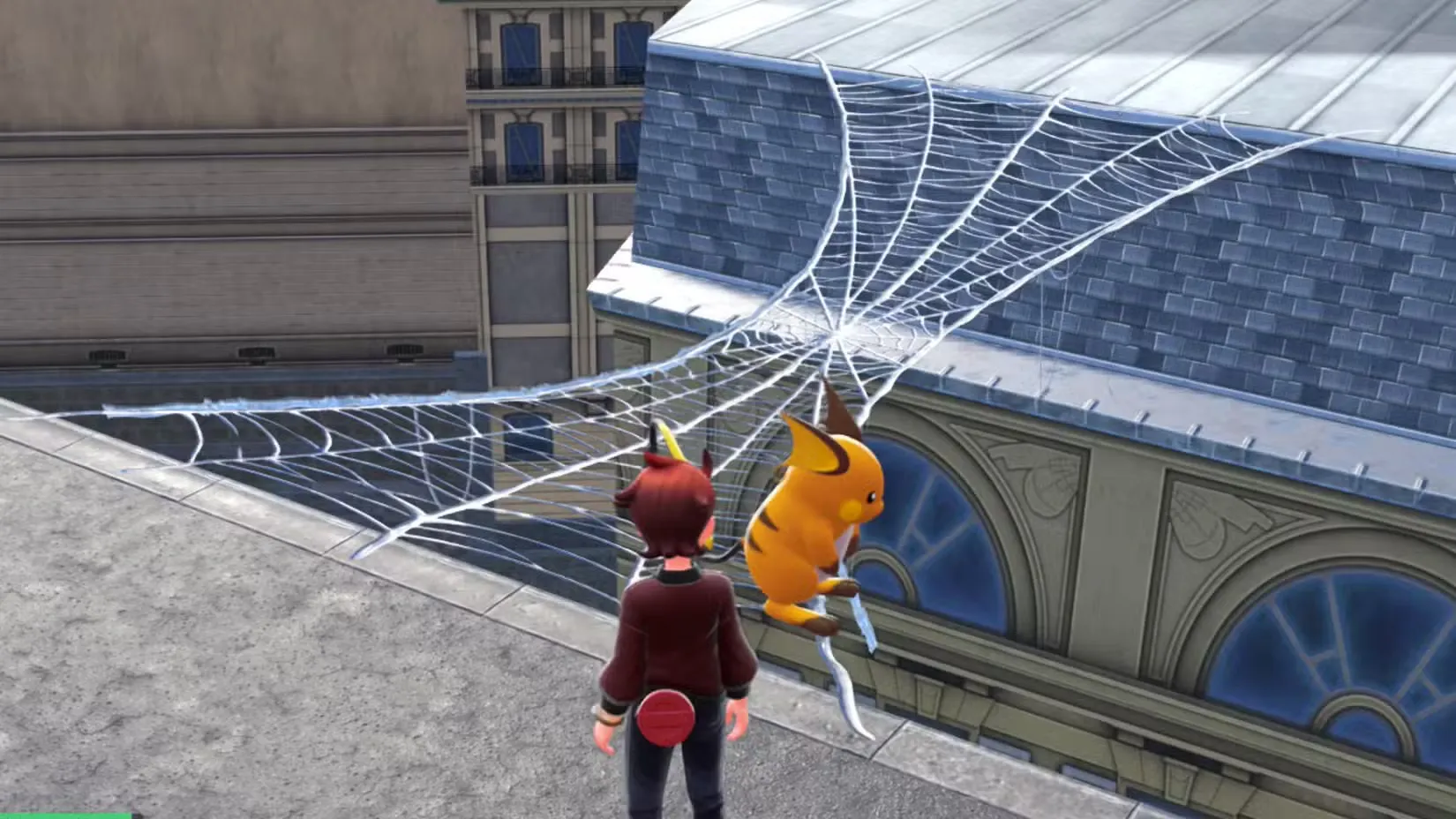
Pokémon Legends: Z-A throws plenty of obstacles in your path as you explore the rebuilt Lumiose City, and those mysterious white cocoons hanging on rooftop edges are one of the more puzzling ones. If you’re like most players, your first instinct when seeing these webby obstacles is probably to torch them with a Fire-type move. After all, that’s how you’d remove thorny vines, right?
But here’s the twist: cocoons in Pokémon Legends Z-A aren’t obstacles to destroy—they’re tools to create shortcuts.
Let me break down exactly what these cocoons do, how to use them properly, and why they’re essential for exploring the upper layers of Lumiose City.
Understanding Webs and Cocoons in Legends Z-A
Where You’ll Find Cocoons
Unlike other environmental barriers in the game, cocoons appear exclusively on rooftops. You won’t find them at street level where you encounter purple sludge or boulders. Instead, these white, silky cocoons dangle near rooftop edges, usually positioned across from other nearby buildings.
The rooftop layer of Lumiose City is essentially a second map above the main streets, and navigating it efficiently requires understanding how these cocoon mechanics work. Once you start exploring areas like Vert Sector 3 or various Wild Zones, you’ll encounter these cocoons constantly.
What Happens When You Break a Cocoon?
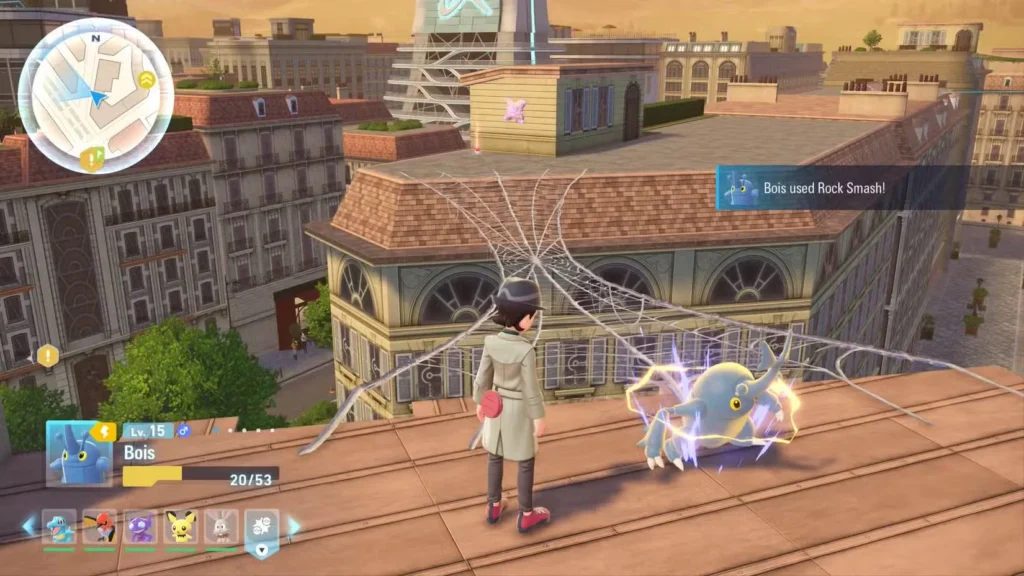
When you attack a cocoon, something pretty cool happens: it bursts open and shoots out a massive spider web that stretches across the gap to connect with a nearby rooftop. Essentially, you’re creating an instant bridge that lets you walk across alleys and streets from one building to another without having to climb down and back up again.
Key features of web bridges:
- They form automatically after breaking the cocoon
- The web connects to a specific nearby rooftop
- They’re permanent—once activated, you can use that bridge forever
- They create shortcuts that save tons of navigation time
- Some rooftops are only accessible via these web bridges
This permanence is crucial. Unlike fast travel points that need unlocking, once you’ve created a web bridge, it becomes part of your permanent traversal network across Lumiose City’s rooftops.
How to Break Cocoons and Create Web Bridges
Here’s the part that surprises most players: you can use ANY attack to break cocoons. That’s right—the type doesn’t matter at all.
Step-by-Step Process
Step 1: Spot a white cocoon hanging near a rooftop edge.
Step 2: Target the cocoon with your cursor (get close enough for your Pokémon to interact with it).
Step 3: Use literally any damaging move from any Pokémon in your party. Fire, Water, Electric, Normal—it all works.
Step 4: Watch as the cocoon bursts open and the spider web shoots across the gap.
Step 5: Wait for the animation to complete before trying to cross. This is important!
The Waiting Game (And Why It Matters)
I can’t stress this enough: be patient and let the web bridge finish forming before you walk on it. The game plays a brief animation as the web stretches and settles into place. If you rush forward too quickly and try to cross while it’s still animating, there’s a very real chance your character will clip through the incomplete bridge and plummet to the streets below.
It’s not a long wait—maybe 2-3 seconds—but it’s worth those extra moments to avoid the fall and having to find your way back up to the rooftop.
Cocoons vs. Other Environmental Obstacles
Pokémon Legends: Z-A features several types of environmental barriers, each requiring different approaches:
Environmental obstacles breakdown:
- Boulders: Break with Rock-type moves (Rock Smash)
- Purple goop/sludge: Clear with Water-type moves or certain Psychic moves like Confusion
- Thorny vines: Burn away with Fire-type moves
- Cocoons: Break with ANY attack type
The fact that cocoons accept any move type makes them the most flexible obstacle in the game. You don’t need to carry specific Pokémon or worry about type coverage—whatever’s in your party will work just fine.
This design choice makes sense when you think about it. Since cocoons aren’t really obstacles but rather tools for creating shortcuts, the developers didn’t want to punish players who happened to not have a specific move type available. If you’re hunting down Rogue Mega bosses or exploring Wild Zones, you’ll appreciate this flexibility.
Why Web Bridges Are Essential for Exploration
As you progress through the game, you’ll realize that some rooftops are completely inaccessible without web bridges. The game’s vertical exploration design means that not every rooftop has a Holovator or staircase leading up to it. Instead, certain buildings can only be reached by crossing from a neighboring rooftop via a cocoon bridge.
What you’ll miss without using cocoons:
- Hidden Pokémon spawns
- Collectible items
- Shortcut routes to mission objectives
- Access to certain Wild Zone entrances
- Optimal paths for catching specific Pokémon
If you’re trying to complete your Pokédex or find rare spawns like Larvitar or Goomy, exploring every accessible rooftop becomes crucial. Those web bridges open up entire sections of the map you’d otherwise miss.
Tips for Efficient Rooftop Navigation
Keep your eyes peeled: Those white cocoons can blend into lighter-colored rooftops. Make a habit of scanning rooftop edges as you explore.
Break cocoons as you find them: Even if you don’t need that particular bridge right now, activate it anyway. You’ll thank yourself later when you’re backtracking or hunting for specific Pokémon.
Use bridges strategically: When planning routes to mission objectives, consider which web bridges can shorten your journey. This is especially useful when dealing with timed missions or when you’re trying to reach Alpha Pokémon before they despawn.
Combine with fast travel: Web bridges work great in combination with fast travel points. Fast travel to a nearby location, then use bridges to reach your exact destination.
Common Mistakes to Avoid
Don’t overthink the move type: Seriously, any attack works. Stop cycling through your party looking for Fire moves.
Don’t rush across: I’ve mentioned this already, but it bears repeating—wait for the animation! Falling from rooftops wastes time and can be frustrating.
Don’t ignore cocoons: Just because a bridge doesn’t seem useful now doesn’t mean it won’t be essential later. Activate them all.
Don’t assume all rooftops have multiple access points: Some buildings genuinely require web bridges as the only way up. If you can’t figure out how to reach a rooftop, look for nearby cocoons on adjacent buildings.
The Bigger Picture: Lumiose City’s Vertical Design
The cocoon system is actually a clever design choice that encourages players to think three-dimensionally about Lumiose City. Unlike leaving Lumiose City entirely to explore Wild Zones, navigating the rooftop layer creates a distinct gameplay experience where verticality matters.
You’re not just walking through streets anymore—you’re climbing, jumping, and bridging between buildings. It adds depth to exploration that makes Lumiose feel more alive and complex than a simple grid of streets and buildings. When you’re searching for the strongest Pokémon or completing missions like finding Spewpa in museums, this vertical gameplay keeps things interesting.
Additional Resources
For more help with Pokémon Legends: Z-A, check out:
- Official Pokémon Legends website: https://legends.pokemon.com/
- Nintendo Store page: https://www.nintendo.com/us/store/products/pokemon-legends-z-a-nintendo-switch-2-edition-switch-2/
Looking for more navigation and exploration guides? Check out our coverage of Wild Zone 8, Wild Zone 9, and Wild Zone 11 for more tips on traversing the game’s trickier areas.
Ending With
Cocoons aren’t obstacles—they’re opportunities. Instead of thinking “how do I get past this?” think “what shortcut can this create?” Once you shift your mindset, rooftop exploration becomes much more intuitive. Break every cocoon you find, wait for the bridges to form completely, and you’ll have a comprehensive network of shortcuts that makes navigating Lumiose City’s upper levels a breeze.
Happy bridge-building, trainer!


