TL;DR
- PP is Ditto’s stamina meter — it depletes every time you use a Move like Water Gun, Leafage, or Rollout
- Restore PP by eating food (berries, crops, cooked meals) or using the healing machine at any Pokémon Center (once per day)
- Berries are the easiest early-game source — water a patch to grow a berry tree, then headbutt it to collect
- Permanently increase Max PP by purchasing PP Up from the PC Shop — you get one per region, starting at Environment Level 3
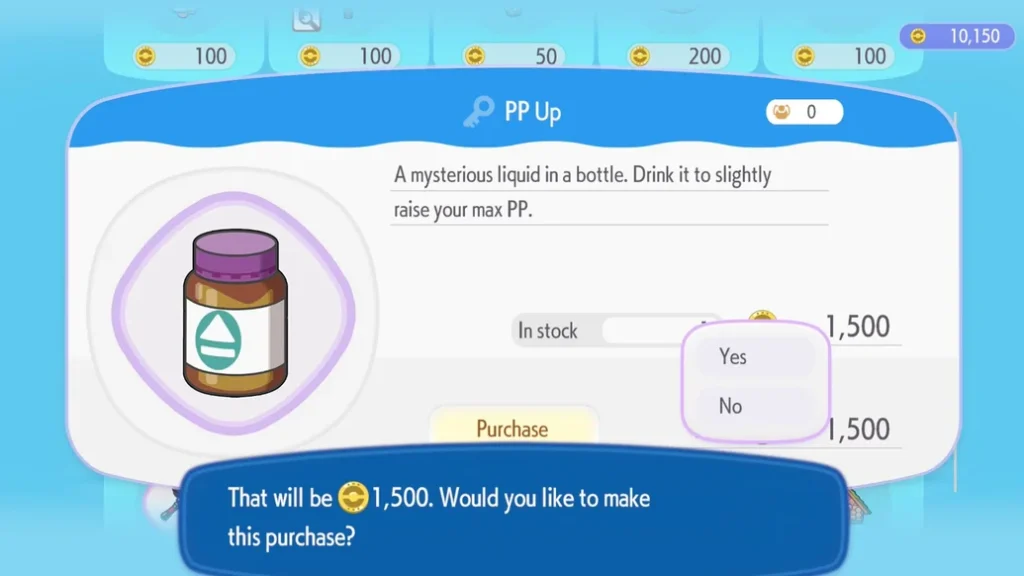
- There are 4 PP Up upgrades in total, costing 300, 1,000, 1,500, and 2,000 Coins respectively
- PP Ups are automatically consumed on purchase — no need to use them from your bag
- Prioritise buying PP Up over other shop items — it’s essential for progression and available only once per area
What Is PP in Pokémon Pokopia?
In mainline Pokémon games, PP (Power Points) determines how many times a Pokémon can use a specific move in battle. In Pokémon Pokopia, the concept is repurposed as Ditto’s personal stamina meter — a single shared energy pool that depletes each time you use any Move, including Water Gun, Leafage, Rototiller, Rollout, Rock Smash, and every other ability in Ditto’s move wheel.
Running out of PP in the middle of a busy building or farming session is genuinely disruptive, so managing your supply and expanding your Max PP as early as possible should be a priority from the start of the game.
How to Restore PP in Pokémon Pokopia
There are two ways to restore PP: eating food and visiting a Pokémon Center.
Eating Food
Consuming food of any kind restores a portion of PP. This includes berries, raw crops like Wheat, and cooked meals. Cooked meals generally restore more PP than raw food — and some may provide additional effects on top — but in the early game, berries are your most accessible and reliable PP source.
The easiest way to keep berries stocked is to:
- Water a patch of ground to grow a berry tree (Leppa Berry trees are ideal)
- Headbutt the tree to collect the berries
- Store them in your bag or a nearby Storage Box for quick access during long play sessions
Raw Wheat also restores a small amount of PP and can be eaten directly from your bag — useful in a pinch when exploring Rocky Ridges and beyond. For more on farming Wheat, see our guide to getting Wheat in Pokémon Pokopia.
As you progress, cooked meals become available via cooking stations like the Chopping Board, Bread Oven, and Frying Pan. These are significantly more PP-efficient than raw food, and some also power up specific Moves — Bread, for instance, powers up Cut. For the full list of powered-up moves and their recipes, check our moves and transformations guide.

Pokémon Center Healing Machine
Once you’ve rebuilt a Pokémon Center, the healing machine on the right-hand side will fully restore your PP for free — but only once per day. This is the most efficient single PP recovery method in the game, since it tops you up completely in one go.
Plan your PP-heavy work sessions around this daily reset — tackle your most Move-intensive tasks (large-scale farming, clearing rumble, decorating habitats) right after using the healing machine to get the most out of your fully restored meter. For a complete guide to rebuilding Pokémon Centers across all five regions, see our Pokémon Center guide.
How to Permanently Increase Max PP in Pokémon Pokopia
Restoring PP is a day-to-day solution — but to reduce how often you need to worry about it, you should be permanently expanding your Max PP through PP Up purchases. A higher Max PP means more Move uses before you need to refuel.
Where to Buy PP Up
PP Ups are purchased from the PC Shop at any Pokémon Center. Your first PP Up unlocks once you reach Environment Level 3 in the Withered Wasteland. Additional PP Ups become available as you reach Environment Level 3 in each new region — one per region, up to a total of four.
PP Ups are automatically consumed the moment you purchase them — they apply to your Max PP instantly and don’t sit in your bag waiting to be used.
All PP Up Costs
| PP Up | Cost |
|---|---|
| PP Up 1 | 300 Coins |
| PP Up 2 | 1,000 Coins |
| PP Up 3 | 1,500 Coins |
| PP Up 4 | 2,000 Coins |
The total cost across all four PP Ups is 4,800 Coins — a significant investment, but one that pays off across the entire game.
Prioritise PP Up Over Other Shop Items
When your PC Shop expands after levelling up the Environment Level, it’s tempting to spend Coins on new recipes and decorations. Resist that temptation. PP Up — alongside Packing Tips for bag expansion — should always be your first purchase in each new area. Both are one-time upgrades that permanently improve your core capabilities, and unlike furniture or recipes, they’re only available once per region. Don’t let them sit unbought while you spend Coins on other things.
For the full breakdown of Packing Tips and bag expansion costs, see our guide to increasing storage in Pokémon Pokopia.
Tips for Managing PP in Pokémon Pokopia
- Always carry berries — stock your bag with Leppa Berries from any berry tree before heading out for a long session; this applies equally in the Withered Wasteland, Bleak Beach, and Rocky Ridges
- Set up berry trees near your main base — watering a patch and headbutting the resulting tree costs nothing and gives a consistent local supply without having to go far
- Cook meals as soon as you can — cooked food provides far better PP recovery than raw berries or Wheat; invest in cooking equipment early
- Jump is PP-free — unlike most moves, jumping doesn’t consume PP. Reach Magikarp and unlock Jump as soon as possible; our Jump guide explains how
- Use the Pokémon Center healing machine last thing each session — since it resets daily, using it at the end of your play session means you start your next one with full PP
- Raise Environment Level in each region promptly — the faster you hit Level 3 in a new area, the sooner you unlock the next PP Up. Keep building habitats and raising Comfort Levels to push Environment Level progress
Frequently Asked Questions
How do I increase PP in Pokémon Pokopia?
There are two methods: temporarily restore PP by eating food (berries, crops, or cooked meals) or using the Pokémon Center healing machine once per day; permanently increase your Max PP by buying PP Up from the PC Shop, available from Environment Level 3 in each region.
How many PP Ups are there in Pokémon Pokopia?
There are four PP Up upgrades in total, one available per region. They cost 300, 1,000, 1,500, and 2,000 Coins respectively — a combined total of 4,800 Coins.
When can I buy the first PP Up in Pokémon Pokopia?
The first PP Up unlocks once you reach Environment Level 3 in the Withered Wasteland. It costs 300 Coins from the PC Shop.
Do I need to use PP Up from my bag?
No — PP Up is automatically consumed on purchase and immediately raises your Max PP. It doesn’t appear in your bag at any point.
What’s the best food for restoring PP in Pokémon Pokopia?
Cooked meals provide the best PP recovery per food item. In the early game when cooking equipment isn’t available, berries are the most accessible and reliable option — headbutt berry trees after watering a patch to collect them quickly.