TL;DR – How to Buy & Store Weapons in GTA 6
- Buy weapons: Visit an Ammu-Nation gun store, speak to the clerk, and purchase your preferred firearm.
- First gun shop: Chuck’s Tackle & Shot in Key Lento becomes part of the Chapter 1 Gear Up mission.
- Store weapons: Open your personal vehicle’s trunk with Triangle on PS5 or Y on Xbox. Hold L1/LB to manage your loadout.
- Stow rifles and shotguns: Highlight your weapon and press Square on PS5 or X on Xbox to use Stow Longarms.
- Weapon lockers: Use lockers at participating Ammu-Nation stores to manage and recover purchased guns.
- Important: Purchased weapons are permanently owned. Guns picked up from enemies are temporary and can be lost.
To buy and store weapons in GTA 6, visit an Ammu-Nation store to purchase firearms, then use your personal vehicle’s trunk or an Ammu-Nation weapon locker to manage your collection.
Unlike GTA 5, you can’t carry an entire gun shop in your pocket. Grand Theft Auto VI limits how many firearms Jason and Lucia can carry at once, making weapon storage an important part of gameplay.
You can carry two sidearms and two long guns, along with melee weapons, explosives, and equipment. Your remaining weapons stay in storage until you need them.
There is another important difference. Buying a weapon makes it permanently yours, while guns collected from enemies can disappear if you lose them.
Here’s everything you need to know about buying firearms, accessing vehicle storage, managing weapon lockers, and recovering guns you’ve lost.
How to Buy Weapons in GTA 6
The main place to purchase weapons in GTA 6 is Ammu-Nation.
These gun stores are scattered across Leonida and sell firearms, ammunition, explosives, protective equipment, and weapon modifications.
You first visit one during the Chapter 1 mission Gear Up.
Step 1: Find an Ammu-Nation Store
- Pause the game using Options on PS5 or Menu on Xbox.
- Open the map or the in-game Index.
- Look under the Weapons category for Ammu-Nation locations.
- Select a gun store and set a waypoint.
- Travel to the store and enter through the main entrance.
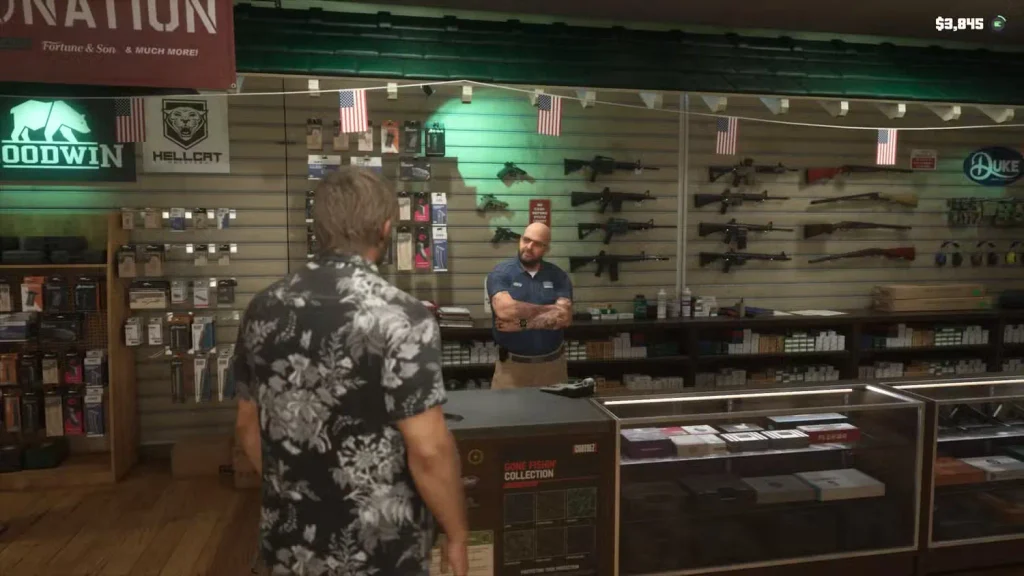
Your first Ammu-Nation location is Chuck’s Tackle & Shot in Key Lento, Mariana County.

You’ll find it close to Jason’s starting home, beside the main highway.
Although it looks like a local fishing and gun shop, it carries Ammu-Nation products and uses the same basic weapon purchasing system.
Step 2: Speak to the Gun Store Clerk
Once inside, approach the clerk behind the counter.
At Chuck’s Tackle & Shot, the shopkeeper is named Andrew.
Use these controls:
- PS5: Hold L2 to focus on the clerk, then press Triangle to open the Weapons & Mods menu.
- Xbox Series X|S: Hold LT to focus on the clerk, then press Y to open the shop menu.
The store’s inventory will appear on your screen.
Step 3: Choose Your Weapon
Ammu-Nation organizes its inventory into categories.
- Sidearms: Pistols and other small firearms.
- Longarms: Shotguns, tactical rifles, assault rifles, and sniper rifles.
- Ammo & Equipment: Ammunition, melee weapons, explosives, and other equipment.
Some larger shops also offer special bundles and a wider selection of firearms.
Use the shoulder buttons to switch between the available store categories.
Select a weapon to see its price, statistics, and available modifications.
Step 4: Buy and Equip the Weapon
- Select the firearm you want.
- Check its price and availability.
- Choose Buy & Equip when the option appears.
- Confirm the purchase.
- Review any additional weapon modifications offered by the store.
The purchased weapon is now part of your permanent owned collection.
Important: During the first Gear Up mission, you must purchase a longarm. Buying ammunition or another type of item won’t complete that mission objective.
How to Unlock Ammu-Nation in GTA 6
The game introduces weapon purchasing during Gear Up (Pick Up Another Gun), an early Chapter 1 mission.
It becomes available after completing Gone Fishing.
The mission sends Jason to Chuck’s Tackle & Shot, where Andrew offers a discounted long gun.
Best First Gun to Buy in GTA 6
During Gear Up, two practical choices are available.
| Weapon | Mission Price | Best For |
|---|---|---|
| Fortune & Son Moreland 850 Shotgun | $350 | Close-range combat |
| Hawk & Little Mediator Tactical Rifle | $450 | Mid-range shooting |
These are the discounted prices offered during the mission, not necessarily their regular shop prices.
Our recommendation: Buy the Moreland 850 shotgun if you’re short on cash.
It’s cheaper and works well during the fight that begins when you leave the store.
If you can afford the extra $100, the Mediator Tactical Rifle gives you a weapon better suited to engaging targets from farther away.
After buying your gun, three Kingfishers arrive outside the shop and confront Jason.
Complete the encounter to finish Gear Up.
For the full mission, including the Kingfishers fight, read our GTA 6 Gear Up walkthrough.
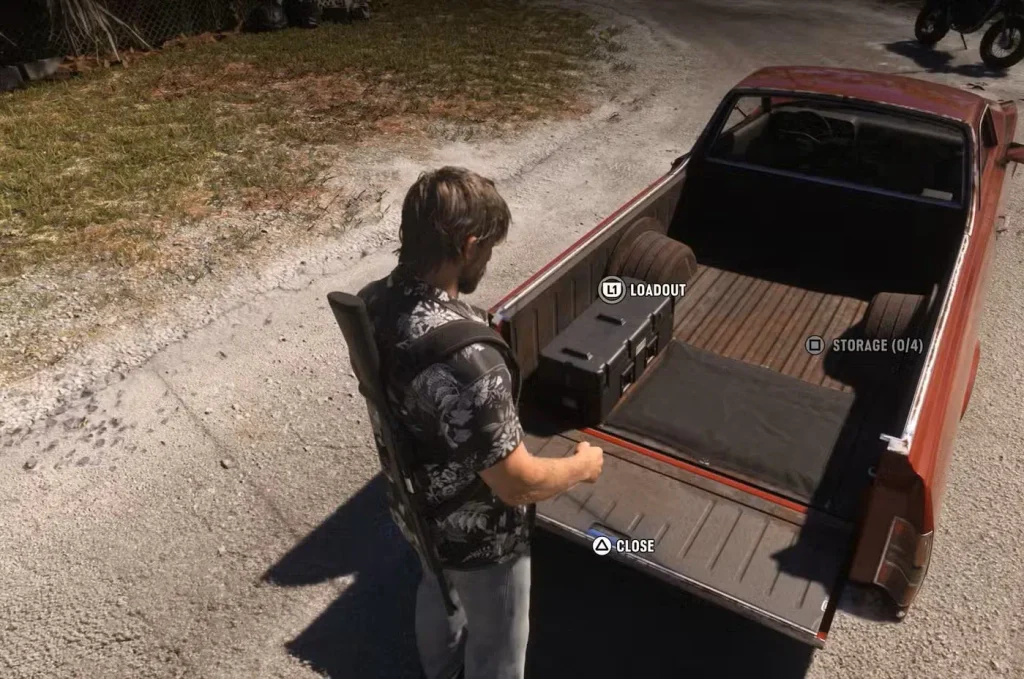
How to Store Weapons in Your Car in GTA 6
One of GTA 6’s biggest gameplay changes is the ability to use your vehicle as a mobile weapons locker.
Rather than carrying every firearm at once, you can keep spare guns in your personal car’s trunk.
This system works with personal vehicles, including Jason’s starting Ganado pickup.
Step 1: Go to Your Personal Vehicle
Find a vehicle registered as your personal vehicle.
Personal vehicles appear with a light blue vehicle icon on the map.
Walk to the rear of the car and position yourself near the trunk.
Step 2: Open the Trunk
Press:
- PS5: Triangle
- Xbox Series X|S: Y
Your character opens the vehicle’s trunk.
The available storage options appear on the screen.
Step 3: Open Your Weapon Loadout
With the trunk open, hold L1 on PS5 or LB on Xbox.
This opens your weapon loadout.
Use the right analog stick to highlight the firearm you want to manage.
You can cycle through available weapons in a category using the left and right directional controls.
Step 4: Store Your Long Guns
If you’re carrying a shotgun or rifle, you can store it instead of keeping it visible on your character.
- Highlight the longarm in your loadout.
- Press Square on PS5 or X on Xbox when Stow Longarms appears.
- Your character moves the weapon into vehicle storage.
- Close the loadout and trunk when finished.
Now the weapon is available from storage rather than being carried on your back.
This is particularly useful when visiting shops, approaching civilians, or traveling through crowded areas.
How to Retrieve Stored Weapons From Your Car
Getting a weapon back is straightforward.
- Return to the trunk of your personal vehicle.
- Press Triangle or Y to open it.
- Hold L1 or LB to access your loadout.
- Highlight the appropriate weapon category.
- Cycle through available stored weapons using the directional controls.
- Select the gun you want to equip.
- Close the trunk and continue playing.
You can change your loadout before a mission without visiting a gun shop.
For example, you might take a shotgun for close-range combat or switch to a rifle when heading into an open area.
Tip: If the weapon you want isn’t appearing, check the Ammu-Nation weapon locker. It may not currently be assigned to your personal vehicle’s trunk.
How to Use Weapon Lockers in GTA 6
Weapon lockers provide another way to manage your firearm collection.
They’re especially useful when you’ve bought several weapons but don’t want every available gun appearing in your vehicle loadout.
You’ll find weapon lockers in many Ammu-Nation stores across Leonida.
Where to Find a Weapon Locker
- Open the in-game map or Index.
- Find an Ammu-Nation location.
- Check its listed features for a weapon locker.
- Travel to the shop.
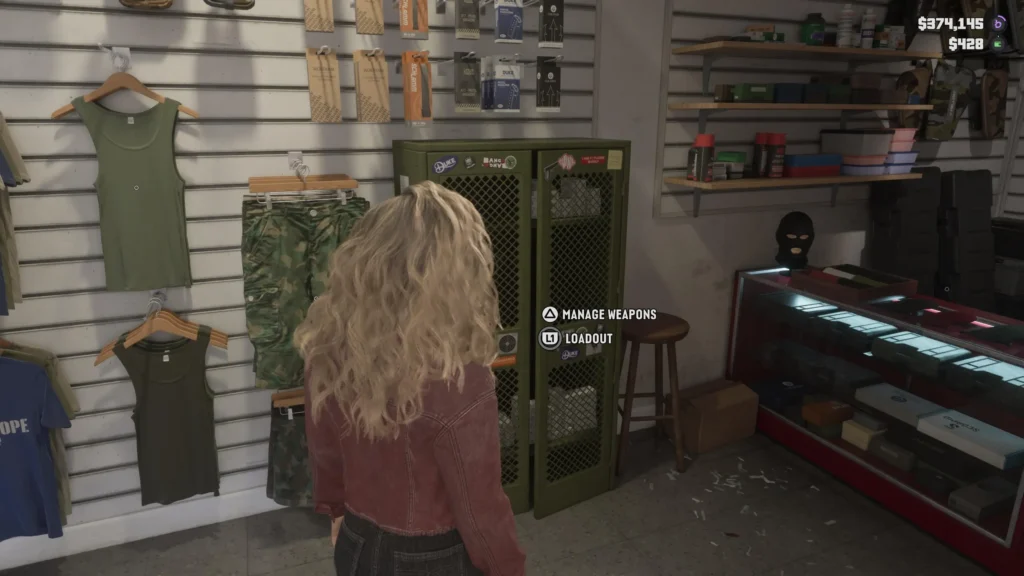
- Look for a green metal locker inside.
- Approach it and use the displayed interaction prompt.
Not every small gun store has the same facilities, so check the store details before traveling a long distance.
How to Manage Weapons at a Locker
At an Ammu-Nation weapon locker, you can:
- View your owned firearm collection.
- Recover purchased weapons that are no longer in your loadout.
- Equip different guns.
- Add weapons to your personal vehicle’s trunk.
- Remove unwanted guns from the trunk selection.
- Switch between standard weapons and unlocked unique variants.
On the default controls, press Triangle on PS5 or Y on Xbox to open Manage Weapons when standing at the locker.
Alternatively, hold L1 or LB to access your loadout directly.
In the Manage Weapons screen, Square or X can be used to add or remove weapons from your trunk selection.
Why Use a Weapon Locker Instead of Your Trunk?
Your trunk is best for quick changes while traveling.
A weapon locker is better when you want to organize your larger collection.
For example, if you’ve purchased several pistols and rifles, you can decide which ones should be available from your vehicle.
That prevents the trunk loadout from becoming cluttered with guns you rarely use.
GTA 6 Owned vs. Unowned vs. Unique Weapons
Not all firearms work the same way in GTA 6.
The game separates them into three ownership categories, each represented by a different weapon icon color.
| Weapon Type | Icon Color | Can You Recover It? |
|---|---|---|
| Owned | Light blue | Yes, from your trunk or weapon locker |
| Unowned | White | No, if permanently lost |
| Unique | Yellow or gold | Yes, after unlocking the variant |
Owned Weapons – Purchased at Ammu-Nation
Owned weapons are firearms you’ve bought from an Ammu-Nation store.
These are the safest weapons to invest in because they’re permanently added to your collection.
If you drop an owned weapon or lose it after being wasted or busted, you can recover it from your personal vehicle’s trunk or a weapon locker.
Owned weapons can also be customized with compatible attachments.
Unowned Weapons – Found or Taken From Enemies
Unowned weapons are guns you find while exploring or pick up from defeated enemies.
They’re useful because you can get them without paying.
However, they have several limitations:
- They aren’t permanently added to your owned collection.
- You can’t customize them like purchased weapons.
- You can lose them after dying or being arrested.
- Dropping them can mean losing them permanently.
- Only a limited number can be stored temporarily in your vehicle.
Don’t rely on an unowned weapon as your only valuable firearm.
If you like a gun you’ve found, buying the corresponding weapon at Ammu-Nation is the more reliable long-term solution.
Unique Weapons – Special Variants
Unique weapons are special firearms found through exploration, activities, or certain missions.
These are marked with gold or yellow icons.
Once collected, unique weapon variants become permanently unlocked for both protagonists.
Unlike normal owned weapons, unique variants generally can’t be modified.
You can access them through an Ammu-Nation locker and select them instead of the standard version.
One example of a special weapon tied to side content is the Mister Mangrove Laird 350 from Kirk’s storyline.
Our All Skunk Ape Missions in GTA 6 guide covers how to complete that questline and obtain its special rifle.
How Many Weapons Can You Carry in GTA 6?
GTA 6 uses a limited loadout system rather than the nearly unlimited weapon wheel from GTA 5.
Here’s what you can carry at one time.
| Category | Carrying Limit |
|---|---|
| Sidearms | 2 |
| Longarms | 2 |
| Melee weapons | 1 |
| Explosives | 1 equipped category |
| Equipment | Dedicated equipment slots |
Additional equipment includes items such as binoculars and flashlights.
Although you can have two longarms assigned to your loadout, that doesn’t mean both can be hidden under your clothing.
Long guns remain visibly carried, and the game limits how you physically handle them.
If you’re carrying too many weapons, return to your vehicle or a locker and choose a smaller loadout.
How to Buy Ammo and Body Armor in GTA 6
Ammu-Nation also sells ammunition, armor, and equipment packs.
These are useful for restocking before story missions, robberies, or extended fights.
How to Purchase Ammunition
- Visit an Ammu-Nation gun store.
- Speak to the clerk.
- Open the Ammo & Equipment category.
- Select the ammunition or supply pack you need.
- Confirm the purchase.
- Return to your personal vehicle’s trunk to collect purchased supply packs.
Ammo and explosive packs purchased at Ammu-Nation are placed in your personal vehicle’s trunk.
You can take them out to replenish the ammunition or explosives you’re carrying.
This means it’s worth bringing your personal car when shopping for supplies.
Can You Store Body Armor in Your Car?
Yes. GTA 6 allows personal vehicles to carry equipment and supplies in addition to weapons.
Body armor and other purchased equipment can be managed through the relevant inventory and storage options.
Keep spare supplies available before heading into missions where you expect heavy combat.
How to Customize Weapons in GTA 6
Buying a gun is only the beginning.
Ammu-Nation offers different modifications that improve or change weapon handling.
Available modifications include:
- Optics: Sights and scopes for aiming.
- Magazines: Different magazine configurations.
- Grips: Attachments that can change weapon handling.
- Muzzle attachments: Options such as suppressors.
- Tactical attachments: Equipment such as weapon-mounted flashlights.
- Cosmetic customization: Available weapon colors, finishes, and other appearance options.
The available upgrades depend on the specific firearm and store.
Larger Ammu-Nation locations may offer more customization options than smaller shops.
Can You Change Attachments Outside Ammu-Nation?
Some attachments can be toggled while exploring.
For example, compatible suppressors and tactical flashlights can be enabled or disabled from your weapon loadout.
However, most other attachment changes require visiting Ammu-Nation.
Don’t expect to replace scopes, magazines, and grips while standing in the middle of a firefight.
Do Jason and Lucia Share Purchased Weapons?
Yes. Buying a weapon makes the base firearm available to both Jason and Lucia.
You don’t need to purchase the same gun twice simply because you’ve switched protagonists.
However, each character manages their own equipped loadout and weapon modifications.
That lets you build different weapon setups for Jason and Lucia without repurchasing the base weapon.
How to Unlock More Weapons at Ammu-Nation
If the gun you want is marked Locked or Unavailable, it doesn’t necessarily mean you’re visiting the wrong place.
GTA 6 uses a store progression system that expands available stock as you purchase more weapons.
The more firearms you buy, the more products can become available at Ammu-Nation stores.
There are also differences between individual shop inventories.
Large stores may sell guns and attachments that smaller locations don’t carry.
To unlock more options:
- Continue progressing through the story.
- Buy weapons that are currently available.
- Check the inventory again after making additional purchases.
- Visit larger Ammu-Nation locations if a specific gun isn’t stocked locally.
- Check for separate activity requirements when a weapon has a special unlock condition.
Tip: Don’t spend all your money on weapons you won’t use just to expand the store inventory. A good pistol, shotgun, and versatile rifle can cover most early combat situations.
How to Recover Lost Weapons in GTA 6
Missing weapons are one of the most confusing parts of GTA 6’s new inventory system.
If you’ve bought a gun and it disappears from your weapon wheel, don’t immediately buy another one.
It may simply be stored.
Method 1: Recover Your Weapon From the Trunk
- Find your personal vehicle.
- Open its trunk with Triangle or Y.
- Hold L1 or LB to access your loadout.
- Highlight the category where your missing gun belongs.
- Cycle through the available weapons.
- Select the owned weapon to equip it again.
If the weapon is assigned to the vehicle, you should be able to access it here.
Method 2: Recover Your Weapon From Ammu-Nation
If the firearm isn’t listed in your trunk loadout, visit a weapon locker.
- Travel to an Ammu-Nation store that has a weapon locker.
- Approach the green metal cabinet.
- Open Manage Weapons.
- Find the missing firearm in your owned collection.
- Equip it or add it to your personal vehicle’s trunk.
Purchased weapons remain permanently owned, so this is the best place to check after losing a gun during a mission or police encounter.
What if You Lost an Unowned Gun?
Unfortunately, guns collected from enemies aren’t protected by the same permanent ownership system.
If an unowned weapon was dropped, lost after death, or removed following an arrest, you may not be able to recover it.
You can find another copy in the world or purchase the weapon from Ammu-Nation when available.
How to Hide Weapons in GTA 6 Without Dropping Them
GTA 6 pays more attention to whether your character is visibly armed.
Walking through a busy neighborhood with a rifle strapped to your back can make civilians nervous and attract unwanted police attention.
Small sidearms can be concealed when holstered, but larger firearms remain visible.
How to Holster a Pistol
Tap L1 on PS5 or LB on Xbox to put away your equipped weapon.
Tap the same button again to draw it.
This is convenient when you want to interact with NPCs or walk around without pointing a firearm at someone.
How to Hide a Rifle or Shotgun
If you’re carrying a long gun, simply holstering it won’t necessarily make it disappear.
Instead:
- Return to your personal vehicle.
- Open the trunk.
- Access your loadout.
- Highlight your longarm.
- Use the Stow Longarms command.
This removes the weapon from your character’s back and places it in storage.
For more details about weapon handling, check our GTA 6 manual holster controls guide.
Best Tips for Managing Weapons in GTA 6
It’s easy to waste money buying guns you rarely use. A little planning makes GTA 6’s weapon system much easier to manage.
- Buy weapons you want to keep: Purchased firearms are permanent, unlike most guns taken from enemies.
- Use your personal car: Keep your important guns and supplies in a recoverable vehicle rather than a random stolen car.
- Prepare before missions: Equip weapons that match the type of combat you expect.
- Keep some cash available: You’ll need money for weapons, ammunition, and modifications.
- Visit weapon lockers: Remove rarely used guns from your vehicle’s available selection.
- Don’t carry longarms everywhere: Visible rifles and shotguns can attract attention in public.
- Check gun statistics: Damage, accuracy, range, and handling matter more than appearance alone.
If you’re struggling to hit targets, changing your aiming marker can also help with visibility. Our GTA 6 reticle customization guide covers the different crosshair shapes, sizes, and settings.
GTA 6 Weapon Storage Not Working? Common Fixes
1. You Can’t Open Your Car’s Weapon Loadout
Make sure you’re using your personal vehicle rather than a random stolen car.
Unowned vehicles can carry some items, but they don’t provide the same full weapon management features as personal vehicles.
Look for your personal vehicle’s light blue icon on the map.
2. Your Purchased Gun Isn’t in the Trunk
Visit an Ammu-Nation weapon locker.
Open Manage Weapons and check whether the missing firearm is assigned to your personal vehicle.
If not, add it to the trunk selection.
3. You Can’t Store a Rifle
Open your trunk loadout and highlight the longarm category.
Use Square on PS5 or X on Xbox when Stow Longarms appears.
Simply tapping the holster button doesn’t store a rifle in your vehicle.
4. You Can’t Find a Weapon Locker
Check the Ammu-Nation location’s features in the map or Index.
Many stores have lockers, but available facilities can vary.
Look for the green metal cabinet once inside the shop.
5. You Can’t Buy a Weapon
Several things can prevent a purchase:
- You don’t have enough money.
- The gun is locked behind store progression.
- The selected shop doesn’t stock that weapon.
- You haven’t unlocked the relevant purchasing requirement.
- A story mission is limiting which weapon categories you can buy.
During early Chapter 1, Jason also needs enough physical cash for purchases before the banking system becomes available.
Check the store’s status message to see why a firearm cannot be purchased.
6. Your Gun Disappeared After Being Arrested
First, determine whether the gun was owned or unowned.
Purchased weapons should be recoverable from a weapon locker or your personal vehicle’s trunk.
Unowned weapons aren’t permanently protected and may be lost after an arrest.
Can You Store Weapons in Any Car in GTA 6?
You can place certain items in the trunks of unowned vehicles, but that isn’t the same as using a personal vehicle for permanent weapon management.
A stolen car can disappear or be lost, taking its temporary contents with it.
Personal vehicles are more reliable because they’re recoverable and support loadout management.
For important firearms, use a registered personal vehicle or an Ammu-Nation weapon locker.
If the nearest gun store is far away, GTA 6 also has a convenient automatic driving feature. Our guide on how to auto-drive in GTA 6 explains how to set a destination, activate cinematic autopilot, and travel without steering manually.
GTA 6 Weapons FAQs
Where Can You Buy Guns in GTA 6?
You can purchase firearms at Ammu-Nation gun stores across Leonida. Your first store is Chuck’s Tackle & Shot in Key Lento, which you visit during the Gear Up mission.
How Do You Store Weapons in GTA 6 on PS5?
Go to your personal vehicle’s trunk, press Triangle to open it, and hold L1 to access your loadout. Highlight a rifle or shotgun and press Square to stow it.
How Do You Store Weapons in GTA 6 on Xbox?
Approach your personal vehicle’s trunk and press Y. Hold LB to open the loadout, then press X when the Stow Longarms command appears.
Can You Keep Guns You Find in GTA 6?
You can use guns collected from enemies and temporarily store a limited number in your vehicle. However, unowned weapons aren’t permanently unlocked and can be lost.
Do You Lose Purchased Guns When You Die?
No. Purchased weapons are permanently owned. You can recover them from your personal vehicle’s trunk or an Ammu-Nation weapon locker after losing them.
Do Jason and Lucia Share Guns?
Yes. Purchasing a base weapon makes it available to both protagonists. However, their equipped weapon selections and modifications are managed separately.
Where Are Weapon Lockers in GTA 6?
Weapon lockers are available at many Ammu-Nation stores across Leonida. Look for a green metal cabinet inside participating locations.
How Many Guns Can You Carry in GTA 6?
You can carry two sidearms and two longarms, plus melee weapons, explosives, and equipment. Other guns must remain in storage.
Can You Customize Weapons You Find?
Normally, no. Unowned weapons taken from enemies can’t be modified like purchased guns. Unique weapon variants also have fixed configurations.
Can You Store Ammo in Your Car?
Yes. Ammunition and explosive supply packs purchased at Ammu-Nation are sent to your personal vehicle’s trunk, where you can collect them when needed.
Can You Get Free Weapons in GTA 6?
Yes. You can pick up firearms dropped by enemies, find weapons while exploring, or earn special variants through activities. However, ordinary found weapons are unowned and aren’t guaranteed to remain available permanently.
How Do You Switch Between Two Rifles in GTA 6?
Hold L1 or LB to open your loadout, highlight the longarm category, and use the indicated weapon-cycle controls. You can also change your selected rifle from your personal vehicle’s trunk or a weapon locker.
Final Tips
The most important thing to remember is that buying a weapon and carrying a weapon are two different things in GTA 6.
Purchased guns belong to your permanent collection, but you can only carry a limited selection at once.
Use your personal vehicle’s trunk for quick weapon changes and Ammu-Nation lockers to organize your larger arsenal. That way, your favorite firearms are always available when you need them.
And before heading into a difficult mission, check your ammunition, equip the right weapons, and store anything you don’t need.