
TL;DR: To get Mewtwo in Pokémon Pokopia, you need to first encounter it during the Sparkling Skylands main story, then visit the Sky Dream Island using a Dragonite Doll. Mewtwo only appears there randomly, so some patience (or a bit of time travel) is required. Once you find it, talk to it, bring it back with Drifloon, and build it a habitat on your island.
Before You Start: Complete the Main Story First
Mewtwo can first be encountered by completing the main story quest in the Sparkling Skylands. Once you’ve met it during the campaign, you can begin the process of adding it permanently to your island. If you haven’t reached that point yet, focus on progressing through the story before attempting any of the steps below.
It’s also worth knowing that you can only persuade legendary Pokémon to join you back in your world if you have completed the region to which they belong. So don’t skip ahead — finishing the story is a hard prerequisite here.
Step 1: Get the Dragonite Doll and Head to the Sky Dream Island
To find Mewtwo permanently, you need to visit the Sky Dream Island using a Dragonite Doll. The Dragonite Doll unlocks the Sky Dream Island, which contains wastepaper, Pokémetal ore, and crystal fragments — alongside the chance of finding Mewtwo itself.
If you don’t have the Dragonite Doll yet, don’t panic. There is a chance you’ll get one after breaking a glowing block using Rock Smash. Using the Dowsing Machine with a Pokémon that has the Search specialty can help you track down those glowing spots more efficiently.
Alternatively, both the Ditto Doll and the Substitute Doll can send you to a randomly selected island — so you might get lucky without needing the Dragonite Doll specifically. Once you have your doll, place it on the ground and inspect it; Drifloon will appear and offer to take you to the corresponding island.
One important thing to keep in mind: you can only bring Drifloon one doll per day, which limits how many islands you can visit. Mewtwo’s appearance on the island isn’t guaranteed either — the layout is selected randomly each visit. If Mewtwo isn’t there, you may need to come back the next day. If you want to speed things up, you can reset the daily limit by changing the time on your Nintendo Switch 2.
Step 2: Find Mewtwo’s Cave on the Island
Once you land on the Sky Dream Island, your job is to locate the cave hidden at the base of the mountain at the island’s centre. The terrain here is elevated and can make the cave entrance tricky to spot — if you’re struggling, try gaining some height and flying around the island for a clearer overhead view.
There may be more than one cave entrance, so keep your eyes open. The one you’re after leads deep into the mountain, and progressing through it may require breaking a wall of rubble — bring a Hamburger Steak along in case you need that extra push.
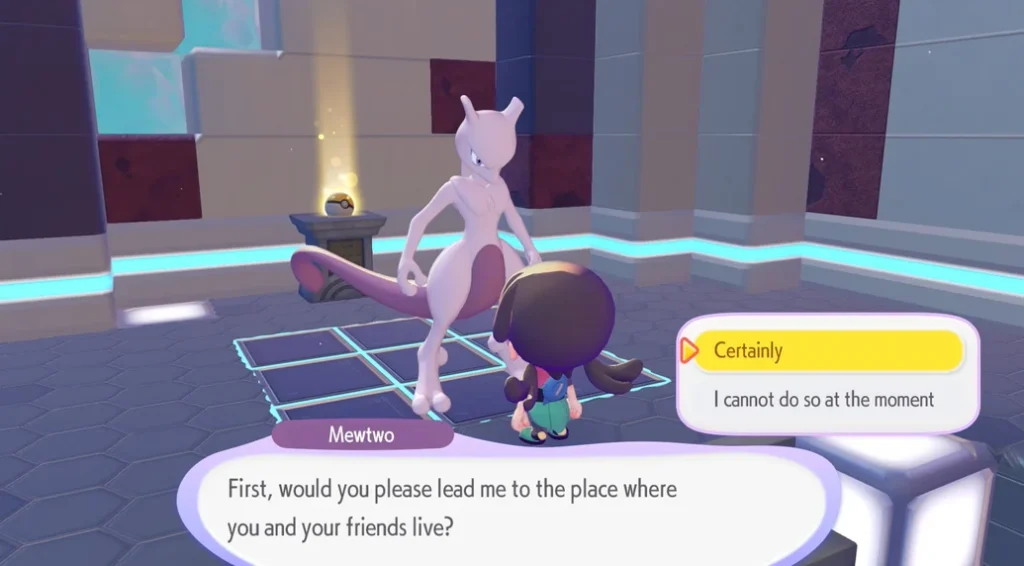
You’ll know you’re in the right place when you reach an inner cavern that resembles a Gym. Through the gaps in the wall, you’ll be able to glimpse Mewtwo waiting inside. Either squeeze through the gaps or smash the blocks apart to enter.

Step 3: Talk to Mewtwo and Bring It Home
Once inside, walk over to Mewtwo and start a conversation. It will tell you it’s looking for a place to live — select “Certainly” to agree to help. After this, you’ll be given the option to return to Drifloon with Mewtwo; taking Mewtwo with you saves a lot of backtracking.
Before leaving though, it’s worth circling back to where you first met Mewtwo — there are three Rare Pokémetal Ingots sitting inside the Yellow Poké Ball at that spot, which are well worth grabbing.
Step 4: Build Mewtwo a Habitat
Back on your island, it’s time to give Mewtwo somewhere to live. If you need a quick option while you plan something grander, a simple Tall Grass habitat works fine, or you can temporarily place Mewtwo in an empty house. The key thing is getting it settled before you start working on a more permanent, themed space.
Head to the location where you’d like Mewtwo to stay, then select “Wanna move in here?” followed by “Yes, it will indeed!” and you’re all set.
It’s worth spreading your legendaries across multiple locations — each one provides a meaningful boost to the Environment Level of wherever they live, and having them clustered together means leaving potential gains on the table elsewhere.
If you’re still early in building out your island, check out our guide on how to get a Furnace in Pokémon Pokopia — you’ll need one eventually for crafting more advanced habitat materials.
All Dream Island Legendary Pokémon at a Glance
In case you’re planning ahead for the full legendary collection, here’s a quick reference for which doll leads to which legendary:
| Doll | Dream Island | Legendary |
|---|---|---|
| Eevee Doll | Wasteland | Suicune |
| Arcanine Doll | Volcanic | Entei |
| Pikachu Doll | Ocean | Raikou |
| Dragonite Doll | Sky | Mewtwo |
| Clefairy Doll | Rock Peak | Volcanion |
Each legendary adds a meaningful boost to your island’s Environment Level, so working through this list is well worth the daily grind of Dream Island visits.


