TL;DR
- Complete the Moses mission in Chapter 2 to unlock vehicle registration in GTA 6.
- Take a stolen car without a tracker to Watkins Auto Parts in Port Gellhorn, respray it and select Register.
- Your first vehicle registration with Moses is free. Future registrations cost money based on the vehicle’s value.
- Pay ‘n’ Spray shops can register cars with Standard Trackers from Chapter 3. Advanced Trackers require further progression through Randy’s missions.
- Registered personal vehicles can be recovered if lost or destroyed, while unregistered vehicles can be lost permanently.
To turn stolen vehicles into personal vehicles in GTA 6, you must register them through Moses or an eligible Pay ‘n’ Spray shop. Vehicle registration first becomes available during Chapter 2, when Lucia meets Moses at Watkins Auto Parts in Port Gellhorn.
Unlike simply stealing a car and parking it outside your safehouse, registering a vehicle gives you permanent ownership. You can recover the vehicle, request delivery, customize it and use its trunk to manage your equipment.
However, not every stolen car can be registered immediately. Vehicle trackers, story progression, registration fees and available garage space all play a role.
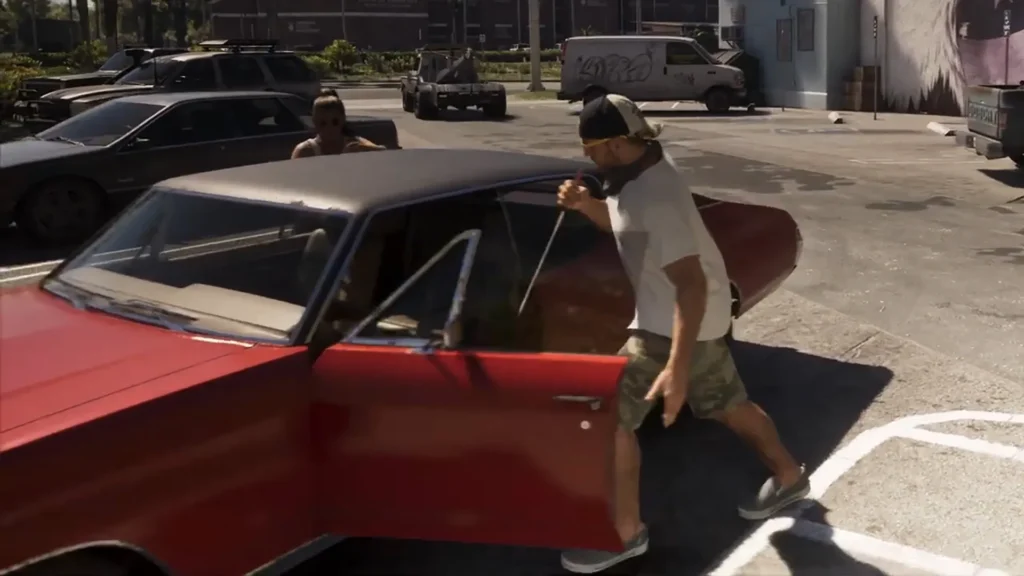
How to Turn Stolen Vehicles into Personal Vehicles in GTA 6
The earliest opportunity to register a stolen car comes during the Moses mission, also known as Take a Vehicle to Moses, in Chapter 2.
You unlock this mission after completing Girl’s Trip. Switch to Lucia and travel to Moses’s workshop in Port Gellhorn.
Follow these steps to register your first stolen vehicle:
- Complete the introductory objectives during the Moses mission.
- Find a car you want to keep.
- Scan the vehicle using the WAiNK app on your phone.
- Make sure its tracker status reads None.
- Take the vehicle to Watkins Auto Parts.
- Open Moses’s vehicle service menu.
- Select Respray and choose a different paint color.
- Return to the menu and select Register.
- Confirm the registration.
The vehicle receives new license plates and becomes Lucia’s personal vehicle. Your first registration during this mission is free.
If you need help unlocking the workshop, follow our GTA 6 Moses mission walkthrough.
When Can You Register Stolen Cars in GTA 6?
Vehicle ownership expands as you progress through the story. You cannot register every type of vehicle from the beginning.
| Story Progress | Registration Location | Eligible Vehicles |
|---|---|---|
| Chapter 1 | Unavailable | No new permanent personal vehicles |
| Chapter 2 | Moses at Watkins Auto Parts | Vehicles without trackers |
| Early Chapter 3 | Pay ‘n’ Spray | Vehicles without trackers and vehicles with Standard Trackers |
| After Randy’s advanced tracker unlock | Pay ‘n’ Spray | Eligible vehicles with Advanced Trackers |
During Chapter 1, Jason’s starting Vapid Ganado is your permanent personal vehicle. You can drive other cars, but you cannot register them yet.
If you find an expensive supercar early in the game, do not assume you can immediately add it to your collection.
How to Check Vehicle Trackers Using WAiNK in GTA 6
Before choosing a car to register, scan it with the WAiNK app. This is especially important if you are still in Chapter 2.
WAiNK becomes available during the Unwanted Attention mission in Chapter 1.
- Approach the vehicle you want to scan.
- Hold Up on the D-pad to access WAiNK.
- Aim the scanner at the vehicle.
- Use R1 on PS5 or RB on Xbox Series X|S to scan it.
- Check its tracker status and registration cost.
The app provides several useful details about vehicles, including:
- Vehicle manufacturer and model.
- Vehicle condition.
- Door lock and alarm status.
- Keyless entry requirements.
- Tracker type.
- Potential selling price.
- Vehicle registration cost.
Tip: Always check the Cost to Register information before taking an expensive vehicle to a workshop. The registration fee can be considerably higher than its selling price.

GTA 6 Vehicle Tracker Types Explained
There are three tracker categories you need to understand when building your personal vehicle collection.
No Tracker
Vehicles without trackers are the easiest to register. These are commonly found among older cars, affordable sedans, pickup trucks and other everyday vehicles.
Moses can register these vehicles from Chapter 2. They are your best option when choosing your first personal car for Lucia.
Standard Tracker
Standard Trackers are common on more valuable vehicles. Moses cannot register these cars during Chapter 2.
They also prevent you from modifying an unregistered vehicle at a mod shop.
Once the relevant vehicle services unlock in Chapter 3, you can register cars with Standard Trackers at Pay ‘n’ Spray shops.
Advanced Tracker
Advanced Trackers are commonly found on expensive sports cars and supercars. These trackers can report your vehicle’s location to the police.
Registration requires additional progression through Randy’s vehicle missions. Simply reaching Chapter 3 or unlocking the Key Cloner is not enough to unlock every registration option.
How to Remove Advanced Car Trackers in GTA 6
If you want to build a collection of high-end supercars, you will eventually need to unlock registration for vehicles equipped with Advanced Trackers.
To unlock this service:
- Progress into Chapter 3 and meet Randy.
- Complete Randy’s available vehicle requests.
- Continue delivering vehicles until Randy requests a ’64 Declasse Mamba GT.
- Complete the Mamba GT delivery.
- Wait for Randy’s follow-up phone call.
After Randy confirms that Pay ‘n’ Spray shops can handle vehicles with Advanced Trackers, you can start registering eligible high-end cars.
The number of earlier vehicle requests should not be treated as a fixed requirement. Continue completing Randy’s jobs until the special vehicle request becomes available.
Important: The Key Cloner and advanced tracker registration are separate unlocks. The Key Cloner gives you access to keyless vehicles, while Randy’s later progression expands the registration services available to you.
How to Register Stolen Cars at Pay ‘n’ Spray in GTA 6
Once the registration service becomes available at Pay ‘n’ Spray in Chapter 3, you no longer need to return to Moses every time you find a vehicle worth keeping.
- Scan your chosen vehicle with WAiNK.
- Confirm that its tracker type is supported by your current progression.
- Make sure you have enough money and available garage space.
- Find a Pay ‘n’ Spray location on the map.
- Clear any active police pursuit before entering.
- Open the vehicle service menu.
- Select Register and pay the displayed fee.
The registered vehicle becomes part of your personal vehicle collection. You can then use it without the same risk of permanently losing an ordinary stolen car.
How Much Does It Cost to Register a Car in GTA 6?
Your first registration through Moses is free. Every subsequent registration requires an in-game payment based on the vehicle’s value.
There is no universal registration fee for every car.
| Vehicle Category | Registration Cost |
|---|---|
| First vehicle through Moses | Free |
| Older economy cars | Usually a few thousand dollars or less |
| Mid-range cars and SUVs | Varies by model |
| High-end sports cars | Can exceed $20,000 |
| Supercars | Check the individual WAiNK registration quote |
Use WAiNK to find the actual registration price rather than relying on a general estimate.
If you are short on cash, our guide to the best ways to make money early in GTA 6 covers several useful ways to fund your vehicle collection.
Best Type of Car to Register First with Moses
Since your first registration is free, it makes sense to choose a vehicle you will actually enjoy using throughout Chapter 2.
Do not focus entirely on top speed. A reliable car with good handling can be more useful during missions than a fast vehicle that struggles around corners.
- Muscle cars: A good choice if you enjoy acceleration and powerful engines.
- Sports cars without trackers: Useful for fast travel across the map.
- Pickup trucks and SUVs: Suitable for off-road exploration and rough terrain.
- Four-door sedans: Practical everyday vehicles for story missions.
Scan several vehicles before making your choice. If two suitable cars perform similarly, registering the one with the higher registration fee gives you better value from your free registration.
Remember that tracker equipment can vary between vehicles. Check the actual car rather than assuming every example of a particular model is eligible.
How to Store Multiple Personal Vehicles in GTA 6
You need additional garage space if you want to own several registered vehicles instead of relying on Jason’s and Lucia’s active personal cars.
The Vice City Real Estate app becomes available later in Chapter 2, around your progression through Moses’s Daily Driver mission.
Use the app to purchase additional garages across Leonida.
- Open your in-game phone.
- Select Vice City Real Estate.
- Browse the available garages.
- Check their prices and storage capacity.
- Purchase a garage with available vehicle space.
- Register another eligible vehicle.
Some garages also become available through story progression. You do not necessarily need to purchase every garage to expand your collection.
If all your available slots are occupied, sell an existing vehicle or acquire additional garage space before attempting another registration.
Can You Keep Stolen Cars Without Registering Them in GTA 6?
Yes. You can temporarily preserve an unregistered stolen vehicle by parking it inside an available garage or designated safehouse parking space.
This is useful when you find a valuable car but cannot afford its registration fee yet.
However, garage storage and permanent vehicle ownership are not the same thing.
| Feature | Unregistered Vehicle | Registered Personal Vehicle |
|---|---|---|
| Garage storage | Supported | Supported |
| Permanent ownership | No | Yes |
| Vehicle delivery | No | Supported |
| Recovery after destruction | No | Yes |
| Customization | Restricted depending on tracker | Supported |
| Permanent loss risk | Yes | Recoverable |
An unregistered vehicle can still be lost if you take it out of storage and abandon or destroy it. Register any car you intend to use regularly.
How to Summon Your Registered Personal Vehicle
The Moses mission also unlocks the Scooter Bros app, which allows you to request delivery of your registered personal vehicle.
- Open your in-game phone.
- Launch the Scooter Bros app.
- Select the available vehicle delivery service.
- Confirm the displayed charge, if applicable.
This is particularly useful when your personal car is far away or you have completed a mission in another part of Leonida.
You can also find your personal vehicle’s current location through the Personal section of the map index.
What Happens if Your Personal Vehicle Gets Destroyed?
One of the biggest advantages of registering a stolen vehicle is that it can be recovered after destruction.
If your personal vehicle is wrecked, open your phone’s Contacts app and contact Joey to access vehicle repair or delivery options.
An ordinary stolen vehicle does not receive the same protection. If it is destroyed before registration, you cannot recover it through the personal vehicle system.
Keep in mind that recovering a destroyed personal vehicle does not guarantee the recovery of every item that was stored in its trunk.
How to Recover an Impounded Personal Vehicle in GTA 6
Your personal vehicle may be impounded if you get arrested or wasted while using it.
To locate it:
- Open the pause menu and access the map.
- Find the Personal section of the map index.
- Locate your impounded vehicle.
- Travel to the marked location and retrieve it using the available in-game recovery method.
Stash bags and other items from the trunk may not be returned with your vehicle. Avoid treating the trunk as a completely secure place for valuable items during dangerous missions.
Why Can’t I Register a Stolen Car in GTA 6?
If the Register option is missing or Moses refuses your vehicle, the problem is usually related to story progression, tracker restrictions or available storage.
| Problem | Solution |
|---|---|
| Registration option is unavailable | Complete the Moses mission in Chapter 2. |
| Moses refuses the vehicle | Check its tracker status using WAiNK. |
| Vehicle stolen too close to Moses | Find another vehicle farther from Watkins Auto Parts. |
| Vehicle requires a respray | Choose a different paint color before registering. |
| Not enough garage space | Purchase another garage or sell an existing vehicle. |
| Standard Tracker is unsupported | Unlock Pay ‘n’ Spray registration in Chapter 3. |
| Advanced Tracker is unsupported | Complete Randy’s Mamba GT request and wait for his call. |
| Insufficient funds | Earn enough money to cover the registration fee shown in WAiNK. |
| Active police pursuit | Lose your wanted level before attempting registration. |
If Moses refuses a tracker-free vehicle, try finding another one along the main road through Port Gellhorn. Vehicles taken immediately outside his workshop may be rejected.
Frequently Asked Questions
Can Jason and Lucia have separate personal vehicles?
Yes. Jason and Lucia can each have their own active personal vehicle. Additional registered vehicles can be kept using available garage storage.
Can you change Jason’s starting car in GTA 6?
Yes. You can register a replacement personal vehicle once the vehicle ownership system becomes available through Chapter 2 progression.
Does respraying a stolen car make it yours?
No. Respraying changes the vehicle’s appearance. You must select Register and complete the registration process to obtain permanent ownership.
Can you register supercars in GTA 6?
Yes, provided the vehicle is eligible and you have unlocked the necessary registration services. Many high-end vehicles require additional progression through Randy’s missions because of their Advanced Trackers.
Does the Key Cloner remove vehicle trackers?
No. The Key Cloner provides access to keyless vehicles. Advanced tracker registration requires a separate unlock through Randy’s vehicle requests.
Do you need to register a car again after it gets destroyed?
No. Registered personal vehicles can be recovered through the game’s vehicle recovery services. You do not need to register the same vehicle again simply because it was destroyed.
Is registering stolen cars worth it in GTA 6?
Yes, especially if you find a rare vehicle or a car you plan to use frequently. Registration protects your investment by giving you access to permanent ownership, recovery, delivery and customization. For ordinary vehicles you only need for a short journey, paying the registration fee is usually unnecessary.
Explore more vehicle tips, story walkthroughs, hidden mechanics and gameplay guides in our complete GTA 6 guides hub.