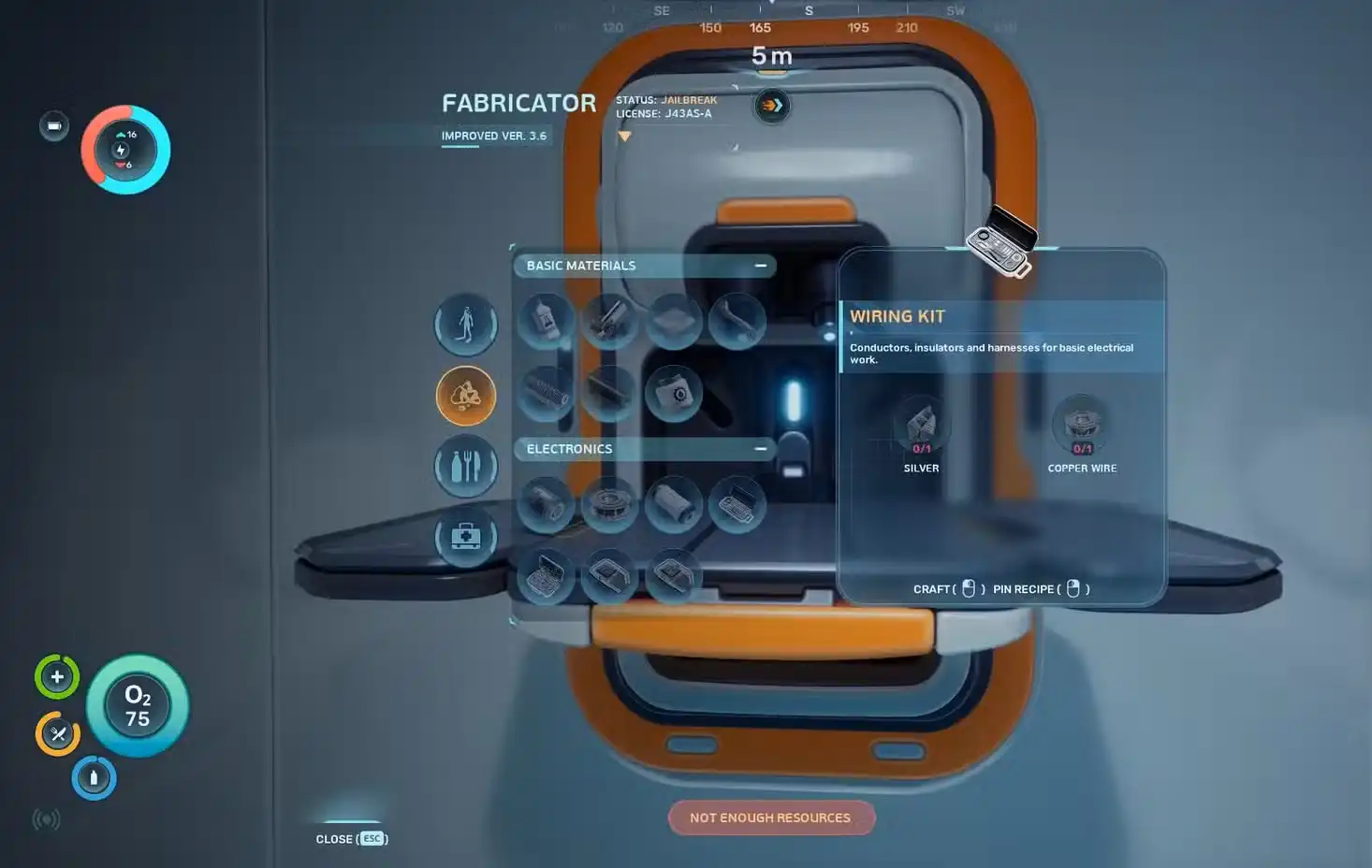
TL;DR
- The “Requires Fully Functional Fabricator” error appears because the Lifepod’s Fabricator is damaged and limited.
- You cannot repair or fix the Lifepod Fabricator — this is intentional game design.
- The only fix is to build your own base and place a new Fabricator inside it.
- To do that, you need the Habitat Builder tool — which requires scanning two Habitat Builder fragments first.
- The closest scan locations are at the Welcome Center, ~85m southeast of your Lifepod.
- Once your base has a Fabricator and power from a Solar Panel, all recipes become available.
- The Fabricator draws 2 energy units per second — power is essential, not optional.
What Does “Requires Fully Functional Fabricator” Mean in Subnautica 2?
You are standing at the Fabricator in your Lifepod, you have the materials, and then you see it — a red error message that says “Requires Fully Functional Fabricator.” The recipe is greyed out and nothing works. It is one of the most confusing moments for new players in Subnautica 2.
Here is what is happening. Your Lifepod took heavy damage during the crash. The Fabricator inside it survived, but only partially. It can handle basic recipes, but as soon as you unlock more advanced crafting options, the damaged Lifepod Fabricator simply cannot process them. The game is pushing you toward the next stage of progression: building your own base.
This is not a bug. It is not a glitch. It is an intentional game mechanic designed to get you out of the Lifepod and into proper base building. Understanding that makes the solution much clearer.
Can You Fix the Lifepod Fabricator?
No. The Lifepod Fabricator cannot be repaired. There is no item, tool, or upgrade that restores it to full functionality. The Lifepod also has no modifiable interior space, so you cannot place a new Fabricator inside it either.
The only way to resolve this error is to build a new Fabricator inside a base you construct yourself. Once you have a working base Fabricator with power running to it, every recipe in the game becomes available to craft. The Lifepod Fabricator stays limited forever — your base becomes your real crafting hub going forward.
How to Fix “Requires Fully Functional Fabricator” — Step by Step
Step 1: Craft a Scanner
Before anything else, you need a Scanner. This is the tool that lets you scan objects in the world to unlock blueprints. You cannot get the Habitat Builder blueprint without it.
To craft a Scanner, go to the Personal tab in the Lifepod Fabricator and gather these materials:
- 2x Titanium — found on the ocean floor and in cave walls near the Lifepod.
- 2x Quartz — found on the seafloor and inside Coral Domes.
- 1x Basic Battery — crafted in the Resources tab of the Lifepod Fabricator using 2x Copper and 1x Acidic Raion Pouch.
For copper locations, our Subnautica 2 copper guide covers all the best early spots in detail, including the cave directly under your Lifepod.
Step 2: Find and Scan Two Habitat Builder Fragments
With your Scanner in hand, you need to find and scan two Habitat Builder fragments to unlock the Habitat Builder blueprint. The easiest location to find both is the Welcome Center, approximately 85 meters southeast of your Lifepod.
At the Welcome Center, look for:
- One Habitat Builder fragment next to the entrance of the Welcome Center structure.
- One Habitat Builder fragment in a hole below the middle of the camp — you may need to clear some metal salvage out of the way to reach it.
Alternatively, you can find a Habitat Builder fragment near the Gene Donor — the large pink alien plant about 160 meters north-northeast of the Lifepod. Once you have scanned two fragments in total from any combination of locations, the blueprint unlocks automatically.
Step 3: Craft the Habitat Builder
Once you have the blueprint, go back to the Lifepod Fabricator and craft the Habitat Builder. Here is what you need:
- Glass — crafted from 2x Quartz in the Fabricator Resources tab.
- Basic Battery — crafted from 2x Copper and 1x Acidic Raion Pouch.
- Copper Wire — crafted from 2x Copper Ore in the Fabricator Resources tab.
All of these sub-components are crafted at the Lifepod Fabricator before you even need the base. Once you have the Habitat Builder in your inventory, you are ready to build.
Step 4: Build a Simple Base
You do not need a large or complex base at this stage. A minimal base works fine. Equip the Habitat Builder and right-click to open the build menu. Place a single corridor tube and attach a hatch to one end. That is enough interior space to place a Fabricator.
A few things to keep in mind when choosing where to build:
- Build in shallow water close to the surface when starting out. Solar Panels work best in shallow areas where light reaches easily.
- Stay near the Lifepod if possible — being close to familiar resources makes early base life much easier.
- Make sure there is space on top of your base for Solar Panels. You need a roof surface to attach them.
Step 5: Add a Solar Panel for Power
A Fabricator draws 2 energy units per second when in use. Without power, your base Fabricator will not work at all — so this step is non-negotiable.
Using your Habitat Builder, place at least one Solar Panel on the roof of your base. In shallow water, one Solar Panel is usually enough to power a basic base with a single Fabricator inside. You can check your base’s power output and draw at any time by walking close to it — the readout appears in the top-left corner of your screen.
Solar Panels do reduce output at night and deeper underwater. If your base is deeper than the shallow starting area, you may need two Solar Panels to keep things running reliably. Later in the game, you can replace or supplement Solar Panels with Hydroelectric Turbines or Bioreactors for more stable power generation.
Step 6: Place a Fabricator Inside Your Base
Once your base has power, go inside and use the Habitat Builder to place a Fabricator on a wall inside your corridor or room. Walk up to it and interact with it.
This Fabricator is fully functional. Every recipe that was greyed out or locked behind the “Requires Fully Functional Fabricator” error will now be available. The error is completely gone.

What Can the Base Fabricator Craft That the Lifepod Cannot?
The base Fabricator unlocks a significantly larger range of recipes. Some key items you can now craft include:
- Fiber Mesh — used in a range of equipment and base furnishings.
- Wiring Kits — a core component for mid-game equipment.
- First Aid Kits — proper healing items for longer dives.
- Advanced base modules, interior furnishings, and progression-critical tools.
As you explore and discover new materials in the ocean, the Fabricator also automatically unlocks new recipes tied to those materials. You do not need to find a blueprint for every recipe — curiosity and exploration unlock many options on their own. The more you find and pick up, the more recipes open up in the menu.

What About the Processor? Is That Different?
Yes. Even the base Fabricator has limits. As you progress further in Subnautica 2, you will discover materials that require a different machine entirely — the Processor. The Processor handles ingots and refined materials that the Fabricator cannot produce. It is not a fix for the “Requires Fully Functional Fabricator” error, but it is the next upgrade you will need to think about once your base is up and running.
Think of progression this way: Lifepod Fabricator → Base Fabricator → Processor. Each step unlocks a new layer of crafting that the previous machine could not handle.
Tips to Avoid Getting Stuck Again
- Build your base early — do not wait until you are frustrated by the error. The Habitat Builder is designed to be one of your first major milestones.
- Always power your base before crafting — a Fabricator without power does nothing. Solar Panel first, Fabricator second.
- Scan everything you find — broken items, furniture in abandoned bases, tools on the seafloor. Every scan potentially unlocks new blueprints and recipes.
- Build one of everything in the Fabricator when you can — some advanced recipes only appear once you have crafted and held the prerequisite item. Hold that item and new sub-recipes unlock automatically.
- Mark your base with a Habitat Beacon — place one on your base as soon as you can. Without a map, finding your base again after exploring can be surprisingly difficult.
For a full picture of what to prioritise early on, check out our Subnautica 2 best early upgrades and progression path guide. And if you need help managing the basics while you work toward your base, our Subnautica 2 water guide and beginner tips and tricks guide cover everything you need to stay alive in the meantime.
About Subnautica 2
Subnautica 2 launched into Early Access on May 14, 2026, developed by Unknown Worlds Entertainment and published by Krafton. It is built on Unreal Engine 5 and supports up to four-player co-op. You can get it on PC via Steam or on Xbox Series X/S via the Xbox Store, including on Xbox Game Pass. For everything you need before diving in, check our Subnautica 2 release date, platforms, price and where to play and our Subnautica 2 PC requirements guide. Playing with friends? Here is the full Subnautica 2 multiplayer and co-op guide.
Quick Recap: How to Fix “Requires Fully Functional Fabricator”
- The Lifepod Fabricator is damaged and cannot be repaired.
- Build a Scanner first — you need it to unlock the Habitat Builder blueprint.
- Scan two Habitat Builder fragments — the Welcome Center (85m southeast of the Lifepod) has two close together.
- Craft the Habitat Builder using Glass, a Basic Battery, and Copper Wire.
- Use the Habitat Builder to place a corridor and hatch — even a small base is enough.
- Attach at least one Solar Panel to the roof for power.
- Place a Fabricator inside your base and interact with it.
- The error is now gone — full crafting is unlocked.


