TL;DR
- You can check vehicle stats in GTA 6 using the WAiNK phone app, vehicle HUD or by inspecting the engine.
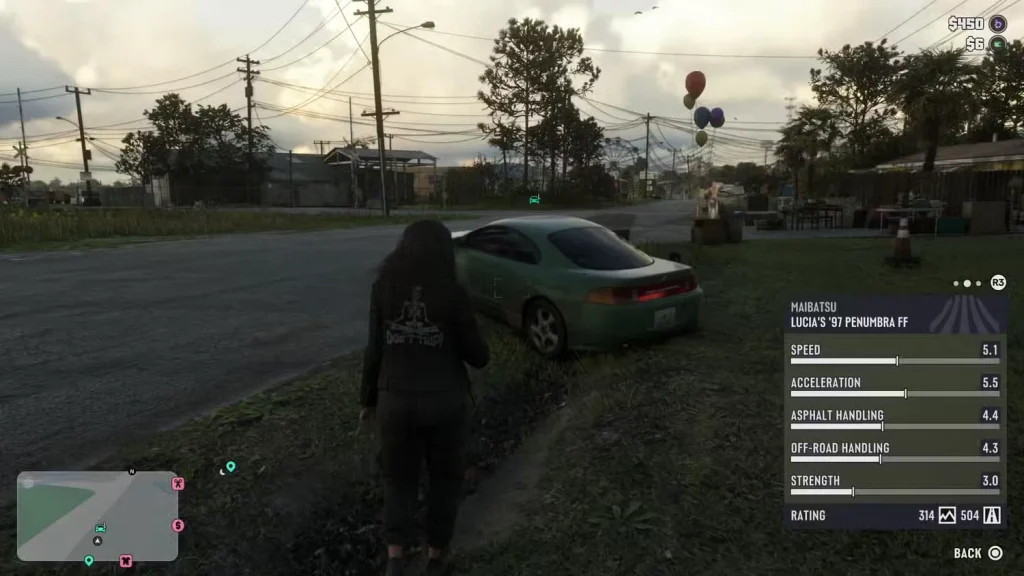
- Vehicles have five main performance stats: Speed, Acceleration, Asphalt Handling, Off-Road Handling and Strength.
- You must start a vehicle’s engine to reveal its full performance statistics through WAiNK.
- Separate road and off-road ratings determine whether your vehicle meets certain race requirements.
- Engine upgrades, tires and wheel kits can change vehicle performance and race ratings.
Vehicle stats in GTA 6 tell you much more than how fast a car can go. You can check its acceleration, handling, durability, security features, registration cost and even how much storage space it offers.
The easiest way to inspect a vehicle is through the WAiNK app on your in-game phone. You can also access performance statistics while driving or by inspecting a vehicle’s engine.
Understanding these numbers can save you thousands of dollars when choosing a personal vehicle, preparing for races or spending money on performance upgrades.
How to Check Vehicle Stats in GTA 6
There are multiple ways to check vehicle statistics in GTA 6. WAiNK is particularly useful when inspecting an unfamiliar car, while the vehicle HUD is more convenient when you are already behind the wheel.
| Action | PS5 | Xbox Series X|S |
|---|---|---|
| Quickly open WAiNK | Hold D-Pad Up | Hold D-Pad Up |
| Scan a vehicle | Hold R1 | Hold RB |
| Switch information pages | R3 | Right Stick Click |
| Access vehicle information while driving | Hold D-Pad Left | Hold D-Pad Left |
| Display vehicle stats on HUD | D-Pad Down | D-Pad Down |
| Inspect vehicle engine | L1 | LB |
Method 1: Check Vehicle Stats Using WAiNK
The WAiNK app becomes available during the Unwanted Attention mission in Chapter 1, when Cal installs it on Jason’s phone.

Once unlocked, follow these steps:
- Approach the vehicle you want to inspect.
- Hold Up on the D-pad to open WAiNK.
- Aim your phone at the vehicle.
- Hold R1 on PS5 or RB on Xbox to scan it.
- Click the right analog stick to cycle through the information pages.
- Enter the vehicle and start its engine to unlock the full performance statistics.
Before starting the engine, you can still inspect the vehicle’s security, price, body condition and other general information.
This makes WAiNK particularly useful when searching for a new car to register or sell.
Method 2: Check Vehicle Stats While Driving
You do not need to take out your phone every time you want to inspect your current vehicle.
- Enter the driver’s seat.
- Hold Left on the D-pad to access the radio and vehicle controls.
- Keep holding the button to display the vehicle information card.
- Click the right analog stick to cycle through its pages.
- Find the page displaying the five performance statistics and race ratings.
You can also press Down on the D-pad while driving to display vehicle statistics on the HUD.
This is a convenient way to compare unfamiliar cars without repeatedly opening WAiNK.
Method 3: Inspect the Vehicle Engine
Another useful feature is the ability to inspect a vehicle from outside.
- Drive the vehicle at least once.
- Park it and exit.
- Walk towards the hood.
- Press L1 on PS5 or LB on Xbox when prompted.
Inspecting the engine allows you to access vehicle information and check its condition without sitting inside the car.
All Vehicle Stats in GTA 6 Explained
GTA 6 displays five main vehicle performance statistics. Each uses a rating scale out of 10, allowing you to compare different vehicles without relying on estimated real-world performance figures.
| Vehicle Stat | What It Measures | Best Use |
|---|---|---|
| Speed | Maximum speed potential | Highways and long races |
| Acceleration | How quickly the vehicle gains speed | Street races and quick starts |
| Asphalt Handling | Handling on paved surfaces | City driving and road racing |
| Off-Road Handling | Handling on unpaved terrain | Dirt racing and wilderness exploration |
| Strength | Resistance to damage | Combat and dangerous missions |
Speed
The Speed stat represents a vehicle’s maximum speed potential. A higher rating generally indicates that a vehicle can reach a greater top speed.
However, the number is not a measurement in MPH or KM/H. A vehicle with an 8.0 speed rating is not necessarily capable of reaching 200 MPH.
Speed is particularly useful when comparing vehicles for highway driving and races with long straight sections.
Acceleration
Acceleration determines how quickly a vehicle builds speed. This matters when pulling away from a stationary position or accelerating after a sharp corner.
A car with excellent acceleration can be more useful in Vice City’s crowded streets than a vehicle with a higher top-speed rating but slower acceleration.
For short races and routes with frequent turns, prioritize acceleration alongside handling.
Asphalt Handling
Asphalt Handling measures how well a vehicle handles paved roads.
Vehicles with strong asphalt handling are generally better suited to tight corners, city streets and road races.
Do not overlook this statistic when choosing a sports car. A fast vehicle that is difficult to control may cost you more time than it saves.
Off-Road Handling
Off-Road Handling measures a vehicle’s suitability for driving away from paved roads.
It is especially important when exploring Leonida’s rural areas, dirt tracks, beaches and uneven terrain.
Pickup trucks, dirt bikes, off-road vehicles and certain SUVs are worth considering when your route involves frequent off-road driving.
A high-performance supercar may dominate on asphalt but struggle against a slower vehicle on a dirt course.
Strength
Strength represents a vehicle’s resistance to damage. Vehicles with higher strength ratings are generally better choices when durability matters more than outright speed.
This statistic is worth checking before starting missions where your vehicle may take heavy damage.
Strength does not make a vehicle indestructible or automatically mean that it has bulletproof windows. You still need to consider its condition and any installed upgrades.
GTA 6 Road and Off-Road Vehicle Ratings Explained
Alongside the five performance statistics, GTA 6 displays two additional vehicle ratings.
- Road Rating: Represents the vehicle’s suitability for asphalt racing.
- Off-Road Rating: Represents its suitability for dirt and off-road racing.
These ratings appear as larger numerical values alongside road and off-road icons on the vehicle information card.
They are separate from the Asphalt Handling and Off-Road Handling statistics. A handling stat may be displayed as 5.0, while the corresponding race rating uses a different numerical scale.
Why Vehicle Ratings Matter for Races
Certain races have vehicle rating requirements. Your car may need to fall within an eligible rating range before you can enter.
Before spending money on upgrades, check the race’s requirements on the map or at the event location.
Make sure you are comparing the correct rating. Improving your road rating does not automatically make your vehicle suitable for a dirt race.
The exact formula used to calculate these ratings is not clearly explained by the game, so use the displayed values rather than trying to calculate them from the five performance statistics.
GTA 6 Vehicle Stats Comparison Example
Here is an example of how Jason’s starting pickup compares with the Obey 8F Drafter.
| Vehicle Stat | Jason’s ’70 Ganado | Obey 8F Drafter |
|---|---|---|
| Speed | 4.7 | 5.3 |
| Acceleration | 5.3 | 6.6 |
| Asphalt Handling | 3.6 | 5.0 |
| Off-Road Handling | 4.5 | 4.5 |
| Strength | 3.0 | 3.0 |
| Road Rating | 458 | 576 |
| Off-Road Rating | 330 | 370 |
The Obey 8F Drafter offers better speed, acceleration and asphalt handling in this comparison. Both vehicles have the same displayed off-road handling and strength statistics, but their overall race ratings differ.
This is a good example of why checking only one performance stat can be misleading.
These figures represent documented vehicle configurations. Modified vehicles and special variants may have different statistics.
All WAiNK Vehicle Information Categories
The WAiNK app provides three categories of vehicle information. Performance is only one part of the system.
Protection and Price
| Information | Meaning |
|---|---|
| Access | Whether the vehicle is unlocked, locked or requires a Key Cloner. |
| Security | Whether the vehicle has a car alarm. |
| Tracker | Whether the vehicle has no tracker, a Standard Tracker or an Advanced Tracker. |
| Sell Value | The displayed amount you could receive for selling the stolen vehicle. |
| Cost to Register | The amount required to register the vehicle as your own. |
Always check this information before deciding whether a vehicle is worth keeping. An expensive car may have excellent performance but require a registration service you have not unlocked yet.
Car alarms also make certain vehicles less convenient to acquire. Our guide on how to stop car alarms in GTA 6 explains that mechanic in more detail.
Further Details
| Information | Meaning |
|---|---|
| Vehicle Type | The vehicle’s category or style. |
| Era | The generation or period associated with its design. |
| Seats | Available seating capacity. |
| Storage | The vehicle’s displayed storage capacity. |
| Body Condition | The current physical condition of the vehicle. |
| Specialist | The type of mod shop that specializes in the vehicle. |
The Specialist field is particularly useful when planning upgrades. Different vehicle categories have access to different specialist modification services.
Storage is also worth checking if you intend to use the vehicle to carry weapons, equipment or other supported items.
Vehicle Stats
The final WAiNK category displays Speed, Acceleration, Asphalt Handling, Off-Road Handling and Strength.
You must start the vehicle’s engine before this performance information becomes available.
If you can only access the first two pages, there is nothing necessarily wrong with your game. The remaining information has not been revealed yet.
Best Vehicle Stats to Prioritize in GTA 6
There is no single performance statistic that determines the best vehicle for every activity. Choose a car based on what you plan to do with it.
| Activity | Stats to Prioritize |
|---|---|
| Street races | Acceleration and Asphalt Handling |
| Highway races | Speed and Acceleration |
| Off-road races | Off-Road Handling and Off-Road Rating |
| City driving | Asphalt Handling and Acceleration |
| Dangerous missions | Strength and Handling |
| General exploration | Balanced Handling and Strength |
| Personal vehicle collection | Performance, Storage and Registration Cost |
For everyday driving, a balanced vehicle is often a better investment than a supercar that excels in only one category.
If you regularly travel between Vice City and Leonida’s rural regions, consider keeping separate vehicles for road and off-road driving.
How to Improve Vehicle Stats in GTA 6
You can improve vehicle performance by installing upgrades at mod shops. Different modifications affect different statistics, and some also change your vehicle’s race ratings.
| Upgrade | Potential Benefit |
|---|---|
| Engine upgrades | Improved speed and acceleration |
| Tires | Changes to road or off-road performance |
| Wheel kits | Changes to handling and race ratings |
| Nitrous | Temporary speed boost during use |
| Pro Builds | Preset combinations of modifications and cosmetic upgrades |
The available parts depend on the vehicle and the mod shop you visit.
Check the performance preview before purchasing an upgrade. A part that improves one aspect of performance may not be the best option for your intended activity.
For example, if you are preparing for an asphalt race, check the updated road rating before confirming your purchase.
Be particularly careful when modifying Standout Vehicles. Removing their unique parts may result in losing those special components.
Check Vehicle Condition Before Comparing Performance
Vehicle strength and vehicle condition are two different things.
Strength describes the vehicle’s durability, while its condition reflects its current state. A vehicle with excellent strength can still suffer serious damage.
Before deciding that a car has poor performance, inspect its engine and repair any existing damage.
Comparing a heavily damaged vehicle with one in excellent condition is not a reliable way to judge their driving performance.
If you want to avoid unnecessary repair expenses, check our guide on how to fix your car for free in GTA 6.
Check Vehicle Stats Before Registering a Stolen Car
Registering a stolen vehicle costs money, so it is worth comparing several cars before committing to one.
Before registering a vehicle, check the following:
- Does its speed and acceleration suit your driving style?
- Does it have enough handling for the roads you normally use?
- Is its registration cost within your budget?
- Does it have a Standard or Advanced Tracker?
- Can you access its specialist mod shop?
- Does it provide enough seats and storage for your needs?
- Does its race rating meet your intended event requirements?
Remember that vehicles equipped with trackers may require registration before they can be modified. Your ability to register certain tracked vehicles also depends on story progression.
Once you find a car worth keeping, follow our guide on how to turn stolen vehicles into personal vehicles in GTA 6 to make it part of your permanent collection.
Why Vehicle Stats Are Not Showing in GTA 6
If you cannot see a vehicle’s full performance statistics, the issue is usually related to how you are inspecting it.
| Problem | Solution |
|---|---|
| WAiNK app is unavailable | Progress through Unwanted Attention in Chapter 1. |
| Only security and price information appears | Enter the vehicle and start its engine. |
| Cannot see the performance page | Click the right analog stick to cycle through the available information pages. |
| Vehicle information disappears | Keep holding Left on the D-pad while accessing the vehicle card. |
| Engine inspection is unavailable | Drive the vehicle first and approach its hood after exiting. |
| Cannot install performance upgrades | Check registration status, tracker restrictions and specialist mod shop availability. |
| Vehicle does not meet race requirements | Check the required road or off-road rating and adjust your vehicle accordingly. |
Are Vehicle Stats Accurate in GTA 6?
Vehicle statistics are useful for comparing cars, but they do not tell you everything about how a vehicle feels on the road.
The displayed Speed stat is not an exact top-speed measurement. There is also no separate braking statistic among the five main performance bars.
Road conditions, vehicle damage, installed modifications and your driving style can all affect actual performance.
Take a vehicle for a short drive before spending money on registration and upgrades. A car with slightly lower statistics may feel more comfortable to control and suit your playstyle better.
For more gameplay mechanics, vehicle guides, mission walkthroughs and useful tips, visit our complete GTA 6 guides hub.