
TL;DR
- Camp Funds are a separate currency from your personal silver — you must manually add them
- Donate Copper or Silver to Carl the Provisions Keeper at Howling Hill for instant funds
- Send Greymanes on Shield missions through Ross for passive, ongoing Camp Funds
- If Carl or Ross is missing, rest at a bed or bonfire to reset NPC locations
- Camp Funds are used for upgrades, dispatch missions, and camp expansion — not personal gear
- The treasury has a cap based on your current Howling Hill level
Camp Funds are one of the most confusing mechanics in Crimson Desert. Your wallet can be full of silver and the camp still shows zero funds. That is because your personal money does not automatically count. You have to move it over yourself.
This guide explains both methods clearly — the fast way and the passive way — and covers common issues players run into like missing NPCs and treasury limits.
For the full Crimson Desert guide hub, visit our Crimson Desert guides page.
What Are Camp Funds?
Camp Funds are a dedicated resource that lives in the Howling Hill treasury. They are separate from the Copper and Silver you carry as Kliff.
They are used to run Dispatch Missions, fund camp upgrades, and expand Howling Hill. You cannot spend them on Kliff’s weapons, armor, or personal items — that comes from your own wallet.
There are five types of camp provisions in total: weapons, minerals, timber, food, and funds. Funds are the most important because almost every major camp activity costs them.
For more on building up the camp itself, see our guide on how to upgrade Howling Hill Base Camp to Level 2.
Method 1: Donate to Carl (Fast)
This is the quickest way to top up Camp Funds at any point.
How to do it:
- Head to the Howling Hill camp
- Find Carl the Provisions Keeper — look for the Provisions Keeper icon on the map when zoomed in
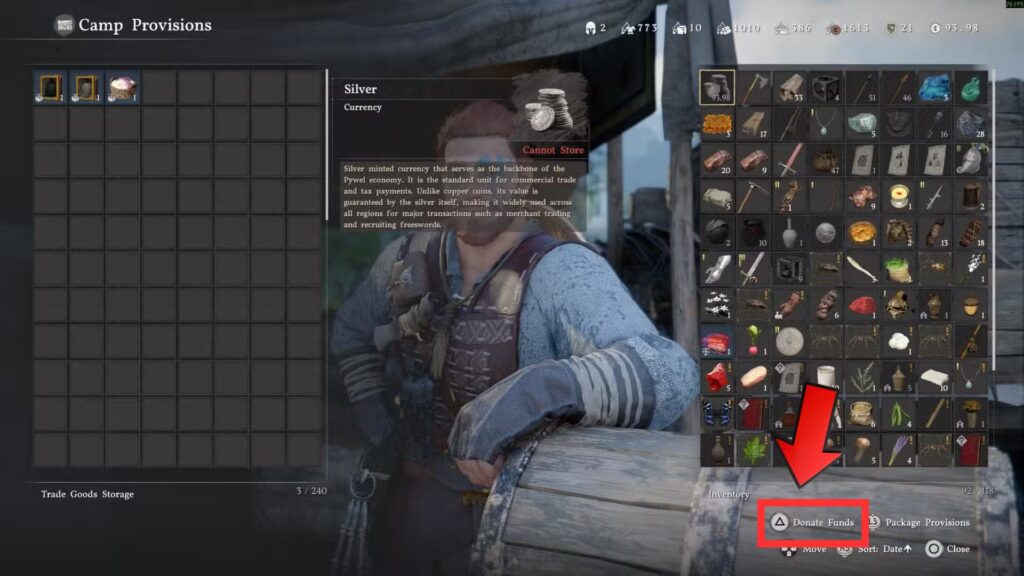
- Speak to him and select Manage Provisions, then Camp Provisions
- At the bottom right of the screen, press F on keyboard or Y / Triangle on controller to open the Donate Funds option
- Enter the amount you want to donate and select Confirm
The funds transfer instantly. No wait time, no missions required.
You can also donate items from this same screen — extra armor, rings, food, ingredients, and general loot all count as provisions and free up inventory at the same time. Donating also boosts your camp donation level, which unlocks rewards over time.
Important: Once you donate an item, you cannot get it back without loading an older save. Only donate things you are sure you do not need.
Watch your silver. Early in the game, your money is already stretched across gear, supplies, and upgrades. Dumping too much into Camp Funds too fast can slow you down elsewhere. Use Carl to solve an immediate shortfall, not as your main long-term strategy.
If Carl is not there: He sometimes moves off his post during certain main story beats. Rest at a bed or bonfire to pass time and he will return to his spot.
Method 2: Shield Missions via Ross (Passive)
This is the better long-term method. Once it is running, Camp Funds build up in the background without you spending a single coin.
How to do it:
- Go to Ross the Dispatch Coordinator at Howling Hill
- Select Manage Comrades, then Mission Dispatch
- Look through the available missions for ones marked with a Shield icon — these are the security missions that pay out Camp Funds as rewards
- Assign the required number of Greymanes and send them off
- The mission runs in the background while you play — rest at a bed or bonfire to speed up completion
Once these missions are running, Camp Funds trickle in passively. They are repeatable too, so you can keep cycling the same missions to earn an ongoing income.
If Ross is not at camp: This happens during certain Chapter 3 and Chapter 4 story beats. You can still dispatch missions directly from the map — open the world map, go to the Factions tab, look for the shield icon location, double-click it, then go to the Missions tab and dispatch your comrades from there.
The Mission Dispatch system unlocks fully after completing the Chapter 3 main mission called Bustling Hill, where the Howling Hill camp expands. Before that point, the dispatch option is limited.

Smart Mission Stacking
Once you have a few Greymanes available, you can chain missions together to make both Camp Funds and other resources pay for each other.
For example: run a food-gathering mission like the Capra Pasture cabbage harvest — it costs a small amount of copper but pays back food. Then use that food to fuel a Guard mission that pays back copper and Camp Funds. Done in the right order, the resources from one mission cover the costs of the next.
Read each mission description carefully before dispatching. Check the cost, the required skill level, and the reward type. Sending the right Greymane with the right skills gets better returns and faster completions.
For a full breakdown of how dispatching works, see our guide on how to dispatch the Howling Hill Expansion Mission.
How to Get More Greymanes
More Greymanes means more missions running at once, which means more Camp Funds flowing in at the same time.
You unlock more Greymanes by completing Greymane Faction Quests. Track these through your Journal — open the pause menu, select Journal, and look under Faction Quests for the Greymanes section.
Each new Greymane comes with their own skill set, so unlocking more also opens up missions that had skill requirements you could not meet before.
For a look at all the companions in the game, check our Crimson Desert all characters and companions guide.
Common Questions
Can Camp Funds be used to buy gear for Kliff? No. Camp Funds are strictly for camp upgrades, provisions, and faction costs. Kliff’s weapons and armor require your personal silver.
Is there a cap on Camp Funds? Yes. The treasury has a limit based on the current level of your Howling Hill camp. Upgrade the camp to raise the cap and store more at once.
Why can’t I see the Shield missions yet? Mission Dispatch opens up after the Chapter 3 Bustling Hill quest. If you are early in the story, progress the main quests until that mission completes and the dispatch system will unlock.
My Camp Funds are not going up even after missions complete. Make sure the mission rewards actually list Camp Funds — not all missions do. Look specifically for the Shield icon on the mission listing before dispatching.
Tips to Keep Camp Funds Healthy
- Always have at least one Shield mission running — idle Greymanes earn nothing
- Use Carl to cover a shortfall quickly, but do not rely on him as your primary source
- Donate excess loot and food to Carl rather than silver when possible — it achieves the same result without draining your wallet
- Unlock more Greymanes through Faction Quests to run multiple Shield missions simultaneously
- Prioritize camp upgrades that improve Mission Efficiency — they increase how much each Shield mission pays out
Related Guides
Running Camp Funds smoothly connects to a lot of other systems in the game. Here are some helpful guides that tie in:
- How to make money fast in Crimson Desert — more personal silver means more to donate when needed
- How to pickpocket in Crimson Desert — a solid way to earn silver early that feeds into donations
- How to get comrades in Crimson Desert — more Greymanes means more missions
- How to use Contribution Points in Crimson Desert
- How to unlock camp in Crimson Desert
- How to unlock Ranch and Farm in Crimson Desert
- How to trade goods in Crimson Desert
- How to farm silver with the Five Card game
Where to Play Crimson Desert
Camp Funds are simple once you know the two methods. Donate to Carl for a quick fix, and keep Shield missions running through Ross for steady passive income. Get both working at the same time and you will never hit a camp wall again. For more help with Crimson Desert, head to our Crimson Desert guides hub.


