
TL;DR
- You cannot switch the Appraiser from the start — you must unlock it first.
- Complete the In The Reflection side quest in Bridge Crossings.
- The quest involves visiting the Vintage Shop, Gold Apple Collection Hall, and a Grocery Shop.
- After the quest, go to your phone settings and use the Switch Appraiser option.
- Once you switch, there is a 24-hour cooldown before you can switch again.
So you picked your Appraiser at the start of Neverness To Everness and now you want to change it. Maybe you went with the male version and now want to try the female one, or the other way around. Either way, the game does not let you do this freely. There is a quest you need to finish first. This guide walks you through the whole process — step by step, no fluff.
What Is the Appraiser in NTE?
The Appraiser — also called Esper Zero — is your main character in Neverness To Everness. At the very beginning of the game, you pick between a male or female version of the MC. This is not just a cosmetic choice. It affects how your character looks in every cutscene, dialogue, and interaction across the game.
But unlike most games where this choice is permanent, NTE lets you change it later. You just have to earn it first.
You can download the game on the official NTE website, on Google Play, or on PlayStation Store.
How To Switch Appraiser In NTE
To switch the Appraiser in Neverness To Everness, you must first complete the In The Reflection side quest. This quest is found in Bridge Crossings. Once you finish it, the Switch Appraiser option becomes available in your in-game phone settings.
Here is how to change the Appraiser step by step after completing the quest:
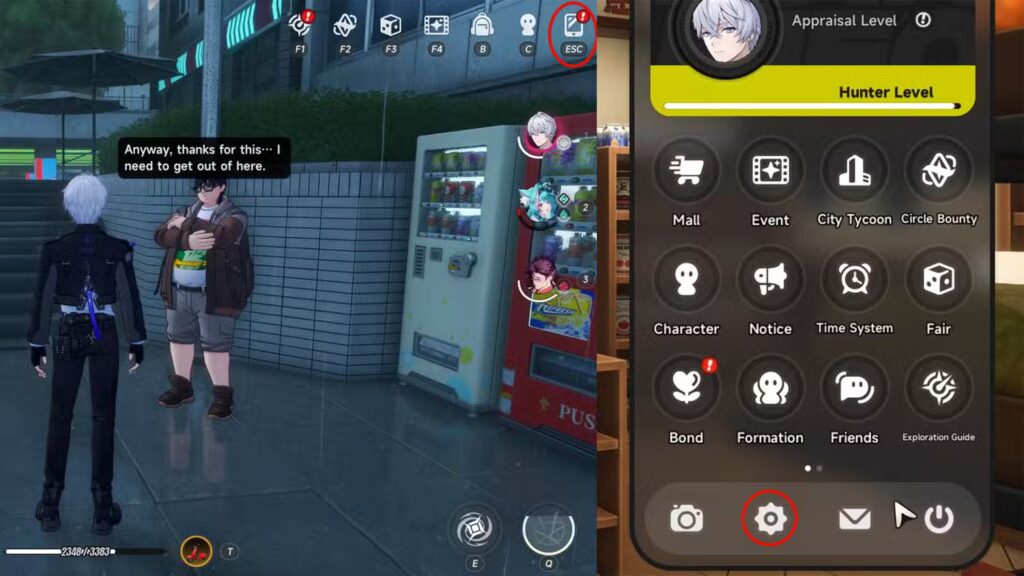
- Open the Appraiser phone menu (your in-game phone).
- Tap the cog icon to open Settings.
- Press the three dots icon to go to the Others tab.
- Find and tap Switch Appraiser under Player Settings.
- Tap Confirm.
The game will send you back to the login screen after you confirm. When you log back in, your Appraiser will be the new version you selected.
Keep in mind — after switching, you cannot switch again for 24 hours. So make sure you are happy with the change before confirming.
How To Complete the In The Reflection Quest in NTE
This is the quest that unlocks the Switch Appraiser feature. It is a short side quest, but it does take you across a few locations. Here is the full walkthrough.
Step 1 — Start the Quest at Hankaku Street
Teleport to Hankaku Street using the Wertheimer Tower. Head northeast of the tower and look for a girl NPC with a quest marker above her head. Talk to her (and the other passerby nearby). They will tell you about a mysterious mirror that they think is an Anomaly. This officially starts the In The Reflection quest.
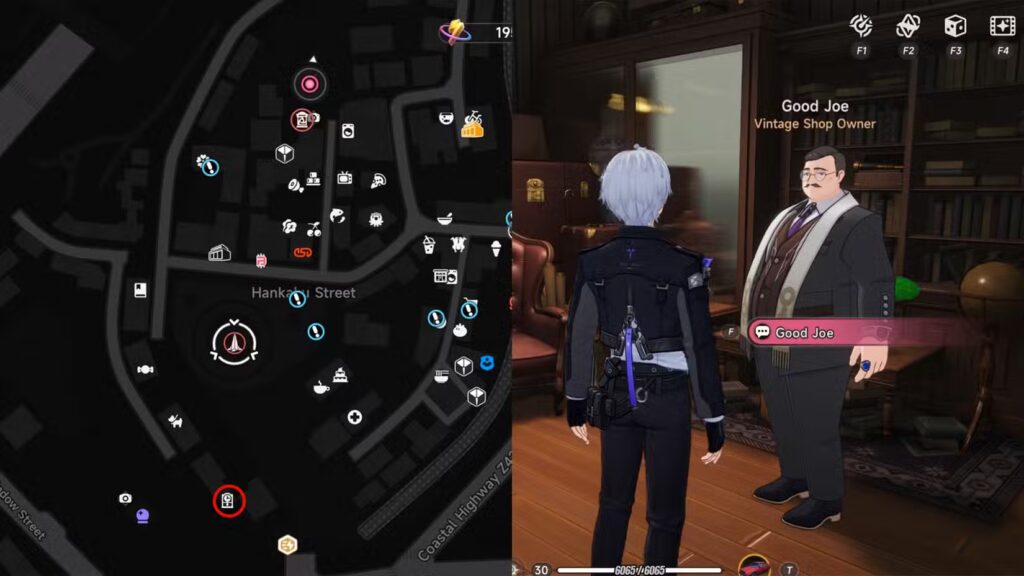
Step 2 — Visit the Vintage Shop and Talk to Good Joe
Head to the Vintage Shop south of Wertheimer Tower. Inside, talk to a character named Good Joe. He will try to sell you a fake item at an outrageously high price — classic. He will not give you a straight answer, but the conversation moves the quest forward. Once you leave the shop, a short cutscene triggers with two more girls who share what they have heard about the mirror.
Step 3 — Go to the Gold Apple Collection Hall
Follow the quest navigation to the Gold Apple Collection Hall in New Herland District. Talk to the NPC there. She will not have the mirror but will point you to yet another store to check.
Step 4 — Head to the Grocery Shop in Miguel District
Go to the Grocery Shop in Miguel District and speak to the owner about the basin. After the conversation, interact with the washbasin and add water to it. This is a key action — do not skip it. After that, talk to the owner again.
Step 5 — Quest Complete
Talking to the owner after the washbasin interaction completes the In The Reflection quest. You will earn 50 Bridge Crossings Footprint Points. More importantly, the Switch Appraiser option now unlocks in your phone settings.
What Happens After You Switch Appraiser?
Once you confirm the switch, the game logs you out automatically. When you log back in, your character model, voice, and appearance will reflect the new Appraiser form. Cutscenes and dialogues will also update accordingly.
One thing to note — the 24-hour cooldown is real. If you switch back immediately thinking it was a mistake, you will be locked out of switching again for a full day. So take a moment before you confirm.
Also, there are no in-game rewards for switching — it is purely a cosmetic and roleplay choice. It does not affect your combat stats, Espers, or progression in any way.
Tips Before You Switch Appraiser in NTE
- Do the quest early — In The Reflection is a short quest. No reason to delay it if you are curious about switching later.
- Plan around the cooldown — If you want to try both versions and compare, remember you need 24 hours between switches.
- No quest rewards for switching — The 50 Footprint Points come from finishing the quest, not from switching itself.
- The setting is easy to miss — It lives under the Others tab (three dots icon), not the main settings screen. A lot of players overlook it.
More NTE Guides You Might Find Useful
If you are exploring everything NTE has to offer, check out these guides from GamingProMax:
- Neverness To Everness Anomaly Furniture Guide
- How To Own a Cafe in Neverness To Everness
- Best PC Settings for Neverness To Everness
- Neverness To Everness Hethereau Hobbies Guide
- NTE Transform Huhehaha Flipped Phone Booth Quest Guide
- Neverness To Everness Seeing Is Believing Quest Guide
- NTE City Tycoon Guide
- Neverness To Everness Redeem Codes
Final Thoughts
Switching the Appraiser in NTE is not complicated once you know what to do. The In The Reflection quest is quick and easy. Most players can finish it in under 15 minutes. The only real thing to watch out for is the 24-hour cooldown after each switch. Other than that, you are free to change your MC’s appearance whenever you feel like it.
If you found this guide helpful, share it with other NTE players who might be stuck on the same thing.


