Everything you need to know — controls, mechanics, coins, skill tree, tips and pro strategies.
Tower of Hell has one simple goal — reach the top of the tower before the timer runs out. No story, no side quests, no distractions. Just you, the tower, and pure skill.
Each round, the game randomly stacks a series of obstacle sections to build the tower. In a Normal Tower there are 6 sections. In a Pro Tower there are 12 sections. The tower changes every round so no two climbs are ever identical.
The rule that defines everything: there are absolutely no checkpoints. Touch a kill part, fall off a platform, or make a single mistake and you go straight back to the bottom — no exceptions. This makes every successful climb a genuine achievement.
No checkpoints. Ever. Fall from section 5 of 6 and you restart from the very bottom. This is not a bug — it is the entire point. Mastering Tower of Hell means learning to complete the full climb without a single mistake.
When a player successfully reaches the top the timer doubles in speed, putting pressure on all remaining players. The more completions in a round, the faster the countdown gets. When time runs out the tower resets and a brand new randomly generated tower takes its place.
New to Tower of Hell? Here is exactly what to do from the moment you join your first server.
Open Roblox and search for Tower of Hell or use the direct link below. The game is completely free to play. Once loaded you will spawn in the lobby at the base of the tower alongside other players.
Before you start climbing, enable Shiftlock. Press ESC → Settings → Shift Lock Switch → On. This is the single most important setting in the game. It locks your camera to your character and makes precise jumps dramatically easier.
Every round begins at the lobby floor. Climb the starter ladder or stairs to reach the first section. Pro tip: use the ladder instead of the stairs — it is significantly faster. Walk on the edge of the stairs if you use them.
Do not rush straight in. Stand at the entrance of each new section and look up to scan what is ahead. Identify kill parts, moving platforms, and laser positions before committing to a jump. Rushing is the #1 reason beginners fall.
Work through each section methodically. Each section has a distinct color and a unique layout. Take your time — the timer gives you 6 minutes for a Normal Tower which is enough for careful, deliberate movement especially for new players.
Touch the finish platform at the top to complete the tower. You earn coins for each section you complete — even partial progress pays. Coins are spent in the shop on gears, mutators and cosmetic effects.
Ready to jump in? Click here to open Tower of Hell on Roblox — free to play on PC, mobile, tablet and console.
Tower of Hell is playable on PC, mobile and console. Here is every control you need to know for each platform.
| Action | PC / Keyboard | Mobile | Console |
|---|---|---|---|
| Move Forward | W | Virtual joystick up | Left stick up |
| Move Backward | S | Virtual joystick down | Left stick down |
| Move Left / Right | A / D | Virtual joystick left/right | Left stick left/right |
| Jump | Space | Jump button (bottom right) | A (Xbox) / X (PS) |
| Shiftlock / Camera Lock | Shift PC only | Shiftlock button near jump | R3 (right stick click) |
| Rotate Camera | Hold right mouse button + drag | Drag with finger | Right stick |
| Zoom Camera | Scroll wheel | Pinch gesture | D-pad up/down |
| First Person View | Scroll wheel up (zoom in fully) | Pinch in fully | D-pad up |
| Open Shop / Menu | Click YX logo (bottom left) | Tap YX logo | Select button |
| Open Settings | ESC → Settings | Hamburger menu → Settings | Menu button |
| Chat / Commands | / or click chat icon | Chat bubble icon | D-pad left |
Shiftlock is the most important setting in Tower of Hell. If you are not using it you are making the game significantly harder than it needs to be.
Shiftlock locks your camera behind your character so it moves with you rather than freely rotating. This gives you precise control over your movement direction and lets you strafe sideways — critical for navigating tight platforms, narrow ledges, and sections that require sidestep jumps.
Press ESC → click Settings tab → scroll to “Shift Lock Switch” → toggle to ON → resume game. Now press Shift at any time to activate it. Your cursor will lock to the centre of the screen.
On mobile, a dedicated shiftlock button appears near the jump button — tap it to toggle. On console (PS5/Xbox), press the R3 button (click the right analog stick) to enable shiftlock.
Shiftlock lets you jump in an exact direction without the camera fighting you. Essential for gap jumps and landing on narrow platforms.
Use A and D keys to strafe sideways while facing forward. Vital for dodging moving kill parts and navigating conveyor sections.
Switch shiftlock OFF temporarily to free-rotate the camera and survey the section ahead. Then switch back ON when ready to move. Best of both worlds.
Align your camera with your character’s head to check laser heights. Look directly up to plan your route through headhitter sections before jumping.
Tower of Hell has 330+ sections but most obstacles fall into recurring types. Learn these and every new section becomes much more manageable.
Coins are the in-game currency and XP levels you up. Both are earned by climbing — even partial progress counts.
You earn coins for every section you complete, not just for finishing the whole tower. This means even if you fall from section 5 you still keep the coins earned from sections 1 through 4. XP works the same way — your XP gained equals your coins gained per tower.
Play Pro Towers — they award 2.5× more coins than Normal Towers and grant 2× XP. Once you can consistently complete Pro Towers, this is by far the fastest way to earn coins and level up. Use a Speed Coil + Low Gravity mutator combo to complete towers faster for even more coins per hour.
Important: Leaving a server mid-round will forfeit all XP earned that round — you will not receive any XP if you quit before the round ends. Coins however are awarded per section and are kept even if you leave early.
The Skill Tree is Tower of Hell’s permanent upgrade system. Spend skill points earned from leveling up to permanently enhance your gears.
To access the Skill Tree click on your level number at the bottom of the screen (not the shop icon). Each level up grants exactly 1 skill point. You need a total of 80 skill points to fully max the skill tree — which requires reaching Level 80.
The skill tree has three branches — one per gear type. Only one branch can be active at a time, so choose the branch that matches the gear you use most. You can switch branches but you will lose the benefits of the inactive ones.
Gravity Reduction I, II, III — reduces gravity by 45%, 55%, 60% making jumps feel lighter and helping clear large gaps. Also includes Extended Duration upgrades. Best branch for beginners.
Speed Increase I, II, III — boosts movement speed by 75%, 140%, 200%. Also unlocks Double Jump skill and Block Size upgrades making platforms feel wider. Good for experienced players.
Hook Range I, II — extends hook reach to 90 and 120 studs. Hook Speed upgrades increase swing speed. Allows powerful skip routes for advanced players who have mastered hook movement.
Reaching Level 80 and fully maxing the skill tree earns you the Maxed badge and the exclusive Pink Halo cosmetic — one of only four obtainable halos in the game. See our complete Halos Guide for all halo details.
Recommended first upgrade for beginners: Gravity Coil → Extended Duration. Higher jumps help with almost every section in the game and make early progress dramatically smoother.
The shop lets you spend coins on Gears and Mutators each round. Both last one round only and must be repurchased every round.
Reduces gravity to make jumps higher and longer. The #1 recommended first purchase for beginners. Higher jumps help with nearly every section in the game.
Significantly boosts movement speed. Great for rushing through easier sections quickly. Can be dangerous on narrow sections — use with care.
Increases jump height. More targeted than the Gravity Coil — purely a jump boost without affecting gravity. Good for sections with tall vertical gaps.
Combines the effects of both Gravity Coil and Speed Coil. The most powerful movement gear but also the most expensive. Best for experienced players.
A grappling hook that lets you latch onto surfaces and swing. Enables creative skip routes and shortcuts. Has a learning curve but extremely powerful once mastered.
Slows down the round timer. Useful when the tower is difficult and you need more time. Note: the Hourglass cannot be upgraded in the skill tree.
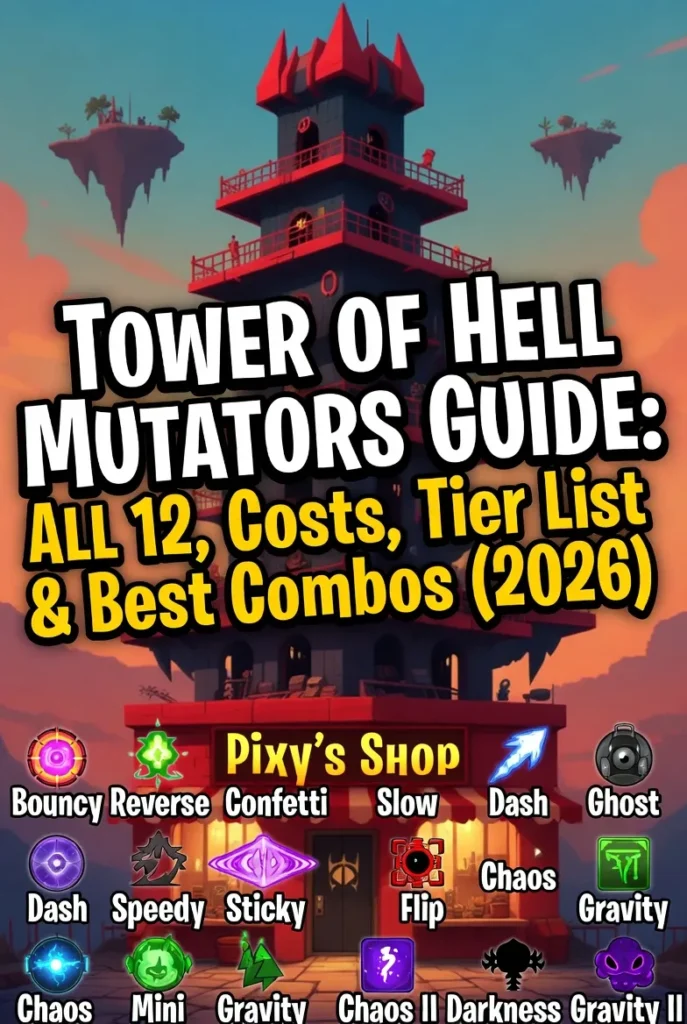
Mutators are server-wide — they affect every player in the lobby simultaneously. The most useful are:
Invincibility (500 coins) — Makes everyone immune to kill parts for one round. The best mutator with zero downsides. Great for practicing sections or getting through a particularly brutal tower.
Double Jump (200 coins) — Gives everyone a second jump mid-air. Combines with gear for a triple jump if you have the right skill tree setup. Huge help for large gaps.
Low Gravity (130 coins) — Reduces gravity server-wide. Useful for practice rounds to learn new sections slowly. Warning: makes headhitter sections nearly impossible.
Avoid: High Speed, Foggy, Negative, Add — These mutators make the game harder or provide no benefit. High Speed especially is dangerous on technical sections requiring precision.
For the complete breakdown of every gear and upgrade see our full Gears Guide and for all mutators visit the Mutators Guide.
The Pro Tower is the next level up from the Normal Tower — longer, harder, and far more rewarding.
| Feature | Normal Tower | Pro Tower |
|---|---|---|
| Sections | 6 | 12 |
| Time Limit | 6 minutes | 8 minutes |
| Coins Reward | 100 coins | 250 coins (2.5×) |
| XP Reward | 100 XP | 250 XP (2.5×) |
| How to Access | Default spawn | Enter the Pro Tower door in the lobby |
| Difficulty | Medium | Hard |
| Best for | Beginners / Learning | Coin farming / Leveling up fast |
Move to Pro Towers once you can consistently complete Normal Towers without falling. Do not rush this — Pro Towers feature 12 sections which means 12 opportunities to fall and restart. It is better to be solid on 6 sections before doubling the challenge.
Tips that separate beginners from experienced Tower of Hell players — researched from the community and verified as of February 2026.
Always look up before moving. Stand at the entrance of each section and scan the entire layout before stepping forward. Identify every kill part and moving obstacle. Planning prevents falling.
Ignore the timer. Watching the countdown causes panic which causes mistakes which causes falls. Focus entirely on the current obstacle in front of you. 6 minutes is enough time for careful movement.
Use the inside line on corners. When navigating curved or L-shaped platforms always hug the inside edge. The inside line is shorter, safer, and reduces the chance of falling off the outer edge.
Always use the ladder at spawn. The starter ladder at the bottom is faster than the stairs. If you must use stairs walk along the very edge — it is slightly faster. Every second counts in the final minutes.
Use the music wisely. The calming Evanbear1 soundtrack can help keep you focused and reduce stress. However if music distracts you turn it off via the pause/play icon in the bottom right of the screen.
Check laser heights with your camera. For laser sections align your camera with your character’s head level. If the laser is above your head you can walk under it. If it is at foot level you jump over it.
Repetition is the only teacher. Every section you fail teaches you its layout. After two or three attempts on a section you will know exactly where every kill part is. Failure is how you learn Tower of Hell.
Play harder obbies to improve faster. If you want to accelerate your skill level play tiered obby games like JToH (Juke’s Towers of Hell) outside of Tower of Hell sessions. Coming back will make ToH feel significantly easier.
PC has a major advantage. Keyboard and mouse gives more precise control than mobile or controller. If you are serious about improving and have access to a PC it will dramatically help your performance.
Buy the Gravity Coil first. At 6,000 coins the Gravity Coil is the best early purchase. Higher jumps help with almost every section and the Extended Duration skill tree upgrade makes it even better. This single purchase will noticeably improve your completion rate.
Here is the optimal progression path from your very first game to fully maxed veteran — as recommended by the Tower of Hell community in 2026.
Enable shiftlock. Learn the controls. Play Normal Towers without any gears. Focus entirely on understanding how each section type works. Do not spend coins yet — save them for the Gravity Coil.
Save 6,000 coins and buy the Gravity Coil. Immediately invest skill points into the Extended Duration upgrade. Begin completing Normal Towers more consistently. Start recognizing recurring section patterns.
Once you can consistently complete Normal Towers transition to Pro Towers for 2.5× coin and XP rewards. Buy the Speed Coil. Unlock more Skill Tree upgrades. You are now earning coins fast enough to buy mutators regularly.
Buy the Fusion Coil and Hook. Learn hook movement for skip routes. Experiment with different Skill Tree branches. Use Invincibility and Double Jump mutators strategically. Try the harder secret sections when they appear.
Reach Level 80 and fully max the Skill Tree to earn the Maxed badge and the Pink Halo. Collect all 7 badges for the Purple Halo. Begin hunting for the Teal Halo by opening all coin box effects.
Only the most skilled players attempt THE Tower of Hell — all 330 sections in one run with no timer. Completing it earns the legendary Red Halo and Certified Beast badge. As of February 2026 only a tiny number of players have achieved this. See our THE Tower of Hell guide for everything you need to know.
Is Tower of Hell free to play? Yes — completely free. Some cosmetics cost Robux (like the Blue Halo) but all gameplay content including gears, mutators and skill tree can be accessed with coins earned for free.
Why does my XP disappear when I leave? XP is only awarded at the end of a complete round. Leaving mid-round forfeits all XP earned that round. Coins however are kept when you leave early.
What should I buy first with coins? The Gravity Coil (6,000 coins) — no question. It helps with virtually every section in the game and is universally recommended as the first purchase by the entire Tower of Hell community.
How do I earn coins faster? Play Pro Towers — they award 2.5× more coins. Use the Speed Coil and Low Gravity mutator to complete towers faster. The Pro Tower gamepass (350 Robux) also grants 2× coin rewards on every completion.
Can two people play the same tower? Yes — public servers have multiple players all climbing the same randomly generated tower simultaneously. When one player reaches the top the timer speeds up for everyone else.
What are secret sections? There are 28 hidden sections that can randomly appear in your tower instead of a regular section. Some give special rewards. The rarest — Saboteur — has approximately a 1-in-10,000 spawn rate. See our Sections Guide for the full list.
Is there a way to practice specific sections? Use a private VIP server and the /mod vanilla command to filter section types. You can also use /setLength to create very short towers for focused practice on specific sections.