
TL;DR
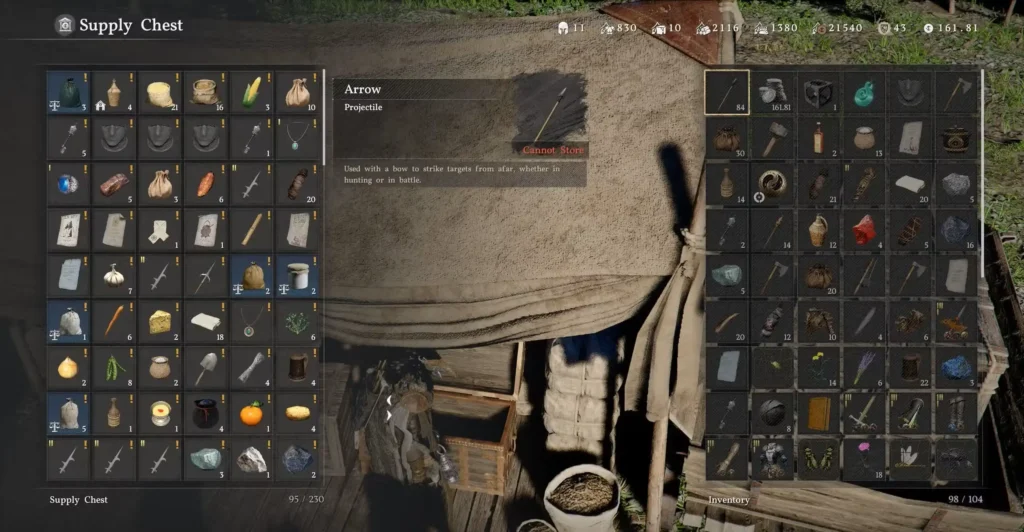
- Lost loot in Crimson Desert is stored automatically in the Supply Chest at Howling Hill camp, behind NPC Carl.
- The chest collects items you did not pick up during liberation events, dropped letters, and uncollected recipes.
- The Supply Chest first appears at the Royal Trading Post in Hernand, then moves to Howling Hill once you unlock the Greymane Camp.
- It holds 230 slots max — check it regularly or it can fill up and stop collecting.
- Carl also has a “Recover Items” tab where you can buy back lost Kuku Pot items — but prices are steep.
- Pets auto-loot during combat and are the best way to prevent loot from going missing in the first place.
- The Supply Chest also holds your Deluxe Edition and pre-order bonus items — check it early.
Losing loot in Crimson Desert happens faster than you think. Liberation events move quickly. Enemy bodies despawn in seconds. Inventory fills up and you start dropping things. One moment you are sweeping through a camp, the next you realize you never looted half the enemies.
That is exactly what the Supply Chest is for. It quietly catches most of what you miss and keeps it safe until you are ready to collect it. This guide explains where to find it, how it works, what it does and does not collect, and how to make sure you are never leaving valuable items behind.
Where Is the Supply Chest in Crimson Desert?
The Supply Chest moves locations as you progress through the early game.
First Location — Royal Trading Post, Hernand
The very first Supply Chest appears right at the start of the game. After arriving in Hernand City and waking up at the Royal Trading Post, look inside the tent next to your bed. There is a Supply Chest sitting right there. Interact with it to claim any bonus items — including your Deluxe Edition and pre-order rewards if you purchased them. This is where those items land first.
For a full breakdown of how to claim pre-order and Deluxe Edition items, see our guide on how to claim pre-order and Deluxe Edition items in Crimson Desert.
Main Location — Howling Hill, Greymane Camp
Once you unlock the Greymane Camp at Howling Hill through the main story, the Supply Chest moves here permanently. This becomes your main hub for retrieving lost loot for the rest of the game.
Head to the camp and look for Carl, the Base Camp Provisions Keeper. The Supply Chest is the large chest sitting directly behind him. Walk up to it and interact to open it and collect anything inside.
The Greymane Camp is unlocked through the main story progression. If you have not unlocked it yet, see our guide on how to unlock Camp in Crimson Desert for what you need to do.
How the Supply Chest Works
The Supply Chest is an automatic lost-and-found system. You do not deposit anything into it yourself — the game fills it passively as you play. Here is what it collects and how it works.
What Goes Into the Supply Chest
| Item Type | Collected? | Notes |
|---|---|---|
| Loot from liberation events | ✅ Yes | Bodies despawn fast — the chest saves what you missed |
| Dropped letters | ✅ Yes | Narrative items you walked past |
| Recipes you haven’t examined | ✅ Yes | Useful for crafting progress |
| Upgrade materials | ✅ Yes | Ore, components, resources |
| Food items | ✅ Yes | Consumables from defeated enemies |
| Weapons and armor | ✅ Yes | Equipment dropped by enemies |
| Abyss Artifacts | ✅ Yes | Including Abyss Cores for skill investment |
| Kuku Pot items | ❌ No | These go through Carl’s “Recover Items” tab instead |
| Items you manually dropped | ❌ No | Intentionally discarded items are not saved |
The chest is particularly useful after camp liberations and stronghold events, where you are dealing with dozens of enemies at once and bodies despawn before you can loot them all. The chest silently saves those drops in the background.
The 230 Slot Limit — Check It Often
The Supply Chest has a maximum capacity of 230 slots. Once it is full, it stops collecting new lost items. If you go a long time without checking it, you can miss loot that genuinely disappears because the chest had no room.
Make it a habit to check the Supply Chest every time you return to camp between missions and expeditions. Empty it out, sell what you don’t need to the camp vendors, and keep those slots available.
You Cannot Store Items in It Yourself
This is a common point of confusion. The Supply Chest is not a storage chest. You cannot put your own items inside it to save for later. It is receive-only — items go in automatically, and you take them out. There is currently no traditional storage system in Crimson Desert at launch.
Carl’s “Recover Items” Tab — Getting Kuku Pot Items Back
Beyond the Supply Chest itself, speaking to Carl directly opens a menu with a “Recover Items” tab. This is separate from the chest.
The Recover Items tab is specifically for Kuku Pot items — the special items tied to Kliff’s personal inventory and progression. If you lose or drop a Kuku Pot item, you cannot get it back from the Supply Chest. Carl is the only way to recover it.
The catch is that Carl charges for this service, and the prices are not cheap. Think of it as a fine for losing something important. Check Carl’s tab if you are missing a Kuku Pot item and cannot figure out where it went — but be prepared to spend a decent amount of Silver.
Need more Silver to afford recoveries and camp upgrades? Check out our guide on how to steal items in Crimson Desert and our Duo card game guide for fast Silver methods.
How to Prevent Lost Loot Before It Happens
The Supply Chest is a great safety net. But it is better to not lose loot in the first place. Here are the most effective ways to stay on top of looting.
Get a Pet
Pets are the single best tool for preventing lost loot. They follow you during combat and automatically pick up nearby items while you fight. In large liberation events with dozens of enemies, a pet will hoover up drops while you move from target to target.
This is especially helpful because enemy bodies despawn so quickly in Crimson Desert. You physically cannot loot everything yourself in a large fight. A pet can. Getting one early is one of the best quality-of-life improvements in the game.
Our guide on how to get a pet in Crimson Desert walks you through exactly how to do it.
Expand Your Inventory
A full inventory means items you pick up have nowhere to go. Increasing your bag size before major events means you can carry more and drop less. Bag space comes from completing Faction Quests and Commission quests in each region, and from buying Small Bags from vendors for 50 copper each.
See our full guide on how to increase inventory space in Crimson Desert to maximize your carrying capacity.
Sell Constantly — Use Vendors as Temporary Storage
Since there is no storage chest system at launch, selling items to merchants is the best way to free up space and avoid losing things. Merchants keep sold items in a “Repurchase” tab for roughly seven in-game days. If you realize you sold something by mistake, you can buy it back from the same vendor.
Be careful though. After seven in-game days, sold items are deleted from the vendor permanently. Do not use this as long-term storage — it is a short-term safety valve only.
For more on managing your gear and inventory across Pywel, check out our guides on how to get iron ore in Crimson Desert and how to upgrade weapons and armor.
The Supply Chest and Deluxe Edition Items
If you purchased the Deluxe Edition of Crimson Desert or pre-ordered the game, your bonus items — including upgraded character armor and horse armor — arrive via the Supply Chest. They will not appear in your regular inventory automatically.
Check the Supply Chest at the Royal Trading Post as soon as you arrive in Hernand at the start of the game. Your bonus items are sitting there waiting. Once you move to Howling Hill, the chest relocates and your items come with it.
These items are cosmetically upgraded versions that can also be further upgraded as you progress, so it is worth collecting them early.
Supply Chest vs. Other Chests — What Is the Difference?
Pywel is full of chests, and it can get confusing. Here is a quick breakdown:
| Chest Type | What It Contains | Can You Store Items? |
|---|---|---|
| Supply Chest (Carl, Howling Hill) | Your missed loot, lost items, pre-order bonuses | No — receive only |
| Strongbox | Rare items, recipes, powerful weapons | No — loot only |
| Treasure Chest | Mid-tier armor, equipment, Palmar Pills | No — loot only |
| Regular Chest | Silver, crafting materials | No — loot only |
| House cabinets/drawers | Copper, small items | No — loot only (storage furniture coming in post-launch patch) |
None of these allow you to deposit your own items. Crimson Desert does not have player-controlled storage at launch. Pearl Abyss has confirmed housing storage furniture is coming in a future update.
Quick Tips for Using the Supply Chest
Check it after every major event. After liberating a camp or completing a region quest, head back to Howling Hill and open the Supply Chest. You will often find more than you expected.
Empty it before you hit 230 slots. A full chest stops working. Do not let it fill up and miss new loot.
Sell unwanted items at camp vendors. Once you open the Supply Chest, you will often end up with duplicates, low-value materials, and items you have no use for. The camp vendors are right there — sell the extras immediately.
Check Carl’s tab too. Opening the chest is not the same as talking to Carl. If you are missing a Kuku Pot item, it will not be in the chest — it will be in Carl’s Recover Items tab.
The chest helps even when you don’t know you lost something. That is the best part about it. Sometimes you will open the Supply Chest and find a rare recipe or a weapon drop you had no idea you missed. Make checking it a routine, not an afterthought.
Related Crimson Desert Guides
- How to Unlock Camp in Crimson Desert
- How to Get a Pet in Crimson Desert
- How to Increase Inventory Space in Crimson Desert
- How to Claim Pre-order and Deluxe Edition Items in Crimson Desert
- How to Steal Items in Crimson Desert
- How to Get Keys in Crimson Desert
- How to Respec in Crimson Desert
- How to Upgrade Weapons and Armor in Crimson Desert
- How to Get Iron Ore in Crimson Desert
- How to Open Sealed Abyss Artifacts in Crimson Desert
- Crimson Desert Abyss Without Balance Puzzle Solution
- How to Beat Kearush the Slayer in Crimson Desert
- How to Fast Travel in Crimson Desert
- How to Enter Hernand Castle in Crimson Desert
- How to Enter Halssius House of Healing in Crimson Desert
- How to Get and Use Palmar Pills in Crimson Desert
- How to Win Arm Wrestling in Crimson Desert
- How to Get a Dragon in Crimson Desert
- How to Change Time of Day in Crimson Desert
- How to Put Away Weapons and Become Unarmed
- How to Ascend Lioncrest Watchtower in Crimson Desert
- Crimson Desert Duo Card Game Guide
- Best PC Settings for Crimson Desert
- Crimson Desert All Main Story Quests and Chapters
- Crimson Desert Belltower Fog of War — All Bell Locations
- Bruna’s Request Quest Guide
- How to Complete Renee’s Request
- How to Complete Rhett’s Request
- Crimson Desert Reunion Quest Walkthrough
- How to Get Crimson Desert Twitch Drops
- Crimson Desert Review
Crimson Desert is available on PlayStation, Xbox, Steam, and Epic Games. Visit the official Crimson Desert website for the latest news.
FAQs — Lost Loot and Supply Chest in Crimson Desert
Q: Where is the Supply Chest in Crimson Desert?
A: The Supply Chest first appears at the Royal Trading Post in Hernand City — inside the tent next to your starting bed. Once you unlock the Greymane Camp at Howling Hill through the main story, the chest moves there permanently. It is located directly behind Carl, the Base Camp Provisions Keeper.
Q: What does the Supply Chest collect in Crimson Desert?
A: It collects loot you missed during liberation events, dropped letters, uncollected recipes, upgrade materials, weapons, food, and Abyss Artifacts. It does not collect items you manually dropped, and it does not save Kuku Pot items — those go through Carl’s “Recover Items” tab instead.
Q: Can you store items in the Supply Chest in Crimson Desert?
A: No. The Supply Chest is receive-only. Items go in automatically when you miss them during gameplay. You cannot deposit your own items into it. There is currently no player-controlled storage system in Crimson Desert at launch, though Pearl Abyss has confirmed housing storage is coming in a future update.
Q: What happens when the Supply Chest is full in Crimson Desert?
A: Once it reaches its 230-slot limit, it stops collecting new lost items. Loot that should go into a full chest is simply lost for good. Check the chest regularly and empty it out to keep those slots available.
Q: How do you recover Kuku Pot items in Crimson Desert?
A: Talk to Carl directly and look for the “Recover Items” tab. This is separate from the Supply Chest. Carl can recover Kuku Pot items that you have lost, but he charges a significant amount of Silver for the service. The Supply Chest will not have these items — Carl’s tab is the only way to get them back.


