TL;DR
- The Paper Plane Anomaly Furniture unlock requires you to take 1 photo of a Paper Plane enemy in NTE.
- The “Paper Plane” is actually an enemy called the Paper Squadron, found in Illusion Town near suburban mailboxes.
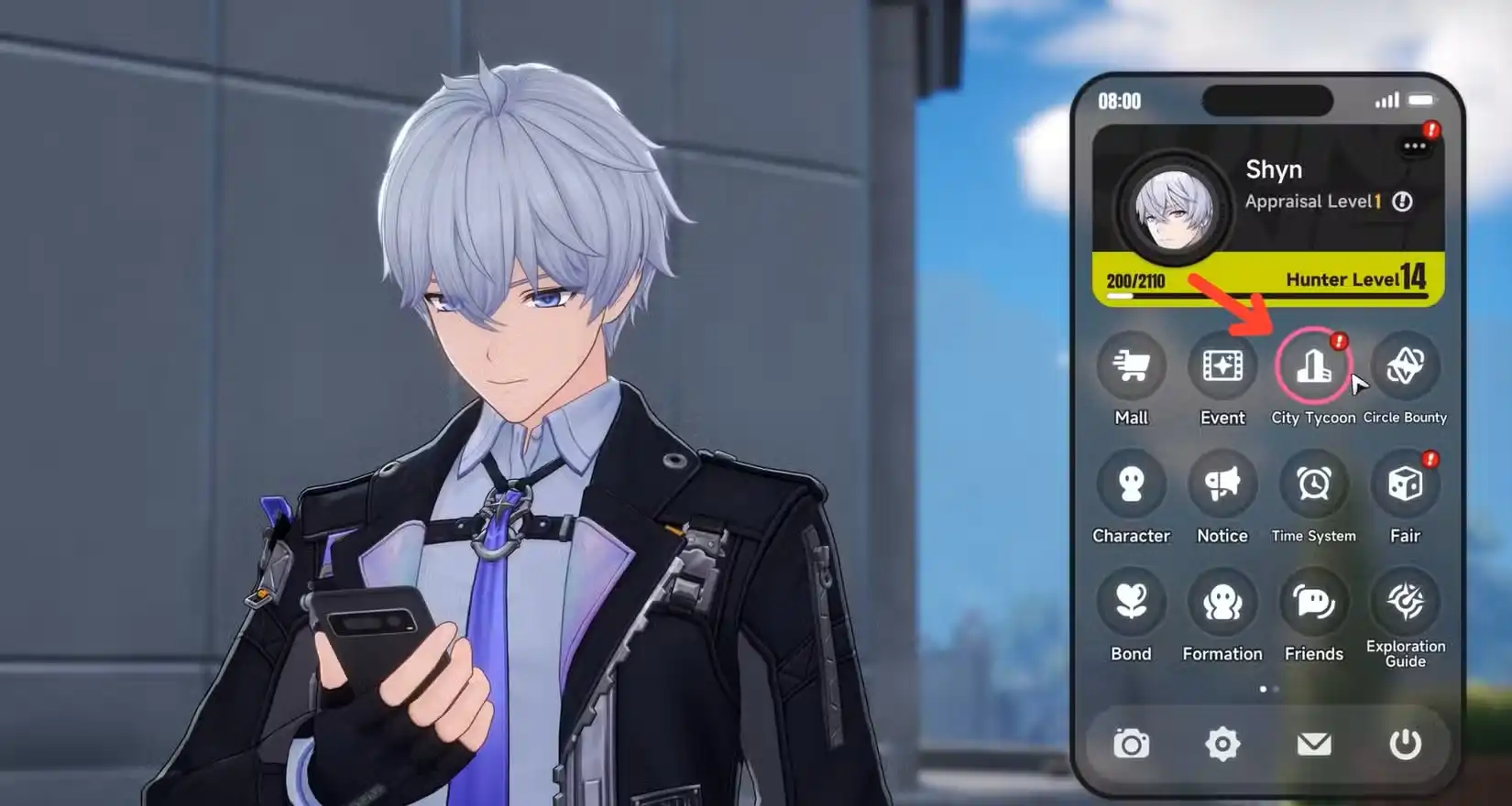
- Open the City Tycoon menu, click the unlock condition to auto-track the Paper Squadron on your map.
- Travel to the marked location, enter photo mode with Esc (PC), focus on a paper plane, and snap the shot.
- Confirm success by checking if the condition reads (1/1) in the Anomaly Furniture menu.
- The Paper Plane Anomaly Furniture reduces your deployed characters’ Climbing Stamina Cost.
- To upgrade it, farm Feather Fragments by defeating Paper Squadron enemies.
What Is the Paper Plane Anomaly Furniture in NTE?
The Paper Plane is one of 18 Anomaly Furniture pieces available in Neverness to Everness (NTE). It is an S-grade special furniture piece that, when placed in your Anomaly Property, gives a permanent passive bonus: reduced Climbing Stamina Cost for deployed characters. This is a meaningful exploration perk since climbing is something you do constantly while moving around Hethereau.
Unlike decorative furniture that only raises your Comfort score, Anomaly Furniture pieces like the Paper Plane give real in-game bonuses. But before you can place it and benefit from that bonus, you need to unlock it first. And that is where many players get stuck — the unlock condition reads “Take 1 photo of a Paper Plane”, which is not exactly obvious about what to do or where to go.
This guide covers exactly what that means, where to find the enemy, how to take the photo correctly, and how to upgrade the furniture once it is active. For a full breakdown of every Anomaly Furniture piece in the game, check out our complete Anomaly Furniture guide for NTE.
What Is the “Paper Plane” You Need to Photograph?
The Paper Plane in the unlock condition does not refer to a collectible, a prop, or anything in your apartment. It refers to a hostile enemy in the open world called the Paper Squadron. This is an anomaly enemy made up of multiple paper planes that fly together as a group. They can typically be found near the mailboxes of suburban homes around Hethereau.
Paper Squadron spawns in Illusion Town. You do not need to fight it to take the photo — you just need to get close enough to snap a clear picture of one of the paper planes in the group using NTE’s in-game photo mode.
How to Find the Paper Squadron Location
The Paper Squadron is not marked on your map by default, but NTE has a built-in way to track it. Here is how to find it quickly:
Step 1 – Open the City Tycoon Menu

Open the City Tycoon interface. You can do this by clicking the icon next to the minimap in the top left corner of the screen, accessing it from your phone menu, or using the radial menu.
Step 2 – Navigate to the Paper Plane Furniture
Inside the City Tycoon menu, go to Property → Wiener Apartments. Select the Paper Plane anomaly furniture from the list on the right to open its context menu. If you have not yet unlocked Wiener Apartments, it becomes available at City Tycoon Level 5 after completing the Coffee Curator tutorial quest. You can learn more about properties in our guide on how to buy a house in NTE.
Step 3 – Click the Unlock Condition to Track the Enemy

In the Paper Plane furniture context menu, scroll down and click on the unlock condition that reads “Take 1 photo of a Paper Plane (0/1)”. When you click this, the city map opens automatically with the Paper Squadron anomaly tracked and marked. You will see a marker appear on the map pointing you directly to the nearest Paper Squadron spawn.
Step 4 – Travel to the Marked Location

Close the menu and fast travel to the nearest ReroRero Phone Booth or Wertheimer Tower to get close to the marked spot. Then follow the tracked marker on your map to find the Paper Squadron. It will be in Illusion Town, near the suburban residential area.
If you need help with fast travel or have not unlocked enough teleport points yet, check our guide on how to unlock teleport points in NTE. You can also read about how to unlock all map areas if parts of Illusion Town are still fogged for you.
How to Take the Photo of the Paper Plane
Once you are close to the Paper Squadron enemy, do not attack it. You need to photograph it first. Here is exactly how to take the photo:
Step 1 – Open Photo Mode

- PC: Press Esc to bring up your phone, then click the camera icon at the bottom of the phone screen to enter photo mode.
- Controller: Open your phone menu and navigate to the camera option.
Step 2 – Frame the Shot

Once in photo mode, move the camera so that at least one of the Paper Planes in the Paper Squadron is clearly in frame and in focus. You do not need to capture all of them. One paper plane clearly visible in the shot is enough. Try to get close and angle the camera toward the flying paper planes rather than pointing at the ground or background.
Step 3 – Take the Photo
Press the capture button to snap the photo. Exit photo mode once done.
Step 4 – Verify the Photo Was Accepted
This is an important step. Not every photo registers as a valid capture. To confirm it worked:
- Go back to the City Tycoon menu.
- Navigate to Property → Wiener Apartments → Paper Plane furniture.
- Check the unlock condition counter at the bottom.
- If it reads “Take 1 photo of a Paper Plane (1/1)” — you did it correctly and the furniture is now unlocked.
- If it still reads (0/1) — the photo was not close enough or the paper plane was not properly in frame. Return to the Paper Squadron and try again with a tighter, more focused shot.
Why Is the Photo Not Registering?
A few common reasons the photo might not count:
- The paper plane was too far away or too small in the frame.
- The camera was pointed at something else when you took the shot.
- You were too far from the enemy when entering photo mode.
The fix is simple: get closer to the Paper Squadron before opening photo mode and make sure one of the paper planes takes up a clear portion of your camera frame before snapping. Once it registers as (1/1), the furniture unlocks immediately.
Paper Plane Anomaly Furniture Effect
Once the photo requirement is met and the Paper Plane furniture is unlocked, place it inside your Wiener Apartments or any other owned property. The moment it is placed, the effect activates automatically:
- Effect: Reduces deployed characters’ Climbing Stamina Cost.
You do not need to keep rotating the piece between rooms or do anything extra. As long as it sits placed in an owned unit, the passive applies everywhere during your gameplay — including during exploration, anomaly hunts, and side quests.
Climbing stamina reduction is genuinely useful in NTE because Hethereau is a vertical city with a lot of tall buildings, walls, and structures to scale. Less stamina spent climbing means more left over for combat and traversal, which adds up over a long play session. It pairs well with the general exploration loop, especially if you are actively doing things like the City Tycoon progression or unlocking new areas across the map.
How to Upgrade the Paper Plane Anomaly Furniture
After unlocking the Paper Plane furniture, you can upgrade it to increase its effect. The upgrade material required is called Feather Fragments, which drops from defeating Paper Squadron enemies in Hethereau City.
To find more Paper Squadron enemies for farming:
- Open the item description of any Feather Fragment you already have and click “Source: Anomaly Paper Squadron” to auto-track Paper Squadron locations on the map.
- Alternatively, repeat the tracking method used above through the City Tycoon furniture menu.
- Head to Illusion Town and defeat Paper Squadron enemies to collect Feather Fragments.
- Return to your property and use the Feather Fragments to upgrade the Paper Plane furniture through the Anomaly Furniture upgrade menu.
You do not need to take another photo to upgrade — the photo is only required for the initial unlock. All upgrades after that only need Feather Fragments.
How to Claim and Place the Furniture After Unlocking
One thing NTE does not explain clearly: unlocking furniture does not automatically place it. After the photo condition is met, you still need to manually claim and place the Paper Plane furniture. Here is how:
- Open the City Tycoon menu.
- Go to your property and open the furniture management section.
- Find the Paper Plane in your available furniture and claim it.
- Place it in one of your Anomaly Furniture slots inside the apartment.
Only once it is physically placed in a slot does the climbing stamina reduction effect activate. Leaving it unclaimed means you get no bonus at all, so make sure to follow through with this step after taking the photo.
Tips for Getting the Most From Anomaly Furniture
- Place every piece you unlock. Anomaly Furniture only works when placed. Even if a bonus seems small, stack as many as your property slots allow.
- More expensive properties have more Anomaly Furniture slots. Upgrading your City Tycoon level unlocks properties like Fengan Villa, which has more slots and lets you run more passive bonuses at once. Check our City Tycoon guide for a full breakdown.
- Use the tracking trick for every piece. Just like clicking the Paper Plane unlock condition auto-tracked the Paper Squadron, many other Anomaly Furniture pieces have conditions you can click to find the required enemies or locations directly. Always try clicking the condition text first before searching manually.
- Prioritize Anomaly Furniture over regular decor early on. Regular decor raises Comfort, but Anomaly Furniture raises Comfort and gives gameplay bonuses. Always grab Anomaly Furniture first when making property decisions.
- Blind Mammon is the highest priority piece. While the Paper Plane is great for exploration, Blind Mammon unlocks a weekly Anomaly Zone inside your home that generates Fons. If you want to know how to get Fons fast, check our guide on safe locations and Fons farming in NTE.
Other Useful Things to Do in Illusion Town
While you are in Illusion Town hunting down the Paper Squadron, it is worth checking out other activities in the area. There are several anomalies and side content nearby:
- Anomaly Zones Guide for NTE — covers all anomaly activities across every district
- Video Cemetery Anomaly Commission Guide — a puzzle-based Anomaly Commission nearby
- Heaven’s Forsaken Anomaly Commission Guide
- After School Anomaly Commission Guide
More NTE Guides to Help You Progress
The Paper Plane furniture is just one small piece of a much larger progression system in NTE. Here are more guides to help you build your character and city faster:
- How to Get Cartridges and Modules
- How to Get the Free S-Class Arc
- Miles Apart Quest Guide
- How to Own a Cafe in NTE
- Hethereau Hobbies Guide
- Best Team Compositions in NTE
- Latest NTE Redeem Codes for Free Rewards
Download NTE and Start Playing
Not playing NTE yet? Get started on your preferred platform:
Final Thoughts
The Paper Plane Anomaly Furniture is easy to miss because the unlock condition — “take 1 photo of a Paper Plane” — sounds vague. Once you understand that the target is the Paper Squadron enemy in Illusion Town and that NTE’s City Tycoon menu will literally auto-track it for you, the whole process takes only a few minutes.
Get close to the enemy, enter photo mode, frame one of the paper planes clearly, and snap the shot. Verify the counter shows (1/1), then claim and place the furniture in your apartment. That is all it takes to activate the climbing stamina reduction bonus and move one step closer to completing your full Anomaly Furniture set.
For more character build help, check out guides like the Nanally build guide, Hathor build guide, and Esper Zero build guide to keep your team strong for every challenge ahead in Hethereau.


